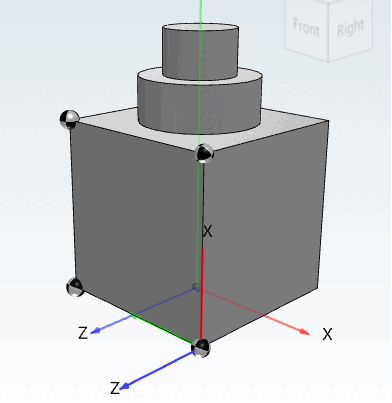
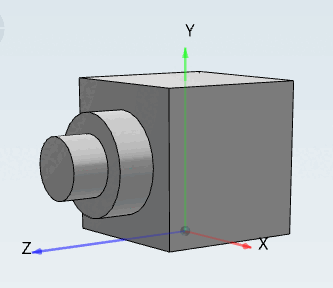
Avec Couper (y compris les dépendances) [Cut (including dependencies)], vous pouvez déplacer un arbre d'historique complet, y compris les dépendances au sein d'une pièce.
Sélectionnez l'esquisse à partir de laquelle vous souhaitez effectuer le déplacement.
Choisissez la commande Couper (y compris dépendant) [Cut (including dependencies)] dans le menu contextuel.
Sélectionnez la surface sur laquelle vous souhaitez insérer l'esquisse.
Dans le menu contextuel, sélectionnez la commande Insérer une esquisse coupée [Insert previously cut sketch] (Esquisse ...).
-> Différents systèmes de coordonnées sont affichés sur la surface d'insertion.
Effectuez un double-clic sur le système de coordonnées correspondant.
Maintenant, l'historique complet sous l'esquisse sélectionnée est déplacé sur la nouvelle surface (ou plan).
![Découpe (y compris les dépendants) [Cut (including dependencies)]](https://webapi.partcommunity.com/service/help/latest/pages/fr/installation_ecatalogsolutions/doc/resources/img/img_fa9eb594b0fc4eb8b2f5ed4704a2ed38.png)
![Insérer une esquisse coupée [Insert previously cut sketch] (Esquisse ...)](https://webapi.partcommunity.com/service/help/latest/pages/fr/installation_ecatalogsolutions/doc/resources/img/img_90d39c2d803c43089f748c194fc5b936.png)