
 |
When building up assemblies in the Konfigurator, dependencies of value range variables have to be considered.
Example: If a part containing value range variables multiply exists within an assembly, it makes sense to bring all in a mutual dependency.
Supposed, in following figure, a bracket pipe changes, the other should be automatically adjusted.
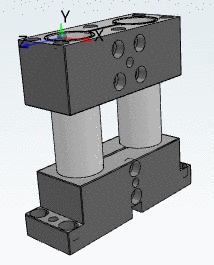
Up to now for each added project all Value range assignments had to be manually created again and again, which can possibly be very time consuming.
With V11 SP5 the Value range assignments can be automatically transferred to other parts.
Right-click on Value range assignments and then click on the Properties button.
-> The dialog box Assignment of value range variables is opened.
-> The dialog box Table browser is opened. It contains a listing of assembly parts.
Select ONE part and transfer the assignments of value range variables by clicking . Afterwards select another part...
In those parts, where adjustments have be performed, click on the Properties again, check for differences, and apply adjustments if needed.


