
1.8.2. Exemples 1.8.2.1. Exemple 1 : définir le chemin d'importation à l'aide de "pdmProxyPdmDocumentI |  |
| Précédent | Suivant |
Un
Petit exemple de définition du chemin d’importation d’un élément (avec
Utilisation de pdmProxyPdmDocumentI ).
Créer un filtre VBS nœud juste après le service de conversion (c’est-à-dire avant que le convertisseur n’ait fonctionné). Poser VBS (
plugin_template.vbs) et Classe VB (_AfterConversion).Allez à la fonction "AfterConversion".
Insérez les lignes de code suivantes :
dim docProp = item.GetPropertiesObject() dim pathProp = Application.GetObject("pdmProxies.ObjectFactory").createPdmProxiesObject ("pdmProxyPropertyObjectC", "Testpath/test")
pathProp.setType("STRING")
docProp.setProperty("path",pathProp)
("pdmProxyPropertyObjectC", "Testpath/test")
pathProp.setType("STRING")
docProp.setProperty("path",pathProp)
Obtenir l'objet de propriété racine (valeur de retour pdmProxyAttributeContainerC)
dim docProp = item.GetPropertiesObject()
Créer un nouveau pdmProxyPropertyObjectC & setValue et Type
dim pathProp = Application.GetObject("pdmProxies.ObjectFactory"). createPdmProxiesObject("pdmProxyPropertyObjectC", "Testpath/test")pathProp.setType("STRING")Ajouter pdmProxyPropertyObjectC à pdmProxyAttributeContainerC
docProp.setProperty("path",pathProp)
Le
converter.vbs(exécuté pendant AttributeMapper) convertit le chemin d’accès à l’attribut en une classification de l’attribut Produit.En classification : "Name": "path", "Group": "document", "Value": { "Text": "Testpath/test" }, "Id": "path" },Modifier le nœud de structure dans PARTdataCenter
Chemin d’accès au document [Document Path] :
$document::path.(Groupe : document ; Nom : chemin --> voir Classification PARTdataCenter)

![Éditeur de nœuds [Node Editor]](https://webapi.partcommunity.com/service/help/latest/pages/fr/installation_ecatalogsolutions/doc/resources/img/img_e880bb7c99374cc48d0cb8ac3654abcd.png)
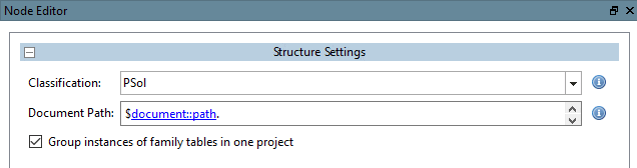
En fonction de la fonction utilisée dans le code, il faut choisir le groupe approprié dans le nœud de structure.
Faible
docProp = élément. GetPropertiesObject() --> 
Mapping de fonctions sur des groupes :
| GetPropertiesObject() | --> document |
| GetFileProperties() | --> fichier |
| GetCadAttributes() | --> cad |
| GetCadDimensions() | --> dimension |
| GetPdmAttributes() | --> pdm |
| GetCustomAttributes() | --> custom |