4.5.1. Différents scénarios d'installation 4.5.1.1. Installation monoposte (RichClient) |  |
| Précédent | Suivant |
![[Remarque]](https://webapi.partcommunity.com/service/help/latest/pages/fr/partsolutions_user/doc/images/note.png)
Méthode d'installation [Installation method]
Pour une installation monoposte utilisant PARTdataManager comme interface utilisateur, sélectionnez Logiciel, données et configuration en local [Software, data and setup locally] dans la routine d'installation sous Dossier cible [Destination Folder] > Méthode d'installation [Installation method] et personnalisez les chemins d'accès de CADENAS DATA, CADENAS SITESETUP et CADENAS Pool comme vous le souhaitez.
Méthode d'installation [Installation method] > Logiciel, données et configuration en local [Software, data and setup locally]
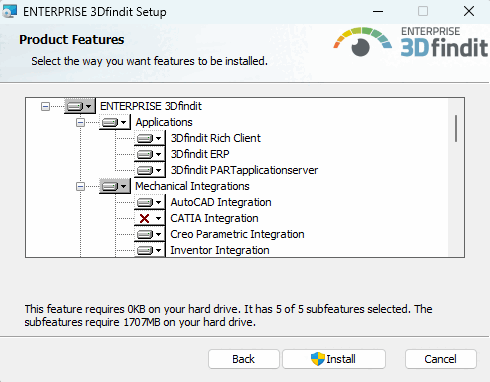
Sélectionner le package 3Dfindit Rich Client (qui comprend également 3Dfindit ERP et 3Dfindit PARTapplicationserver ). Toutes les applications (3Dfindit, PARTdataManager, PARTadmin, PARTlinkManager, PARTdataCenter, etc.) sont ainsi installées. Si l'ERP est souhaité, il est préférable de choisir tout de même l'option 3Dfindit ERP en plus, afin de couvrir toutes les éventualités.
Choisissez également l'intégration souhaitée.
![Méthode d'installation [Installation method] > Logiciel, données et configuration en local [Software, data and setup locally]](https://webapi.partcommunity.com/service/help/latest/pages/fr/partsolutions_user/doc/resources/img/img_bd07b0292d22437e90de50b32ac62296.png)