

Si un
projet a été supprimé, aucune attribution automatique n’est possible. Ils
Reconnaissez-le par l’icône correspondante  dans l’arborescence des répertoires. Dans le tableau de gauche de l’ancien
projet, l’icône
dans l’arborescence des répertoires. Dans le tableau de gauche de l’ancien
projet, l’icône  s’affiche sur chaque ligne. La bonne table du nouveau projet
manquant.
s’affiche sur chaque ligne. La bonne table du nouveau projet
manquant.
Si le projet n'existe effectivement plus, confirmez l'affectation manquante.
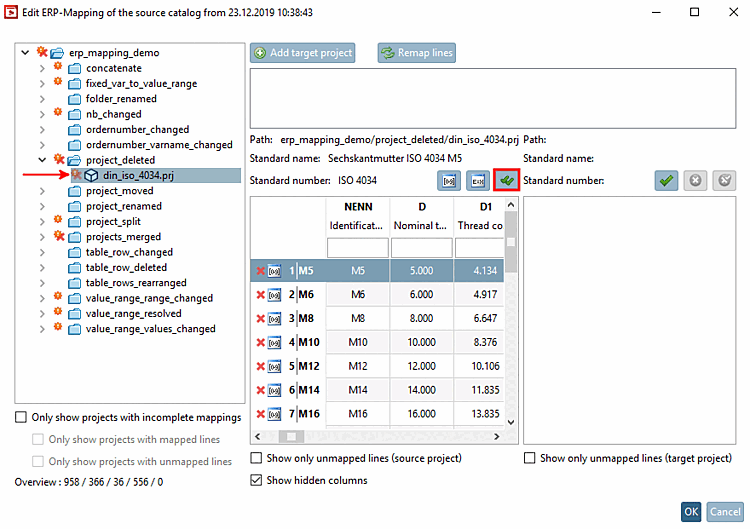
Cliquer
Cliquez sur le bouton Tous les mappages
Confirmez [Verify all mappings]
 .
.
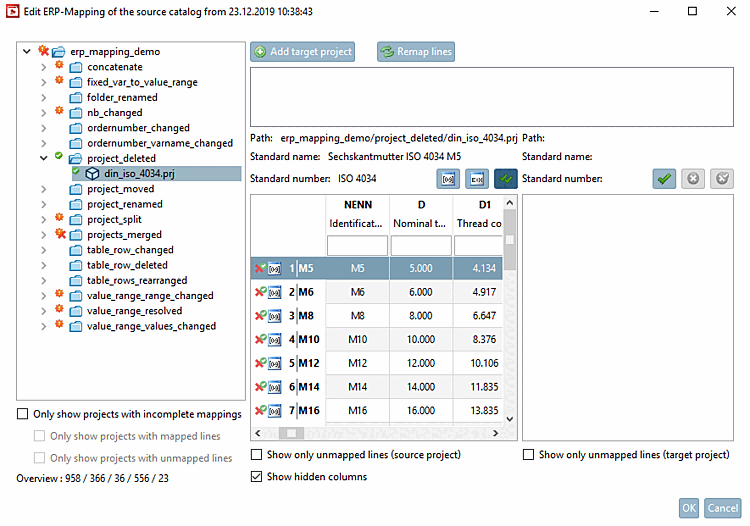
Toutes les affectations sont confirmées : Les icônes correspondantes s'affichent dans l'arborescence du répertoire et dans le tableau.
Dans un cas similaire, il se peut que vous souhaitiez attribuer manuellement un autre projet. Vous trouverez une description de l'attribution manuelle sur Section 6.10.2.3.1, « Bouton plus » -> Ajouter un projet cible [Add target project].