
7.1.
les rôles: Page d'onglet "Généralités
7.1.4.
Condition d'affichage des lignes de la table - plinkgroups.cfg -> Bloc [Role_name] -> Clé "TABRESTRICTION
|  |
| Précédent | Suivant |
![[Remarque]](https://webapi.partcommunity.com/service/help/latest/pages/fr/partwarehouse/doc/images/note.png) | Remarque |
|---|---|
La condition d'affichage des lignes de tableau [Viewing condition for table rows] dépend du rôle, elle doit donc être définie séparément pour chaque rôle. | |
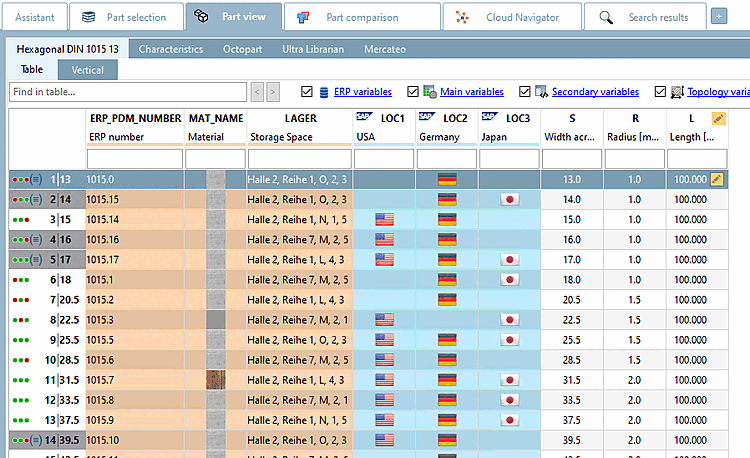
Fonction: seuls les enregistrements qui répondent à la condition sont affichés.
Réglage dans le fichier de configuration
$CADENAS_SETUP/plinkgroups.cfg:
Bloc [<nom_du_rôle>], clé "TABRESTRICTION
[Role_name]
TABRESTRICTION=(ERP_PDM_NUMBER.NE.'')
Signification : Le champ pour ERP_PDM_NUMBER ne doit pas être vide.
Seuls les enregistrements contenant un numéro ERP/PDM sont affichés.
Réglage dans l'interface utilisateur sous PARTadmin -> Catégorie Rôles [Roles] -> Onglet Général [General] -> Condition d'affichage pour les lignes de tableau [Viewing condition for table rows]
![Condition d'affichage pour les lignes de tableau [Viewing condition for table rows]](https://webapi.partcommunity.com/service/help/latest/pages/fr/partwarehouse/doc/resources/img/img_9519edf6e4be41889d18239ac02a479e.png)
-> Affichage dans PARTdataManager:
| Remarque |
|---|---|
L'effet est comparable à celui de la série préférentielle [Preferred ranges], mais il est ici restrictif. Il ne peut pas être désactivé par l'utilisateur. Comparer Section 7.1.2, « Série préférentielle - plinkgroups.cfg -> Bloc [Role_name] -> Clé "PREFRANGE » | |