

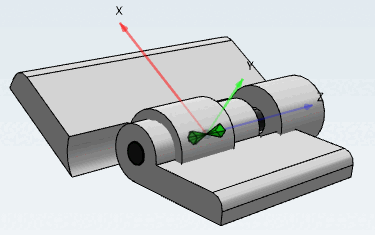
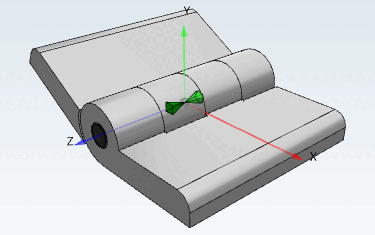
Pour que deux vantaux de charnière et l'axe soient compatibles en termes de longueur et de diamètre, des conditions doivent être définies.
![[Remarque]](https://webapi.partcommunity.com/service/help/latest/pages/fr/partwarehouse/doc/images/note.png) | Remarque |
|---|---|
Vous trouverez l'exemple complet sur Section 7.13.3, « Créer un projet de table d'assemblage de A à Z ». | |
Appelez le menu contextuel du sous-répertoire Conditions dans le composant fluegel1 .
Sélectionnez la commande Nouvelle condition [New condition].
→ La fenêtre Propriétés de la condition [Condition properties] s'ouvre.
La réflexion préalable est la suivante :
La valeur de la variable "L" dans la partie de départ factice doit correspondre à la variable "L" dans l'aile 1.
Nom [Name]: Saisissez un nom pour la condition (ici "L").
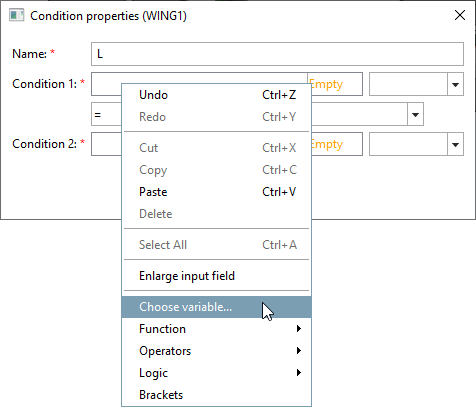
Cliquez (bouton secondaire de la souris) dans le champ Condition 1.
Sélectionnez l'option de menu Sélectionner une variable.... [Choose variable...]
→ La boîte de dialogue Navigateur variable [Variable browser] s'ouvre.
Vous pouvez voir les variables appartenant à la pièce de départ fictive en cliquant sur DUMMY DE CHARIOT dans le champ Pièces [Parts].
Dans le champ Variables de la pièce [Variables of part], sélectionnez la variable L (longueur de la charnière ou de l'aile de la charnière).
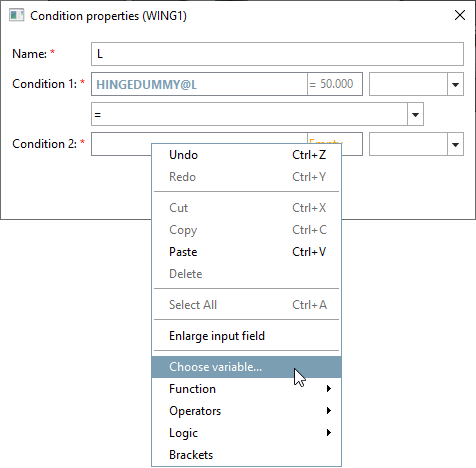
→ Le nom [Name of variable] du composant et de la variable [Name of variable] sont repris dans le champ Condition 1, séparés par le signe @.
SCHARNIERDUMMY@L
Ouvrez le menu contextuel du champ Condition 2 et définissez la deuxième partie de la condition.
Dans le navigateur de variables [Variable browser], sélectionnezFLUEGEL1 sous Pièces [Parts] et sélectionnez la variable L à droite sous Variables de la pièce [Variables of part]. " L" est la longueur du battant de la charnière.
Définissez le signe = comme opérande. Vous pouvez voir le choix des opérandesen ouvrant la zone de liste avec la flèche vers le bas.
=    gleich
<    kleiner
<=   kleiner gleich
>    größer
>=   größer gleich
<>   ungleich
L'expression suivante doit maintenant apparaître dans la fenêtre Propriétés de la condition [Condition properties]:
SCHARNIERDUMMY@L=FLUEGEL1@L
En d'autres termes, la valeur de la variable "L" dans la partie de départ correspond à la valeur de la variable "L" dans l'aile 1.
-> Une condition terminée s’affiche. dans la fenêtre d’ancrage Configurator en tant que sous-entrée avec le symbole si
 .
.(if) <nom de la condition> (ici "L")
Effectuez maintenant la même procédure pour l'aile 2.
SCHARNIERDUMMY@L = FLUEGEL2@L
Si, plus tard, une valeur est choisie pour la variable "L" dans le tableau d'assemblage (c'est le tableau de la pièce de départ fictive), cela entraîne automatiquement le réglage de la variable "L" des pièces individuelles "Aile 1" et "Aile 2" sur la même valeur.
La même chose doit bien sûr encore être effectuée pour le boulon.
SCHARNIERDUMMY@D1 = BOLZEN@D
SCHARNIERDUMMY@L = BOLZEN@L
![Appel "Nouvelle condition [New condition]](https://webapi.partcommunity.com/service/help/latest/pages/fr/partwarehouse/doc/resources/img/img_6a6da53fd91d40fdbd9343545ed00371.png)
![Boîte de dialogue "Propriétés de la condition [Condition properties]](https://webapi.partcommunity.com/service/help/latest/pages/fr/partwarehouse/doc/resources/img/img_62fa6865e77c41048c56fc9de965974b.png)
![Fenêtre Navigateur variable [Variable browser]](https://webapi.partcommunity.com/service/help/latest/pages/fr/partwarehouse/doc/resources/img/img_5ca68bfd81f4448cb85f65fddd8e4130.png)
![Fenêtre Navigateur variable [Variable browser]](https://webapi.partcommunity.com/service/help/latest/pages/fr/partwarehouse/doc/resources/img/img_4e6f93c23aee4ecba9072cda674bd308.png)
![Fenêtre Propriétés de la condition [Condition properties]](https://webapi.partcommunity.com/service/help/latest/pages/fr/partwarehouse/doc/resources/img/img_c8619b14713249ae8e1911ffef6e8814.png)
![Vue du configurateur [Configurator] de fenêtres Docking](https://webapi.partcommunity.com/service/help/latest/pages/fr/partwarehouse/doc/resources/img/img_0afeb8b22e46488fba3cf98aaf93c7a8.png)
![Fenêtre Propriétés de la condition [Condition properties]](https://webapi.partcommunity.com/service/help/latest/pages/fr/partwarehouse/doc/resources/img/img_08ea417eba2b443f9bbc86c11f516137.png)