

PARTadmin -> Catégorie [Category] -> PARTsolutions -> Environnement ERP [ERP environment] -> Rôles [Roles]
Sur la page d'onglet PDM, vous pouvez définir à quoi doit ressembler le dialogue d'information PDM-ID.
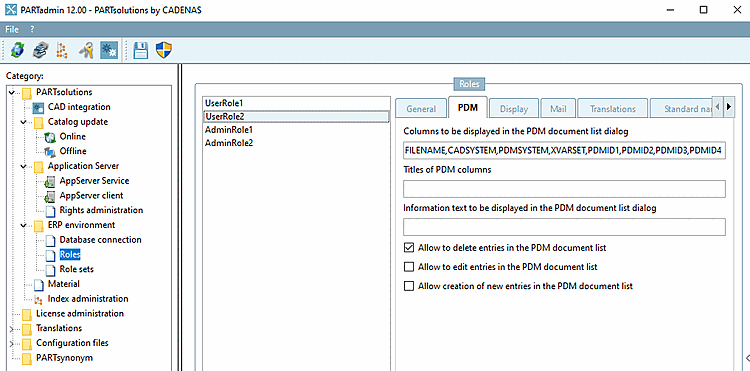
Colonnes à afficher dans la liste des documents PDM [Columns to be displayed in the PDM document list dialog]
Les noms des colonnes sont séparés par des virgules.
Si aucune entrée n'est disponible, les colonnes suivantes sont affichées par défaut :
PDMID1,PDMID2,PDMID3,PDMID4,PDMID5,XVARSET,CADSYSTEM,PDMSYSTEM,GEOFEATURES,NBDEFAULTLANG
Texte d'information pour la liste des documents PDM [Information text to be displayed in the PDM document list dialog]
Autoriser la suppression de lignes dans la liste de documents PDM [Allow user to delete rows in the PDM document list dialog]
Le bouton Supprimer
 visible/masqué
Est La case à cocher est désactivée, le bouton Supprimer
caché.
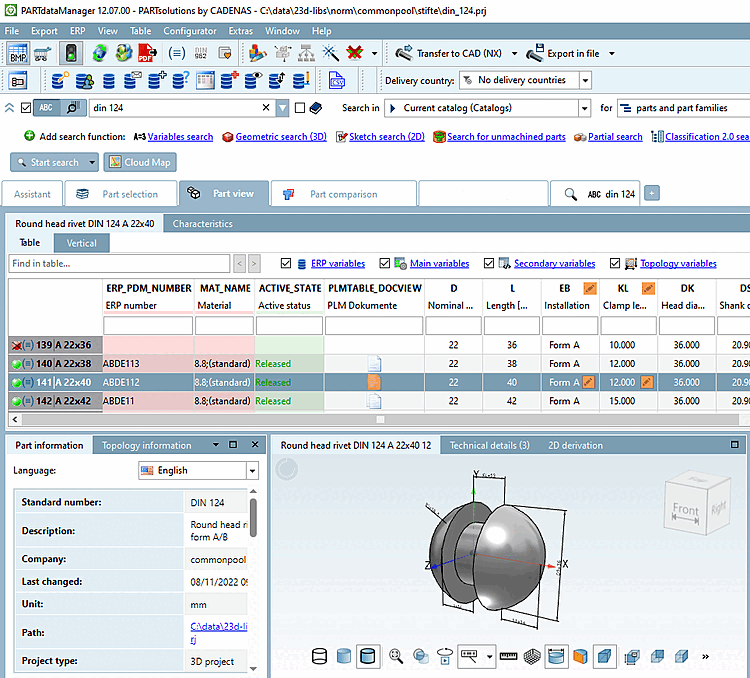
Vous trouverez de plus amples informations détaillées sur Section 4.2.9, « Identifier les documents CAO (PDM-ID) dans 3Dfindit / PARTdataManager ».