
1.7.8.2.
Optimiser les menus, les éléments de menu, les barres d'outils, les boutons et les commandes de menu contextuel
1.7.8.2.1. Aperçu |  |
| Précédent | Suivant |
Tous les réglages sont effectués avec des fichiers de configuration standard sous PARTadmin -> Catégorie Fichiers de configuration [Configuration files] -> $CADENAS_Setup.
Vous pouvez reconnaître l'application commandée par un fichier directement à son nom.
Il existe deux types de fichiers :
menustructure_<nom de l'application>.cfg
menustructure_PARTdataManager.cfg
menustructure_PARTProject.cfg
Les fichiers de configuration "menustructure" définissent la structure en soi, c'est-à-dire quels menus, points de menu, barres d'outils, boutons et menus contextuels sont en principe disponibles.
Pour plus de détails sur
menustructure_<name of
      application>.cfg
, reportez-vous à la section Section 1.7.8.2.2.1, « menustructure_PARTdataManager.cfg ».menuvisibility<nom de l'application>.cfg
menuvisibility_PARTdataManager.cfg
menuvisibility_PARTProject.cfg
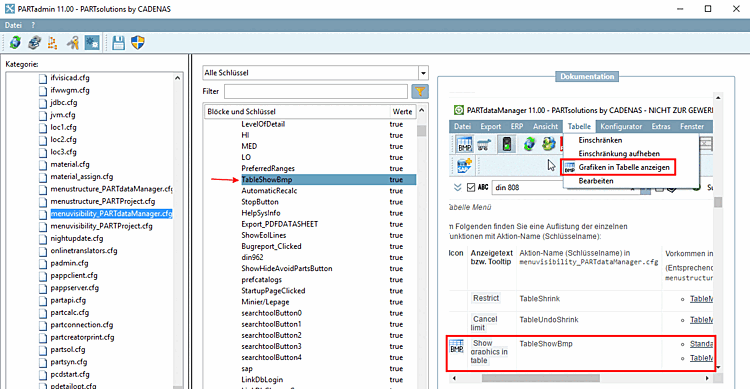
La visibilité des éléments de l'interface utilisateur est définie dans les fichiers de configuration "menuvisibility".
Le fichier est divisé en blocs qui représentent certains modes (débutant [Beginner], professionnel [Professional] ou modes dépendant des rôles [en cas d'intégration ERP]).
Chaque mode contient une liste de clés qui représentent les différentes fonctions/éléments d'interface utilisateur (dans les menus, les barres d'outils et les menus contextuels).
La valeur de la clé peut être true (élément visible) ou false (élément caché). Il suffit de définir la valeur de la clé comme vous le souhaitez. Lorsque vous cliquez sur les clés, les illustrations correspondantes de l'interface utilisateur s'affichent à droite dans la zone de dialogue Documentation, ce qui vous permet d'établir immédiatement la relation entre l'élément fonctionnel et le paramètre de configuration.
Vous trouverez des détails à ce sujet sur Section 1.7.8.2.2.2, « menuvisibility_PARTdataManager.cfg ».
![[Remarque]](https://webapi.partcommunity.com/service/help/latest/pages/fr/partwarehouse/doc/images/note.png)
![[Astuce]](https://webapi.partcommunity.com/service/help/latest/pages/fr/partwarehouse/doc/images/tip.png) | Astuce |
|---|---|
Lisez également les remarques générales sous Aperçu de l'interface utilisateur et Recherche plein texte. | |