7.13.4. Créer un sous-assemblage
7.13.4.5. Insérer le collier de serrage dans la structure au moyen d'une règle |  |
| Précédent | Suivant |
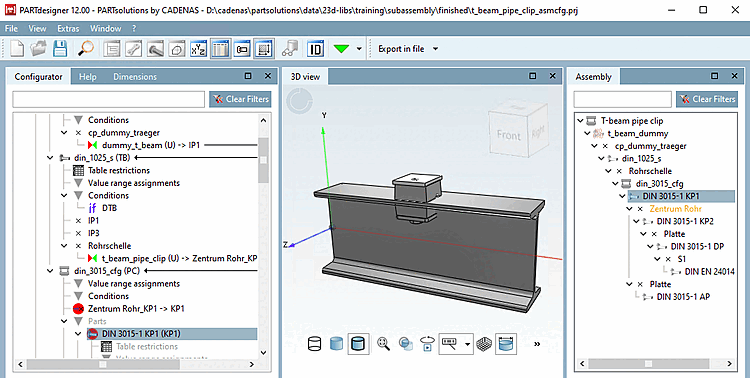
Le collier de serrage doit maintenant être repris dans la structure. Pour cela, il faut définir quel point d'attache de la "poutre en double T" doit être relié à quel point d'attache du "collier de serrage".
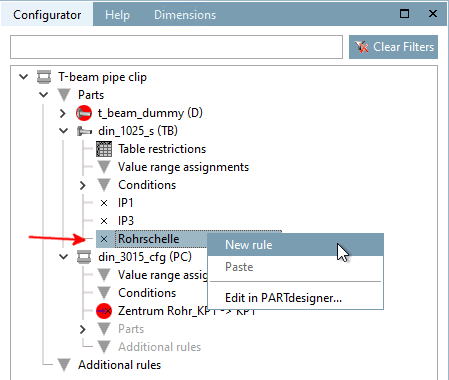
Dans la fenêtre Configurateur [Configurator] de docking, dans le composant "Poutre en double T (T)", dans le menu contextuel du point d'attache "Collier de serrage", cliquez sur la commande Nouvelle règle [New rule].
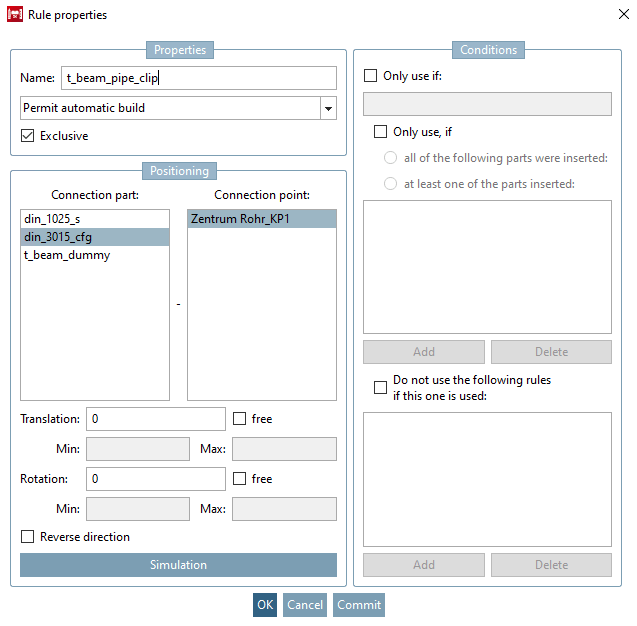
Attribuez un nom (ici "Collier de serrage") et définissez la pièce à assembler (ici "Collier de serrage") et le point d'assemblage (ici "Centre tube_KP1").
Règle pour le point d'attache "collier de serrage" sur l'élément de construction "poutre en double T
Dans la fenêtre d'ancrage Structure [Assembly], cliquez sur l'élément racine de l'assemblage, puis sur la pièce de départ fictive et sélectionnez ensuite une ligne de tableau.
Comme l'option Ajouter automatiquement des points d'attache libres [Append free connection points automatically] a été activée dans la boîte de dialogue Propriétés de l'assembly [Assembly properties], la construction devrait maintenant se faire automatiquement.
-> La construction se fait automatiquement, mais s'arrête au niveau du collier de serrage. La raison en est qu'aucune ligne de tableau ne peut être déterminée automatiquement pour celui-ci.
-> C'est pourquoi un message d'erreur correspondant apparaît : "Aucune ligne de tableau valide n'a été sélectionnée [No valid table line selected]".
Dans la structure, cliquez sur l'élément rouge du collier de serrage, puis sur une ligne du tableau.
-> La mise en place se déroule maintenant complètement ; il y a cependant encore des ajustements à faire.
Il faut définir une condition pour qu'une sélection automatique de la ligne du tableau puisse avoir lieu pour le collier de serrage. C'est-à-dire que le type de collier de serrage correct doit être inséré, le diamètre du tube doit être correct, etc.
Pour cela, il est nécessaire de définir au préalable des partages de variables [Variable shares].
Le collier de serrage doit être correctement aligné.
Pour cela aussi, il est nécessaire de définir au préalable des partages de variables [Variable shares].
![Aucune ligne de tableau valide sélectionnée [No valid table line selected]](https://webapi.partcommunity.com/service/help/latest/pages/fr/partwarehouse/doc/resources/img/img_de2e76e81fe54a2fbdf0b42a346d34d9.png)