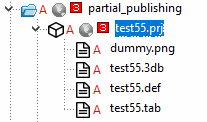
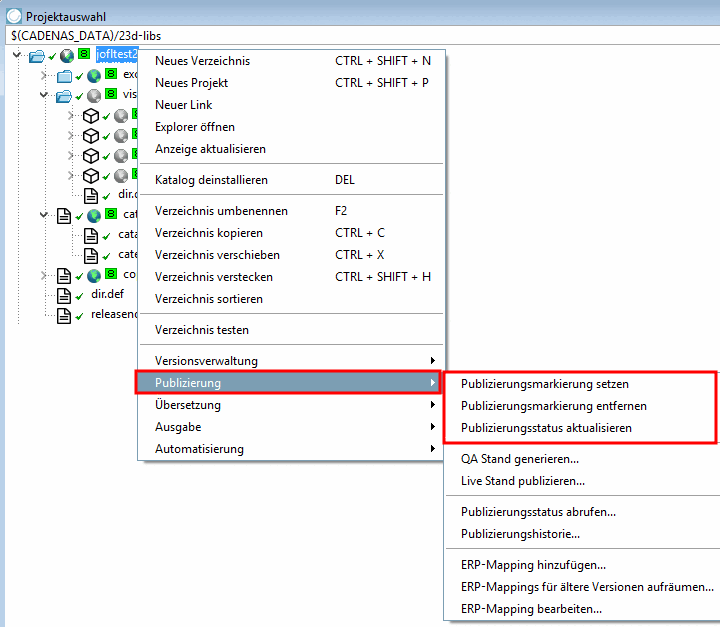
Pour empêcher l'affichage de projets (répertoires) dans les médias de sortie, il n'est pas nécessaire de les supprimer, mais il suffit d'utiliser la commande du menu contextuel Supprimer le repère de publication [Remove publication mark]. Avec Définir le repère de publication [Set publication mark], les projets (répertoires) peuvent en principe être prévus pour être affichés dans les médias de sortie, même si d'autres facteurs entrent en jeu.
Les icônes suivantes permettent d'identifier le statut de publication [Publication status]:
 Ce projet sera réalisé dans le cadre de la
catalogue publié, sauf indication contraire
est caché [This project will be visible in the published catalog, unless hidden otherwise]
Ce projet sera réalisé dans le cadre de la
catalogue publié, sauf indication contraire
est caché [This project will be visible in the published catalog, unless hidden otherwise]
Vous trouverez des explications sur les raisons pour lesquelles un projet peut ne pas être visible sur Section 6.10.4, « Différenciation des cas concernant la visibilité du projet dans les médias de sortie ».
 Dans le catalogue publié
Ce projet ne sera pas visible [This project will not be visible in the published catalog]
Dans le catalogue publié
Ce projet ne sera pas visible [This project will not be visible in the published catalog]
-
Tous les projets de ce
L’annuaire sera visible dans le catalogue publié s’ils
ne peut pas être caché autrement [All projects from this directory will be visible in the published catalog, unless hidden otherwise]
Vous trouverez des explications sur les raisons pour lesquelles un projet peut ne pas être visible sur Section 6.10.4, « Différenciation des cas concernant la visibilité du projet dans les médias de sortie ».
 Quelques projets de ce
seront visibles dans le catalogue publié s’ils
ne peut pas être caché autrement [Some projects from this directory will be visible in the published catalog, unless hidden otherwise]
Quelques projets de ce
seront visibles dans le catalogue publié s’ils
ne peut pas être caché autrement [Some projects from this directory will be visible in the published catalog, unless hidden otherwise]
Vous trouverez des explications sur les raisons pour lesquelles un projet peut ne pas être visible sur Section 6.10.4, « Différenciation des cas concernant la visibilité du projet dans les médias de sortie ».
-
Dans le catalogue publié
Aucun projet de ce répertoire ne sera visible
être [No projects from this directory will be visible in the published catalog]
| Icône | Signification |

|
Le point d'interrogation apparaît lorsque l'état n'est pas clair (par exemple lors du téléchargement d'un catalogue). Dans d'autres cas, vous pouvez utiliser la commande Actualiser l'état de publication [Update publication status] pour clarifier l'état. |
| Effet | |
|
Au niveau du projet : l’icône passe de
Niveau du répertoire : l’icône change
de | |
|
Supprimer le marqueur de publication [Remove publication mark] |
![[Remarque]](https://webapi.partcommunity.com/service/help/latest/pages/fr/partwarehouse/doc/images/note.png) | Remarque |
|---|---|
L’état du marqueur de publication
ne fait pas référence au transfert de projets vers le serveur SVN,
mais sur la visibilité dans les médias de sortie. Même si vous supprimez le marqueur de publication [Remove publication mark]
(icône grise
Marquage de la publication
sur
Marqueur de publication
désactivé = Pour plus de détails, veuillez consulter le site Section 6.10.4, « Différenciation des cas concernant la visibilité du projet dans les médias de sortie ». | |
Le marqueur de publication est placé sur tous les projets et répertoires.
La commande de menu contextuel Supprimer le repère de publication [Remove publication mark] est exécutée sur un répertoire donné.
Le globe à ce niveau de répertoire change de couleur en gris
, signalant que
Répertoire qui ne figure pas dans la version publiée du catalogue (en
support de sortie).Le globe au niveau de l’annuaire au-dessus, la couleur passe au gris-vert
, signalant qu’il y a un
répertoire il y a au moins un répertoire/projet où
La marque de publication n’est pas fixée.La coche verte à côté du répertoire modifié passe au rouge et signale ainsi que la copie de travail locale et l'état du serveur sont différents. Il en va de même pour les répertoires situés au-dessus.
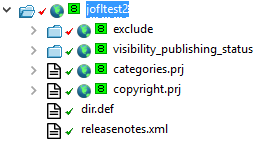
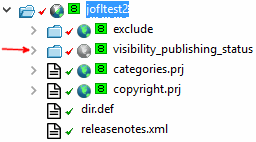
À
Les projets sous le statut d’assurance qualité 5 ont la marque de publication désactivée (=
icône grise ).
Un message d'erreur s'affiche lorsque vous essayez d'utiliser la commande Définir un repère de publication [Set publication mark].
![Placer un marqueur de publication [Set publication mark]](https://webapi.partcommunity.com/service/help/latest/pages/fr/partwarehouse/doc/resources/img/img_25d036446129489eac83ce881b3307a5.png)
![Le projet a un niveau de QA trop bas ! [The project does not have a sufficient QA level!]](https://webapi.partcommunity.com/service/help/latest/pages/fr/partwarehouse/doc/resources/img/img_b0b9ea5d5472404bb339a7a29862b30c.png)
Devient
un projet avec un ensemble
Indicateur de publication
attribué un statut d’assurance qualité < 5, il perd la valeur
Marqueur de publication (-> ).
La situation de départ est un projet dont le statut QA est 8.
Le statut QA est défini sur 3.
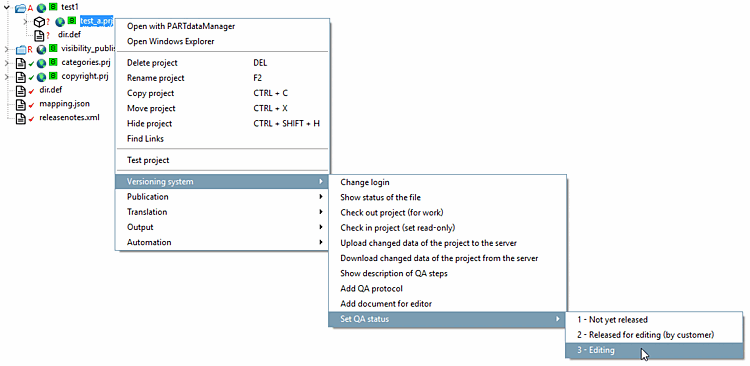
-> Une demande de sécurité apparaît encore. (Le projet doit alors par exemple à nouveau passer le TestMeta).
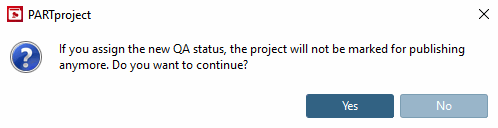
->
Après avoir confirmé par , la marque de publication
supprimé (-> ).