

![Modifier [Modify] -> Recadrage [Trim] groupé (partie 2)](https://webapi.partcommunity.com/service/help/latest/pages/fr/installation_ecatalogsolutions/doc/resources/img/img_1f91da6b1a2043f7969b8ae275cc68a4.png)
![[Remarque]](https://webapi.partcommunity.com/service/help/latest/pages/fr/installation_ecatalogsolutions/doc/images/note.png)

Créer un congé
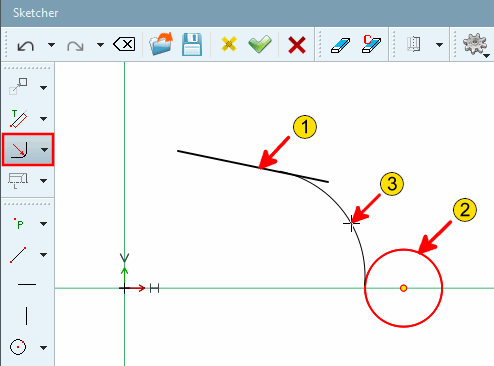
 Arrondi sur 2 éléments [Radius with 2 elements]
Créer un congé entre deux lignes.
Sélectionner la première ligne/le premier cercle [Select first line/circle]
Sélectionner une deuxième ligne/un deuxième cercle [Choose second line/circle]
Sélectionner le rayon [Choose radius]: déterminez le rayon de [Radius] l'arc de cercle en positionnant le curseur de la souris.
Ajustez si nécessaire le rayon [Radius] exact dans la fenêtre Editer l'élément [Edit element].
Le segment de cercle touche les lignes de manière tangentielle.
![Congé à 2 éléments [Radius with 2 elements]](https://webapi.partcommunity.com/service/help/latest/pages/fr/installation_ecatalogsolutions/doc/resources/img/img_b9e1779885d847de90d59eaf2811c88b.png)
![Congé à 2 éléments [Radius with 2 elements] - Rayon [Radius]: 3](https://webapi.partcommunity.com/service/help/latest/pages/fr/installation_ecatalogsolutions/doc/resources/img/img_49d2fc0640d1454d82f563c84cce726a.png)
| ||||
chanfrein
 à 2 lignes sur des angles et des distances
Carrefour [Chamfer at 2 lines defined by angle at distance from intersection]
à 2 lignes sur des angles et des distances
Carrefour [Chamfer at 2 lines defined by angle at distance from intersection]
Chanfrein entre 2 lignes, réglable par l' angle [Angle] par rapport à la première ligne sélectionnée ou par une distance [Distance] qui se définit, comme le montre l' illustration ci-dessous.
Chanfrein sur 2 lignes par l'angle et la distance au point d'intersection [Chamfer at 2 lines defined by angle at distance from intersection]
 Chanfrein sur 2 lignes sur l’angle et la longueur du chanfrein [Chamfer at 2 lines defined by angle and chamfer length]
Chanfrein entre 2 lignes, "réglable" par l'angle par rapport à la première ligne sélectionnée (sens inverse des aiguilles d'une montre) et la longueur du chanfrein.
Sélectionner le début du chanfrein sur la première ligne [Choose chamfer start on first line]
Sélectionner la fin du chanfrein sur la deuxième ligne [Choose chamfer end on second line]
Déterminez la distance [Distance] (longueur du chanfrein) et l'angle [Angle] dans la fenêtre Editer l'élément [Edit element].
Exemple 2 (les lignes sont cliquées dans l'ordre inverse)
Sélectionner le début du chanfrein sur la première ligne [Choose chamfer start on first line]
Sélectionner la fin du chanfrein sur la deuxième ligne [Choose chamfer end on second line]
Déterminez la distance [Distance] (longueur du chanfrein) et l'angle [Angle] dans la fenêtre Editer l'élément [Edit element].
 chanfrein sur 2 lignes sur des angles et
Longueur d’avance [Chamfer at 2 lines defined by angle and chamfer height]
chanfrein sur 2 lignes sur des angles et
Longueur d’avance [Chamfer at 2 lines defined by angle and chamfer height]
Chanfrein entre 2 lignes, "réglable" par l'angle par rapport à la première ligne sélectionnée (dans le sens inverse des aiguilles d'une montre) et la longueur d'introduction (distance entre le chanfrein et le point d'intersection des lignes).
Sélectionner le début du chanfrein sur la première ligne [Choose chamfer start on first line]
Sélectionner la fin du chanfrein sur la deuxième ligne [Choose chamfer end on second line]
Déterminez la distance [Distance] (longueur d'introduction) et l'angle [Angle] dans la fenêtre Editer l'élément [Edit element].
Exemple 2 (les lignes sont cliquées dans l'ordre inverse)
Sélectionner le début du chanfrein sur la première ligne [Choose chamfer start on first line]
Sélectionner la fin du chanfrein sur la deuxième ligne [Choose chamfer end on second line]
Déterminez la distance [Distance] (longueur d'introduction) et l'angle [Angle] dans la fenêtre Editer l'élément [Edit element].
 chanfrein au milieu de 2 lignes sur la distance jusqu’à
Carrefour [Chamfer centered at 2 lines defined by distance to intersection]
chanfrein au milieu de 2 lignes sur la distance jusqu’à
Carrefour [Chamfer centered at 2 lines defined by distance to intersection]
Chanfrein de 45° entre 2 lignes, "réglable" par la distance du chanfrein au point d'intersection (imaginaire) des deux lignes.
Choisir la distance par rapport au point [Select distance by point]: Cliquez n'importe où dans la zone du chanfrein à créer.
Dans le champ de saisie sous Distance, adaptez la distance souhaitée dans la fenêtre d'ancrage Éditer l'élément [Edit element].
Facultatif : il est également possible de placer le chanfrein en dehors du corps esquissé :
Cochez ou décochez les cases sous Inverser la page 1 [Invert side 1] et Inverser la page 2 [Invert side 2] en conséquence.
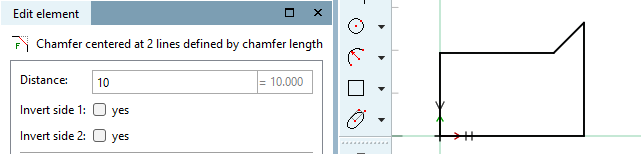
 chanfrein au milieu de 2 lignes sur la longueur du chanfrein [Chamfer centered at 2 lines defined by chamfer length]
Chanfrein de 45° entre 2 lignes, "réglable" par la longueur du chanfrein.
Choisir la distance par rapport au point [Select distance by point]: Cliquez n'importe où dans la zone du chanfrein à créer.
Déterminez la longueur exacte du chanfrein dans la fenêtre Editer l'élément [Edit element].
Facultatif : il est également possible de placer le chanfrein en dehors du corps esquissé :
Cochez ou décochez les cases sous Inverser la page 1 [Invert side 1] et Inverser la page 2 [Invert side 2] en conséquence.
 chanfrein au milieu de 2 lignes sur la longueur d’alimentation [Chamfer centered at 2 lines defined by chamfer height]
Chanfrein de 45° entre 2 lignes, "réglable" par la longueur d'introduction de la zone de ligne coupée.
Choisir la distance par rapport au point [Select distance by point]: Cliquez n'importe où dans la zone du chanfrein à créer.
Déterminez la longueur d'insertion exacte dans la fenêtre d'amarrage Éditer l'élément [Edit element].
Facultatif : il est également possible de placer le chanfrein en dehors du corps esquissé :
Cochez ou décochez les cases sous Inverser la page 1 [Invert side 1] et Inverser la page 2 [Invert side 2] en conséquence.
 chanfrein au milieu de 2 lignes de travers
2 longueurs d’alimentation [Chamfer centered at 2 lines with 2 distances] :
chanfrein au milieu de 2 lignes de travers
2 longueurs d’alimentation [Chamfer centered at 2 lines with 2 distances] :
Sélectionner la fonction Chanfrein centré sur 2 lignes sur 2 longueurs d'alimentation [Chamfer centered at 2 lines with 2 distances].
Choisir la distance par rapport au point [Select distance by point]: Déterminez l' espacement 1 [Distance 1] et l'espacement 2 [Distance 2] dans la fenêtre du docking Editer l'élément [Edit element].
Facultatif : il est également possible de placer le chanfrein en dehors du corps esquissé :
Cochez ou décochez les cases sous Inverser la page 1 [Invert side 1] et Inverser la page 2 [Invert side 2] en conséquence.


![Chanfrein sur 2 lignes par l'angle et la distance au point d'intersection [Chamfer at 2 lines defined by angle at distance from intersection]](https://webapi.partcommunity.com/service/help/latest/pages/fr/installation_ecatalogsolutions/doc/resources/img/img_d05f9c1af30d4b44b4ecee025f312b9e.png)




| ||||