
 |
Up to now the customer administration had to perform a mapping for LinkDB datasets (available ERP integration) at each catalog update if project names or variables had been changed, which led to lots of effort on the customer side and less upgrades to latest catalogs.
In order to relieve the customer side, as of V10, mapping information from catalog versions is integrated directly into the catalog. That means these tasks are now done by the modeller of the catalog before it is published.
At first catalog update with V10 the updates still have to be manually performed (with the Update Manager), but from then on this will only be necessary in exceptional cases where an automatic assignment is not possible.
At catalog xy the latest status is from 01/01/2015 and still without mappings. A customer with V10 has exactly this catalog status.
Now a new version is released on 06/01/2015. In this, the modeling has already added the mapping information, namely at the last released status from 01/01/2015.
When the customer installs the latest status now, these mappings are automatically processed.
However, if the customer has an installed status from 10/01/2014 then therefor no mappings exist and if he installs the status from 06/01/2015 then he has to do the mapping himself (for this last time). However, parts which have not been changed between 10/01/2014 and 01/01/2015 can automatically be mapped.
The mapping happens in eCATALOGsolutions, in PARTproject, because the mapping has to be created by the modeling for each release.
The following figure shows the user interface (dialog box Edit release mapping).
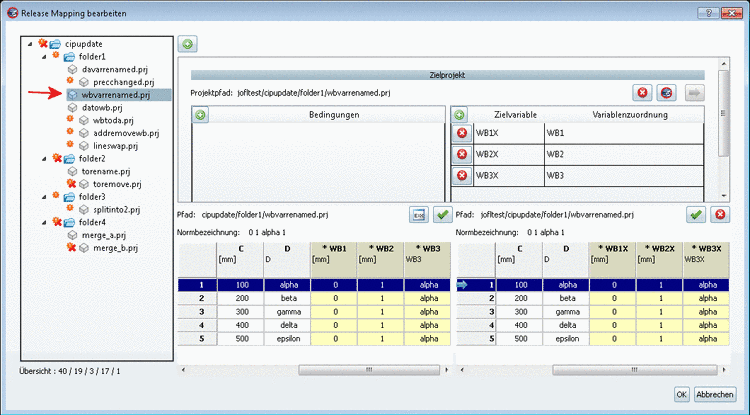
You can see a project where variables have been changed. When selecting a table line the old version is displayed on the left side and the new version on the right side. Top right you can see the variable mapping as a check (or possibly in order to change it).
In order to map value range variables (yellow fields) conditions with Fortran code can be used.
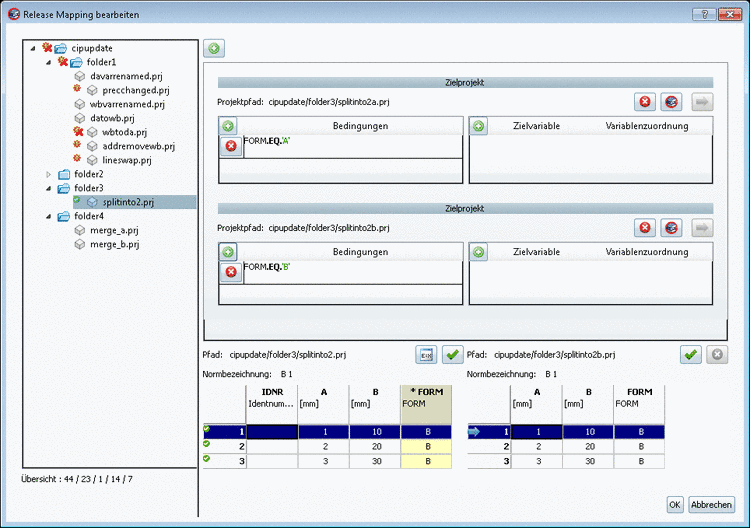
A detailed description on this can be found under Section 6.10.2, “ Check ERP-Mapping (Add ERP-Mapping... and Edit ERP-Mapping...) ” in eCATALOGsolutions Manual.