

![[Remarque]](https://webapi.partcommunity.com/service/help/latest/pages/fr/installation_ecatalogsolutions/doc/images/note.png) | Remarque |
|---|---|
Information pour les nouveaux clients : Vous trouverez une vidéo montrant l'ensemble du processus d'inscription à PARTupdate, le téléchargement du logiciel et des classifications, la demande et l'installation de la licence et enfin l'activation de QA, le téléchargement de votre catalogue en cliquant sur le lien suivant : https://elearning.easygenerator.com/2fe645e5-1ee4-4ca3-92cb-ead6ee7e7b06/ | |
Dès que le QA est activé et que vous êtes connecté, vous pouvez télécharger initialement votre catalogue du serveur (et l'actualiser, le vérifier et le modifier à tout moment par la suite).
![[Avertissement]](https://webapi.partcommunity.com/service/help/latest/pages/fr/installation_ecatalogsolutions/doc/images/warning.png) | Avertissement |
|---|---|
Lors de l'exécution de Télécharger le catalogue du serveur [Download catalog from server], aucun répertoire du même nom ne doit déjà exister ! Dans le cas contraire, renommez ce répertoire ![65] | |
Dans l'arborescence du répertoire au niveau de la racine (...\23dlibs), appelez le menu contextuel (bouton secondaire de la souris) et sélectionnez la commande Télécharger le catalogue du serveur [Download catalog from server] sous Gestion des versions [Versioning system].
La fenêtre de dialogue Sélectionner le catalogue [Select catalog] s'ouvre.
Sélectionnez le catalogue souhaité dans la liste. Si le nombre de catalogues affichés est trop important, il est préférable d'utiliser le champ de saisie pour filtrer.
→ La boîte de dialogue Extraire le catalogue [Check out catalog] s'ouvre et le catalogue est téléchargé. L'index est ensuite mis à jour.
→ Le téléchargement est consigné dans la boîte de dialogue.
Une fois le téléchargement réussi, le message Prêt ! [Ready!] apparaît dans la fenêtre de dialogue.
Vous pouvez maintenant fermer la boîte de dialogue.
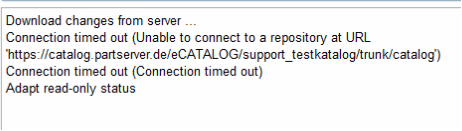
Si un message d'erreur avec "Connection timed out" apparaît, veuillez modifier le réglage dans la boîte de dialogue Svn Login sous Timeout.
Le catalogue téléchargé s'affiche.
Sur les catalogues gérés par SVN, des icônes de statut de traitement et de gestion des versions sont affichées.[66] Il existe également une commande de gestion des versions [Versioning system] dans le menu contextuel.
Cliquez sur Fermer [Close]. Vous pouvez maintenant tester le catalogue dans 3Dfindit / PARTdataManager.

![Boîte de dialogue "Sélectionner un catalogue [Select catalog]](https://webapi.partcommunity.com/service/help/latest/pages/fr/installation_ecatalogsolutions/doc/resources/img/img_88d1ff101eaa435aa4be6bce1def8911.png)
![Boîte de dialogue "Extraire le catalogue [Check out catalog]](https://webapi.partcommunity.com/service/help/latest/pages/fr/installation_ecatalogsolutions/doc/resources/img/img_cbbed71ba69f431c8c80407f507c54d6.png)
![Commande de menu contextuel "Gestion des versions [Versioning system]](https://webapi.partcommunity.com/service/help/latest/pages/fr/installation_ecatalogsolutions/doc/resources/img/img_348bb42e2e224dfab5c11842113dd1ff.png)


[65] Vous pouvez copier ultérieurement une structure éventuellement déjà existante dans le répertoire de catalogue géré.
[66] Pour plus de détails, voir Section 6.4, « Icônes Statut QA et gestion des versions »