

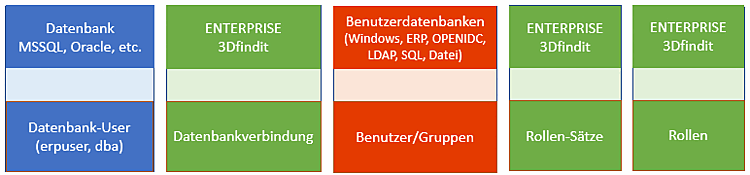
Lors de la configuration de l' environnement ERP [ERP environment], la connexion à la LinkDB est paramétrée dans la sous-catégorie Connexion à la base de données [Database connection], le mappage des utilisateurs/groupes [Users/groups] sur les enregistrements de rôles [Role sets] dans la catégorie Gestion des droits [Rights administration] et le mappage sur les rôles [Roles] dans la catégorie Enregistrements de rôles [Role sets].
Si tous les paramètres sont présents de bout en bout, les utilisateurs/groupes peuvent s'authentifier correctement et accéder à la LinkDB.
![Catégorie "Connexion à la base de données [Database connection]](https://webapi.partcommunity.com/service/help/latest/pages/fr/installation_ecatalogsolutions/doc/resources/img/img_1eaa67918160443a94c91b4aa86e9c22.png)
![Catégorie "Gestion des droits [Rights administration]" → "Bases de données d'utilisateurs [User databases]](https://webapi.partcommunity.com/service/help/latest/pages/fr/installation_ecatalogsolutions/doc/resources/img/img_bdada6c969ba436a9f5deefe5eb8a7e0.png)
Catégorie "Gestion des droits [Rights administration]" → "Bases de données d'utilisateurs [User databases]
![Catégorie "Gestion des droits [Rights administration]" → "Attribution de droits [Assign rights]](https://webapi.partcommunity.com/service/help/latest/pages/fr/installation_ecatalogsolutions/doc/resources/img/img_2a37d84684e845ee90e5b7da55d869e5.png)
![Catégorie "Jeux de rôles [Role sets]"](https://webapi.partcommunity.com/service/help/latest/pages/fr/installation_ecatalogsolutions/doc/resources/img/img_3e773b0fd54a409d83155917d3ebed24.png)
![Catégorie "Rouleaux [Roles]](https://webapi.partcommunity.com/service/help/latest/pages/fr/installation_ecatalogsolutions/doc/resources/img/img_ea355072a7cd4b129d048ceb5bd55563.png)
Les principales étapes partielles de l'élaboration du concept de rôle sont décrites ci-dessous :
Créer des utilisateurs de base de données [Database user] via SQL Scripting dans LinkDB. Voir Section 5.2.4, « Création d'un schéma de base de données et d'utilisateurs pour ERP (à l'exemple de MSSQL) ».
Configurer et tester la connexion à la base de données dans la catégorie Connexion à la base de données [Database connection].
Voir la section suivante "Connexion à la base de données [Database connection]".
Activation des bases de données d'utilisateurs [User databases] souhaitées (une ou plusieurs)
(Le cas échéant, création d'utilisateurs ENTERPRISE 3Dfindit ERP)
Voir Section 1.4.5.8.3.2, « Page d'onglet "Bases de données utilisateurs ».
Mappage des utilisateurs/groupes [Users/groups] sur des ensembles de rôles [Role sets]
Voir Section 1.4.5.8.3.3, « Page d'onglet "Attribution de droits ».
Créer et configurer des rôles [Roles] dans la catégorie Rôles [Roles]
Attribuez une configuration aux utilisateurs ou aux groupes sous Gestion des droits [Rights administration] -> Onglet Attribution des droits [Assign rights] -> ERP -> Configuration.
Grâce à l'attribution des droits, on n'a pas forcément besoin d'une configuration spécifique (= utilisateur ERP) pour chaque "utilisateur réel" (utilisateur ou groupe).
Les configurations (= utilisateurs ERP) sont uniquement spécifiées par une liste de rôles. Si plusieurs "utilisateurs réels" (utilisateur ou groupe) peuvent donc assumer les mêmes rôles, il suffit d'une seule configuration pour cela. Sous Utilisateurs/Groupes [Users/groups], on peut par exemple sélectionner des groupes Windows et/ou des utilisateurs Windows.
Vous pouvez par exemple aussi définir d'abord un groupe avec moins de droits (voir les entrées sous Profils [Profiles] ) et ensuite un utilisateur individuel avec plus de droits, mais qui est également membre du groupe. Pour éviter les conflits, attribuez à l'utilisateur individuel une priorité plus élevée que celle du groupe.