
5.4.
Filtre
5.4.6. Exemple "Recherche par filtre sur tous les catalogues" de A à Z
|  |
| Précédent | Suivant |
On cherche la vis cylindrique suivante :

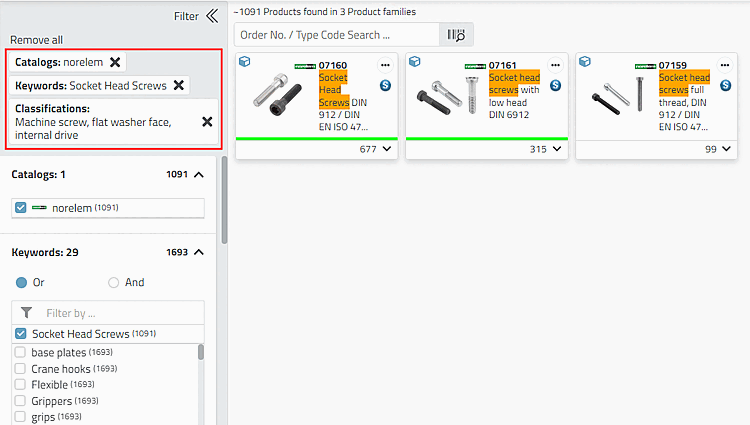
Définissez les filtres souhaités :
Classifications -> Vis autotaraudeuse, pose à plat, entraînement interne
-> Après chaque définition d'un filtre, l'affichage est immédiatement adapté.
-> Plus on spécifie, plus le nombre de filtres de variables (pour les vis, par exemple, le diamètre nominal du filetage et la longueur, etc. (Ce sont toujours ceux qui sont communs au niveau concerné).
Limitez par exemple les valeurs de la variable L (Length). Dans l'exemple, cela se fait par étapes afin de montrer les différentes options.
Par exemple, réduisez la valeur de la barrière supérieure à 100.
-> Comme il ne reste que relativement peu de valeurs possibles, les valeurs restantes sont affichées sous forme de liste.
Mais il se peut que seules une ou deux valeurs soient nécessaires. Plutôt que de désélectionner celles qui ne sont pas nécessaires, il est plus rapide d'utiliser le filtre qui s'affiche maintenant.
Vous pouvez utiliser les opérateurs logiques suivants dans le champ de saisie :
Pour réduire la liste à la valeur souhaitée en un seul coup, saisissez par exemple la valeur 50 avec l'opérateur logique "=".
=50
Une fois la saisie terminée, appuyez sur la touche Entrée.
-> Désormais, seule l'option 50 est valable.
-> Seules les lignes auxquelles s'appliquent les spécifications du filtre sont affichées. L'option Filtre de recherche [Search filter] est activée. Si elle est désactivée, toutes les lignes existantes du tableau sont affichées.
![[Astuce]](https://webapi.partcommunity.com/service/help/latest/pages/fr/installation_ecatalogsolutions/doc/images/tip.png)


![Filtre de recherche [Search filter] activé](https://webapi.partcommunity.com/service/help/latest/pages/fr/installation_ecatalogsolutions/doc/resources/img/img_c9b04c3fb1624b9691f7f3b52b8761ac.png)
![Filtre de recherche [Search filter] désactivé](https://webapi.partcommunity.com/service/help/latest/pages/fr/installation_ecatalogsolutions/doc/resources/img/img_74a75a9c5a2e4b44adbf5aff0e9049af.png)