Dans la catégorie Intégration CAO [CAD integration], vous pouvez facilement enregistrer et désenregistrer des interfaces.
![Catégorie "Intégration CAO [CAD integration]](https://webapi.partcommunity.com/service/help/latest/pages/fr/partsolutions_user/doc/resources/img/img_99a24c542ea04dbaa779604c7d1ee09c.png)
Dans PARTadmin , sélectionnez la catégorie Intégration CAO [CAD integration] sur la gauche. Pour ce faire, vous devez utiliser le Si[6], sinon un message correspondant apparaît.
-> A droite, une matrice des systèmes de CAO disponibles pour lesquels le service d'activation/désactivation est disponible dans l'interface utilisateur est maintenant affichée.
Système CAO [CAD system]: liste de tous les systèmes CAO pour lesquels l'activation/la désactivation peut être effectuée via l'interface utilisateur.[7]
CAD installé trouvé [Installed CAD System found]: Si "Oui", la CAO concernée est installée.
l'intégration : Cliquez sur le bouton pour activer ou désactiver l'intégration.
![[Remarque]](https://webapi.partcommunity.com/service/help/latest/pages/fr/partsolutions_user/doc/images/note.png)
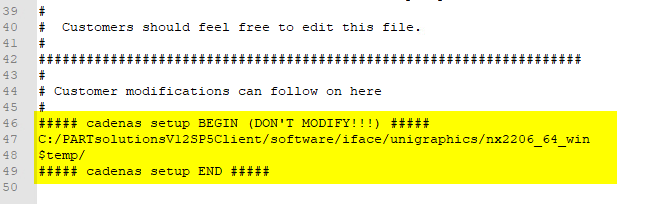
Remarque L’activation ajoute une ligne en dessous
NXxxx\UGII\menus\dans le fichiercustom_dirs.datajouté. Ici modifications éventuellement apportées par le client devenir.