7.9.6.
Historique de l'esquisse Menus contextuels
7.9.6.1.
Éditer l'élément / Modifier les paramètres
|  |
| Précédent | Suivant |
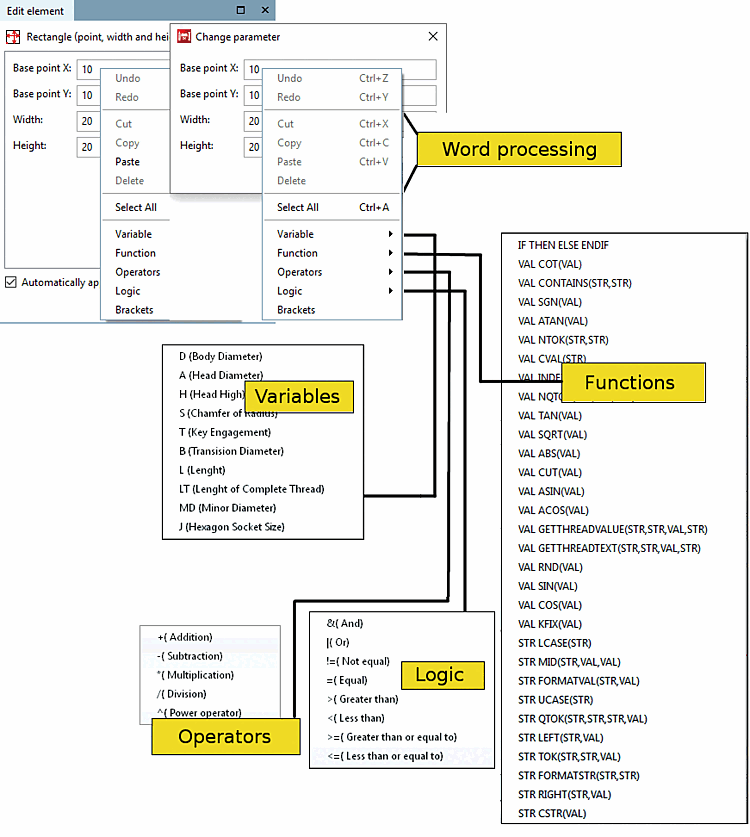
Les champs énumérés (ici point de base [Base point] X, point de base [Base point] Y, largeur [Width], hauteur [Height] ) de la fenêtre d'amarrage Editer élément [Edit element] ou de la fenêtre Modifier les paramètres [Change parameter] s'orientent vers la fonction sélectionnée. Outre des valeurs concrètes, vous pouvez également y indiquer des formules ou des variables.
![[Remarque]](https://webapi.partcommunity.com/service/help/latest/pages/fr/partsolutions_user/doc/images/note.png) | Remarque |
|---|---|
Vous trouverez des informations détaillées sur les fonctions mathématiques et la syntaxe exacte sur Section 10.1, « PARTdesigner-Expressions ». | |
Utilisez le menu contextuel en annexe (clic droit dans le champ concerné) pour paramétrer les grandeurs correspondantes. Les variables peuvent ainsi être reliées arithmétiquement entre elles à l'aide des options de menu Fonctions, Opérateurs, Logique et Parenthèses [Brackets]. Les variables, fonctions, etc. sont transférées par un simple clic de souris dans le champ de paramètres où elles sont éventuellement ajoutées aux paramètres existants.