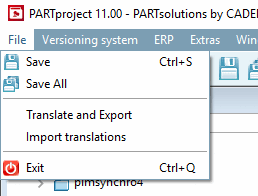
Enregistrer [Save]: Les modifications apportées au fichier de projet actuellement sélectionné sont enregistrées.
![[Remarque]](https://webapi.partcommunity.com/service/help/latest/pages/fr/partsolutions_user/doc/images/note.png)
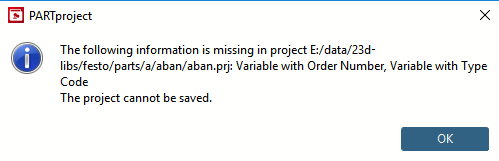
Remarque Si une entrée correspondante manque sous PARTproject → Paramètres [Settings] → Onglet Général [General] → Variables → Variable avec numéro de commande [Variable with order number] et/ou Variable avec clé de type, un message d'erreur apparaît.
Vous trouverez des détails à ce sujet sur Section 5.12.3.6.10, « Classification selon CNSORDERNO / CNSTYPECODE ».
Enregistrer tout .. [Save All]. : Tous les fichiers de projet modifiés de la session PARTproject actuelle sont enregistrés.
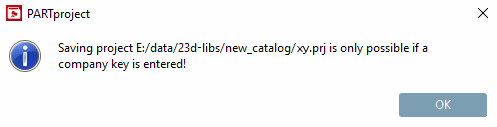
Remarque Si une entrée correspondante manque sous PARTproject -> Editer le projet [Edit project] → onglet Général [General] -> Variables -> Variable avec numéro de commande [Variable with order number] et/ou variable avec clé de type, un message d'erreur correspondant apparaît lors de l'exécution de Tester le projet ou Tester le répertoire. Voir Section 5.8.2.1.16, « Tester le projet / tester le répertoire ».
Vous trouverez des détails à ce sujet sur Section 5.12.3.6.10, « Classification selon CNSORDERNO / CNSTYPECODE ».
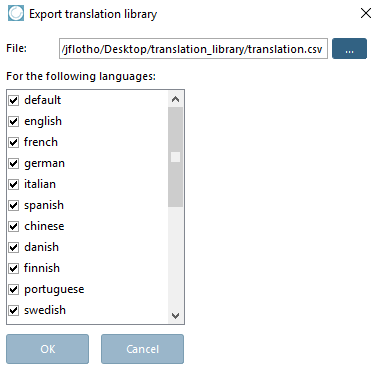
Exporter les traductions [Translate and Export]: La fenêtre de dialogue Exporter la bibliothèque de traductions [Export translation library] s'ouvre. Vous pouvez y exporter tous les fichiers de langue créés ou seulement une sélection de ceux-ci sous forme de fichier *.csv. Dans le champ Fichier [File], définissez l'emplacement de destination de cette bibliothèque.
Importer des traductions [Import translations]: La boîte de dialogue Importer une bibliothèque de traductions [Import Translation Dictionary] s'ouvre. Vous pouvez y importer un fichier de bibliothèque *.csv préalablement exporté.
Les fichiers de langue peuvent être échangés entre différentes installations de PARTproject (postes de travail) grâce à l' exportation de traductions [Translate and Export] et à l'importation de traductions [Import translations].
Quitter la [Close] session : La session PARTproject en cours se termine.
Remarque Dans la mesure où l'option Enregistrer automatiquement [Automatic save] est désactivée sous Outils [Extras] -> Paramètres [Preferences] → Général [General], la boîte de dialogue Enregistrer tout [Save All] apparaît à la fermeture de PARTproject.
Boîte de dialogue "Réglages [Settings]" Option de menu Généralités [General] → Option "Sauvegarde automatique [Automatic save]
Vous y trouverez une liste de tous les projets/répertoires qui ont été modifiés pendant la session PARTproject en cours. Par défaut, toutes les modifications sont cochées. Cela signifie que si vous confirmez avec , elles seront toutes prises en compte. Décochez les lignes qui ne doivent pas être enregistrées.
![Boîte de dialogue "Réglages [Settings]" Option de menu Généralités [General] → Option "Enregistrement automatique [Automatic save]](https://webapi.partcommunity.com/service/help/latest/pages/fr/partsolutions_user/doc/resources/img/img_999e24afad314a5e961b1815f5959200.png)
![Boîte de dialogue "Tout enregistrer [Save all]](https://webapi.partcommunity.com/service/help/latest/pages/fr/partsolutions_user/doc/resources/img/img_4644c64ed85f4a0886f7bbace9e898bf.png)