3.3.10.3.1. Bloc [AttributeMapping(3D)] - Régler la langue des attributs
3.3.10.3.1.1. Déclarer un préfixe pour les attributs 3Dfindit
|  |
| Précédent | Suivant |
Dans l'exemple suivant, une clé doit être ajoutée afin de pouvoir attribuer un préfixe aux attributs 3Dfindit.
![[Remarque]](https://webapi.partcommunity.com/service/help/latest/pages/fr/partsolutions_user/doc/images/note.png) | Remarque |
|---|---|
Le préfixe est attribué aussi bien aux attributs standard qu'aux attributs supplémentaires (voir Section 3.3.10.3.2, « Bloc [CadDocumentAttributes] - Transmettre des attributs définis par l'utilisateur »). | |
Sous PARTadmin > catégorie [Category] Fichiers de configuration [Configuration files] > $CADENAS_SETUP > ifsolidworks.cfg, ouvrez le bloc AttributeMapping(is3d).
Insérez une clé (voir aussi Section 1.7.1.4.3, « Traiter les blocs, les clés et les valeurs clés »).
Exporter une pièce vers SolidWorks.
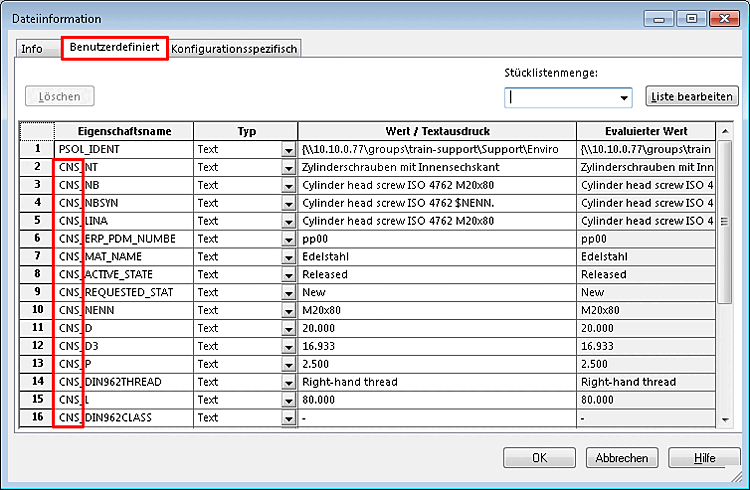
-> Tous les attributs 3Dfindit reçoivent maintenant le préfixe (ici dans l'exemple "CNS_").
![Ajouter une clé [Add key]](https://webapi.partcommunity.com/service/help/latest/pages/fr/partsolutions_user/doc/resources/img/img_a49f20d5eea74c48882923ec903ca5de.png)