

Le
Configuration du menu de l’interface PARTsolutions et de la commande
la barre d’outils de l’interface est utilisée dans la
Fichier de configuration ifacecommon.cfg.

Avec V12
La configuration a été standardisée. Une division des clés en
Touches de base en ifacecommon.cfg et plus encore en
Le fichier de configuration spécifique n’existe plus. La configuration de base
est entièrement représenté dans ifacecommon.cfg . [176]
![[Remarque]](https://webapi.partcommunity.com/service/help/latest/pages/fr/partwarehouse/doc/images/note.png)
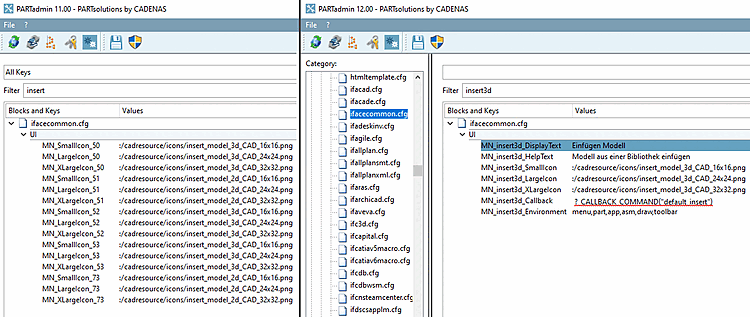
Exemple basé sur
 Insérer
Modèle [Insert model] :
Insérer
Modèle [Insert model] :
[UI]
MN_insert3d_DisplayText=Einfügen Modell
MN_insert3d_HelpText=Modell aus einer Bibliothek einfügen
MN_insert3d_SmallIcon=:/cadresource/icons/insert_model_3d_CAD_16x16.png
MN_insert3d_LargeIcon=:/cadresource/icons/insert_model_3d_CAD_24x24.png
MN_insert3d_XLargeIcon=:/cadresource/icons/insert_model_3d_CAD_32x32.png
MN_insert3d_Callback=?_CALLBACK_COMMAND("default_insert")
MN_insert3d_Environment=menu,part,app,asm,draw,toolbar
Il en va de même pour les autres clés.
Clés importantes dans les fichiers de configuration spécifiques :
MN_valid: liste des clés prises en charge par le système
Exemple tiré de
ifadeskinv.cfg:seamless,replace3d,history,loadpsx,insert3d,geosearch,partialsearch,execlivesearch,
 togglelivesearch,documentscan,eventmgr,settings,licenseshow,info,help,about,repeat,
execscript,licenserelease,topsearch,nativecheckin
togglelivesearch,documentscan,eventmgr,settings,licenseshow,info,help,about,repeat,
execscript,licenserelease,topsearch,nativecheckin