

La représentation suivante montre l'ensemble du flux de travail entre la CAO, ENTERPRISE 3Dfindit, PDM/ERP, LinkDB, les catalogues, et les connexions externes.
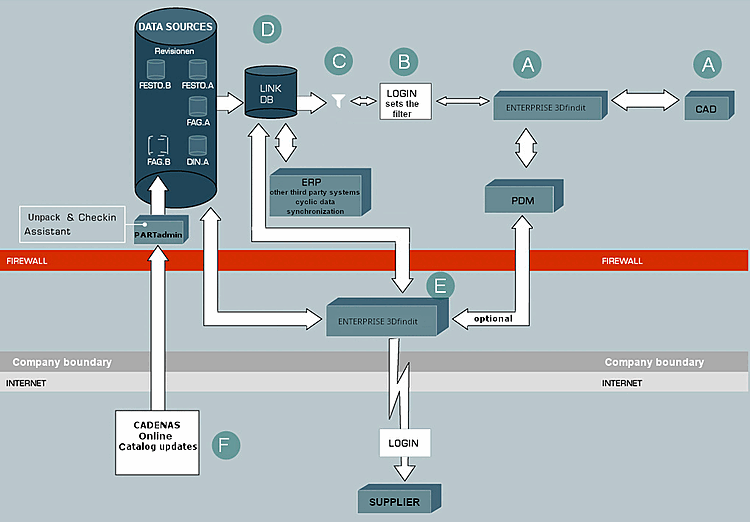
A : Lors d'un processus de conception ou d'achat, l'ingénieur ou l'acheteur appelle le système intelligent de gestion des pièces à partir de la CAO ou de son poste de travail.
Pour une description détaillée des commandes ENTERPRISE 3Dfindit dans la CAO, voir Appel 3Dfindit à partir de la CAO.
B Après l'identification de sa personne et de son rôle par le système - généralement résolue par une authentification unique (connexion unique au système d'exploitation) et une gestion centralisée des données utilisateur dans une base de données LDAP centrale - il obtient l'accès à la base de données centrale des normes, des répétitions et des pièces achetées.
C : Selon le rôle et les droits de l'utilisateur, les vues sur le stock de pièces sont différentes.
Vous trouverez une description du point de vue de l'utilisateur sous Chapitre 10, Fonctionnalité ERP in ENTERPRISE 3Dfindit - Utilisateurs.
Vous trouverez des informations détaillées sur la configuration du système de droits de rôle sous Section 5.7, « Configurer l'environnement ERP ».
D : Les données géométriques normalisées, répétitives et de pièces achetées, telles que la longueur, la largeur et la hauteur, sont directement reliées à n'importe quelle autre donnée d'entreprise via une base de données relationnelle de référencement (LinkDB) par accès en ligne ou une réplication en ligne. L'ensemble des données est représenté dans l'interface du système de gestion des pièces ENTERPRISE 3Dfindit. Une fois la pièce sélectionnée, la géométrie correspondante est générée ou extraite du système PDM et placée dans le système CAO.
Pour la liaison initiale de données de systèmes tiers avec ENTERPRISE 3Dfindit, voir Section 1.1, « Attribution des articles (remplissage initial de la LinkDB) » in PARTwarehouse.
E : Grâce à la technologie Web, les fournisseurs peuvent accéder en ligne à la même base de données. ENTERPRISE 3Dfindit vous aide également à définir les flux de travail, comme la demande ou la création de numéros de base d'articles. Les catalogues des fabricants sont mis à jour plusieurs fois par an. Les informations sur les modifications de produits, les nouveautés ou l'épuration du portefeuille de produits doivent également être disponibles en temps réel dans vos systèmes.
F : Pour la mise à jour des catalogues de pièces, il existe donc un assistant de mise à jour intégré qui compare la base de données actuelle avec la dernière version des catalogues des fabricants et détermine les nouveaux niveaux de révision à télécharger. Les modifications apportées aux catalogues des fabricants sont bien entendu affichées avant l'installation et les données existantes sont automatiquement révisées. Si des pièces de fabricants ont changé ou ne sont plus disponibles, le contrôle d'actualité le détecte et peut être transmis directement au système ERP connecté.