5.17.3.
Aggiornamento del catalogo con collegamento ERP - risolvere i problemi di assegnazione con Update Manager
5.17.3.6.
Aggiornamento del catalogo con collegamento all'ERP - verifica dei problemi di assegnazione PRIMA dell'installazione (tabella e vista 3D)
|  |
| Indietro | Avanti |
È possibile filtrare le parti già installate nel CAD (cioè con voci LinkDB) e la cui geometria è stata modificata PRIMA di un aggiornamento del catalogo.
Tutti i progetti con il vecchio e il nuovo tracciato e la vecchia e nuova somiglianza NB e geometrica sono elencati nella pagina della scheda Registro di stato [Status log].
Se si seleziona una linea di progetto, si possono vedere i dettagli in Confronto tabellare [Tabular Compare] e Confronto 3D [3D comparison], in modo da poter valutare la rilevanza delle modifiche geometriche.
![[Nota]](https://webapi.partcommunity.com/service/help/latest/pages/it/installation_ecatalogsolutions/doc/images/note.png)
![Non appena si seleziona una riga nel "Registro di stato [Status log]", la parte corrispondente viene caricata in "Confronto tabellare [Tabular Compare]" e "Confronto 3D [3D comparison]".](https://webapi.partcommunity.com/service/help/latest/pages/it/installation_ecatalogsolutions/doc/resources/img/img_ef741d4ce26f4fa485e1e18b5b4d85d8.png)
Figura 5.414. Non appena si seleziona una riga nel "Registro di stato [Status log]", la parte corrispondente viene caricata in "Confronto tabellare [Tabular Compare]" e "Confronto 3D [3D comparison]".
![[Suggerimento]](https://webapi.partcommunity.com/service/help/latest/pages/it/installation_ecatalogsolutions/doc/images/tip.png) | Suggerimento |
|---|---|
Organizzate le finestre di aggancio in modo da poter acquisire rapidamente tutte le informazioni che vi interessano. | |
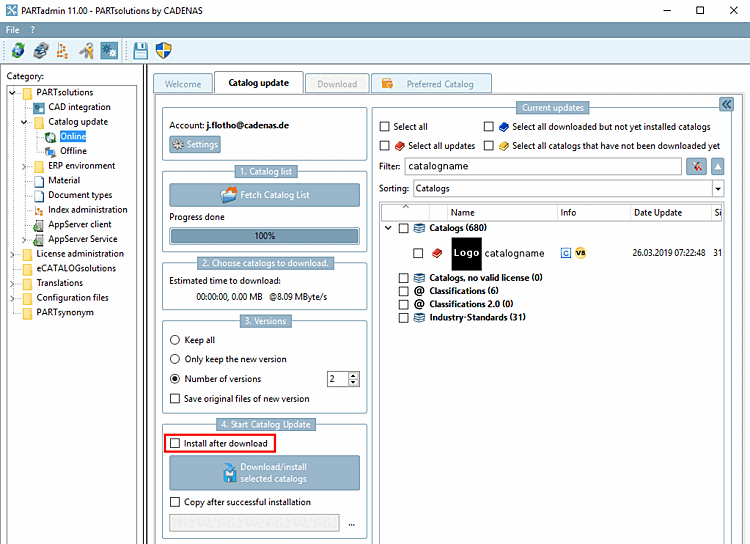
Poiché la finestra di controllo è disponibile PRIMA dell'installazione, disattivare la casella di controllo Installa dopo il download [Install after download].
I cataloghi scaricati rimangono nella directory temporanea definita in ( [Catalog update] scheda Aggiornamento catalogo [Catalog update] -> -> Directory di download [Download directory] ).
(Fino all'installazione, il catalogo viene visualizzato nell'elenco dei cataloghi con un simbolo blu).
Una volta completato il download, passare alla categoria [Category] Offline e aprire il catalogo scaricato facendo clic su .
Nella finestra di dialogo Verifica [Check], fare clic su Simula aggiornamento ERP [Simulate ERP update].
Una volta completata la verifica, selezionare la pagina della scheda Stato ERP [ERP Status].
Se ora si seleziona una riga nel registro di stato [Status log], la parte corrispondente viene caricata in Confronto tabellare [Tabular Compare] e Confronto 3D [3D comparison].