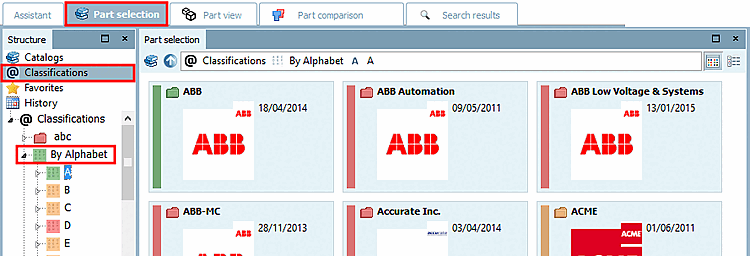
3.1.6.4.13.4. Item "Classifications"

When selecting Classifications you can find the parts classified according to different classifications:

Overview on Classifications

Overview on Classifications

  • Nach Alphabet

    1. Click on Nach Alphabet.

    2. Click on the initial letter of your choice.

      --> Now those catalogs are displayed whose name begins with the selected initial letter.

    3. Now select the desired catalog.

    Classification: By Alphabet

    Classification: By Alphabet

  • Nach Kategorien

    1. Click on Nach Kategorien.

    2. Select a category.

      --> Only those catalogs are shown which contain parts in the selected category.

    3. Now select the desired catalog.

    Classification: Nach Kategorien

    Classification: Nach Kategorien

  • Nach Ländern

    1. Click on Nach Ländern.

    2. Click on the country of your choice.

      --> Only catalogs are shown which deliver parts for the country you selected.

    3. Select the desired catalog.

    Classification: Nach Ländern

    Classification: Nach Ländern

  • More Classifications:

    • CIBSE PDT

    • eClass 4.1, 5.0 (SP1), 5.1, 6.0, 6.1, 6.2, 7.0, 7.1, 8.0, 8.1, 9.0, 9.1, 10.0

    • ETIM 4.0

    • FSF

    • ICS

    • IFC4

    • OmniClass

    • OmniClass 2006

    • Standards

    • Uniclass2015

    • UNSPSC

  • Own classifications

As soon as you have clicked on a certain class in the index tree, the subclasses of the next lower level will be shown to the right under Symbols or Details.