

- 5.27.1. Chiamata a PARTlinkManager dal menu di avvio
- 5.27.2. Chiamare PARTlinkManager da PARTdataManager
- 5.27.3. Diritti di accesso
- 5.27.4. Menu
- 5.27.4.1. File
- 5.27.4.2. Vista
- 5.27.4.3. Extra
- 5.27.4.3.1. Database
- 5.27.4.3.2. Configurare l'ambiente ERP
- 5.27.4.3.2.1. Pagina delle impostazioni di PARTlinkManager
- 5.27.4.3.2.2. Pagina delle impostazioni di PARTdataManager
- 5.27.4.3.2.3. Pagina della scheda Database
- 5.27.4.3.2.4. Pagina della scheda Esportazione tabelle
- 5.27.4.3.2.5. Pagina della scheda Traduzioni
- 5.27.4.3.2.6. Pagina della scheda Designazione standard , Designazione standard (breve) , Designazione elenco parti
- 5.27.4.3.3. Impostazioni
- 5.27.4.3.4. Aggiornamento del catalogo - Gestore aggiornamenti
- 5.27.4.4. (Aiuto)
- 5.27.5. Pulsanti della barra degli strumenti
- 5.27.6. Visualizzare i record di dati filtrati
- 5.27.7. Pulsanti
- 5.27.8. Comandi del menu contestuale
- 5.27.8.1. Comandi del menu contestuale: Panoramica delle varie opzioni
- 5.27.8.2. I comandi del menu contestuale in dettaglio
- 5.27.9. Display del filtro
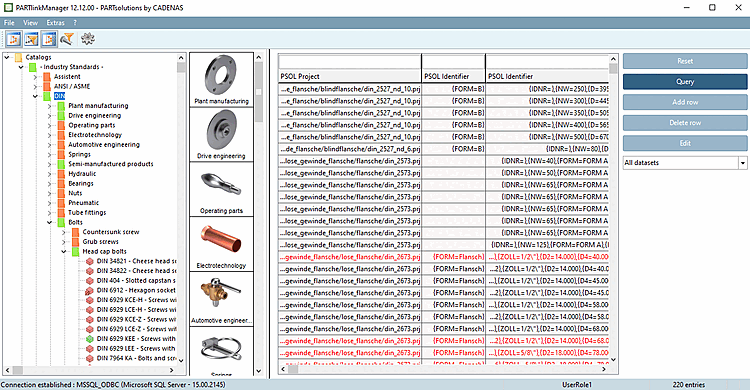
È possibile accedere al contenuto del LinkDB utilizzando PARTlinkManager.
Ulteriori informazioni provenienti da sistemi di terze parti sono memorizzate nel LinkDB!
PARTlinkManager fornisce, tra le altre, le seguenti funzioni:
![[Nota]](https://webapi.partcommunity.com/service/help/latest/pages/it/installation_ecatalogsolutions/doc/images/note.png)