
7.8.12.
Algoritmi delle caratteristiche
7.8.12.3. Sintassi - Pulsanti per la creazione della formula
|  |
| Indietro | Avanti |
Se si utilizzano i pulsanti | | , si può essere certi che la formula sia stata creata con la sintassi corretta.
![Finestra di dialogo "Algoritmo di caratteristiche [Attribute algorithm]"](https://webapi.partcommunity.com/service/help/latest/pages/it/installation_ecatalogsolutions/doc/resources/img/img_c956691ac8c84642b145c6b57a261f57.png)
![[Nota]](https://webapi.partcommunity.com/service/help/latest/pages/it/installation_ecatalogsolutions/doc/images/note.png)
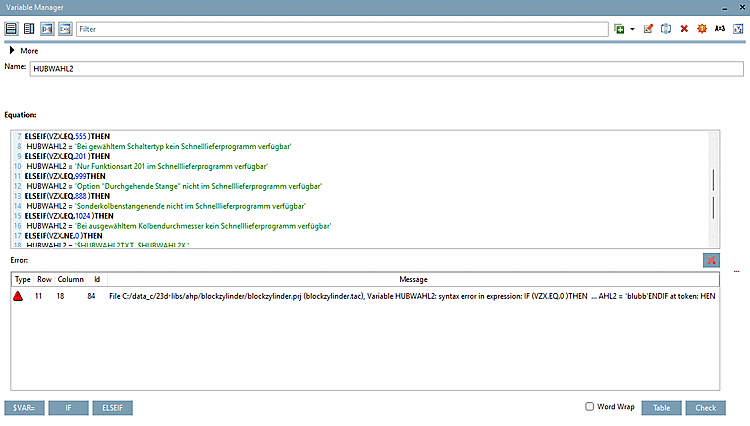

Questo pulsante trasferisce nel campo di immissione solo la variabile visualizzata sotto Nome [Name].
Un algoritmo basato su una condizione IF può avere il seguente aspetto:
IF ( ) THEN
   D3 =
ELSE
   D3 =
ENDIF
Inserire la condizione tra le parentesi () (ad esempio, "L1.EQ.10"). In questo esempio, "D3" è la variabile selezionata nell'elenco delle variabili.
Dopo THEN D3 = inserire il valore che D3 deve assumere se la condizione è soddisfatta .
Dopo ELSE D3 = è il valore di D3 se la condizione non è soddisfatta . Terminare la condizione con ENDIF .
IF (L1.EQ.10) THEN
D3 = 20
ELSE
D3 = 30
ENDIF
-> Viene generato quanto segue:
ELSEIF ( ) THEN
 <selektierte Variable> =
Se è necessario distinguere i casi, è possibile utilizzare le istruzioni ELSEIF.
IF (L1.EQ.10) THEN
D3 = 10
ELSEIF (L1.EQ.20) THEN
D3 = 20
ELSEIF (L1.EQ.30) THEN
D3 = 30
ELSE
D3 = 40
ENDIF
Diverse condizioni IF possono anche essere collegate in serie all'interno di una variabile dell'algoritmo delle caratteristiche [Attribute algorithm].
L'uso di una singola condizione IF con distinzione dei casi ELSEIF porterebbe spesso a soluzioni molto più complesse con molti più ELSEIF.
Struttura delle condizioni con un esempio:
La prima condizione IF deve contenere un'alternativa ELSE per garantire l'inizializzazione delle variabili. Le altre condizioni IF possono contenere facoltativamente delle alternative ELSE.
IF (OPZ1.EQ.'-' )THEN
 LINAALG = '$IDNR./$CX1./$VL./$MOTX./$OM1./$COEL./$DA./$AP1./$AA1.'
ELSE
 LINAALG = '$IDNR./$CX1./$VL./$MOTX./$OM1./$COEL./$DA./$AP1./$AA1./$OPZ1.'
ENDIF
IF (OPZ2.EQ.'-' )THEN
 LINAALG = '$LINAALG./'
ELSE
 LINAALG = '$LINAALG./$OPZ2.'
ENDIF...
Non corretto: (il primo IF non contiene un ELSE)
IF (OPZ1.NE.'-' )THEN
 LINAALG = '$IDNR./$CX1./$VL./$MOTX./$OM1./$COEL./$DA./$AP1./$AA1./$OPZ1.'
ENDIF
IF (OPZ2.NE.'-' )THEN
 LINAALG = '$LINAALG./$OPZ2.'
ENDIF...
Inoltre è corretto: se la prima istruzione è una semplice istruzione senza condizione, un "ELSE" può essere completamente omesso, poiché l'istruzione inizializza sempre la variabile.
CNSTYPECODE = '$MODEL.$W.-$ST.-$THETA.-$TYPE.-$SPRING.'
IF(K.EQ.1)THEN
 CNSTYPECODE = '$CNSTYPECODE.-K'
ENDIF
IF(FK.EQ.1)THEN
 CNSTYPECODE = '$CNSTYPECODE.-FK'
ENDIF
IF(N.EQ.1)THEN
 CNSTYPECODE = '$CNSTYPECODE.-N'
ENDIF
La prima condizione, che viene sempre calcolata, deve evitare un ciclo infinito. Ulteriori "if...endif" richiamano sempre la prima condizione e aggiungono un valore supplementare.
Pertanto, non utilizzate la variabile dell'assegnazione nella prima condizione per la differenziazione del caso ELSE.
IF (OPZ1.EQ.'-' )THEN
 LINAALG = '$IDNR./$CX1./$VL./$MOTX./$OM1./$COEL./$DA./$AP1./$AA1.'
ELSE
 LINAALG = '$IDNR./$CX1./$VL./$MOTX./$OM1./$COEL./$DA./$AP1./$AA1./$OPZ1.'
ENDIF
IF (OPZ2.EQ.'-' )THEN
 LINAALG = '$LINAALG./'
ELSE
 LINAALG = '$LINAALG./$OPZ2.'
ENDIF...
Non corretto: (differenza in rosso)
IF (OPZ1.EQ.'-' )THEN
 LINAALG = '$IDNR./$CX1./$VL./$MOTX./$OM1./$COEL./$DA./$AP1./$AA1.'
ELSE
 LINAALG = '$LINAALG./$OPZ1.'
ENDIF
IF (OPZ2.EQ.'-' )THEN
 LINAALG = '$LINAALG./'
ELSE
 LINAALG = '$LINAALG./$OPZ2.'
ENDIF...


