
6.5.4.3.2. Commenti a livello di stato di AQ 6.5.4.3.2.1. Modifiche a livello di directory
|  |
| Indietro | Avanti |
A livello di directory, la voce di menu Imposta stato AQ [Set QA status] non ha voci di sottomenu; si apre invece la finestra di dialogo Imposta stato AQ [Set QA-status].
![Impostare lo stato di AQ [Set QA status]](https://webapi.partcommunity.com/service/help/latest/pages/it/installation_ecatalogsolutions/doc/resources/img/img_25fda8b566424c11aa65ee87327f0ad5.png)
In Nuovo stato AQ [New QA status], selezionare lo stato nella casella di riepilogo .
![Finestra di dialogo "Imposta stato AQ [Set QA status]](https://webapi.partcommunity.com/service/help/latest/pages/it/installation_ecatalogsolutions/doc/resources/img/img_f14588568b8a42e6ac5c170a2580ef4d.png)
![[Nota]](https://webapi.partcommunity.com/service/help/latest/pages/it/installation_ecatalogsolutions/doc/images/note.png) | Nota |
|---|---|
Non è possibile aumentare lo stato AQ di una directory di livello superiore se un progetto/directory di livello inferiore ha uno stato AQ inferiore! (Vedere il seguente messaggio di errore) | |
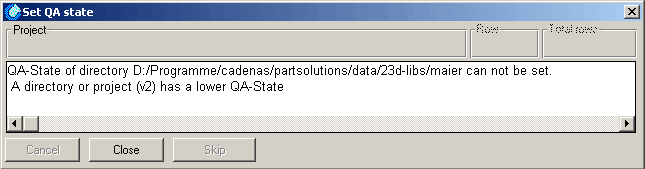
Impostare lo stato nei progetti e nelle sottodirectory [Set status in projects and directories]:
È anche possibile impostare lo stato nei progetti e nelle sottodirectory usando l'opzione Imposta stato nei progetti e nelle sottodirectory [Set status in projects and directories]. In questo caso, non appare alcun messaggio di errore.
Impostare lo stato solo nei progetti visibili [Set status only in visible projects]:
Ad esempio, se si ha una cartella con 10 assiemi e 30 progetti nascosti, è molto utile e fa risparmiare tempo poter applicare la modifica solo agli assiemi, ad esempio quando si abbassa lo stato QA.
Viene impostato solo se lo stato precedente è il seguente [Set only if the current status is]:
È possibile utilizzare l'opzione aggiuntiva Imposta solo se lo stato precedente è il seguente [Set only if the current status is] per limitare o specificare l'assegnazione dello stato di conseguenza.
| Nota |
|---|---|
La selezione di un commento nel campo elenco è obbligatoria! Sezione 6.6, “"Pagina della scheda "Storia ”(Vedere ) È inoltre possibile inserire ulteriori commenti nel campo di testo. | |