
 |
Process files are initially cached in the CADENAS User directory at first start of the Wizard ($CADENAS_USER/vdi).
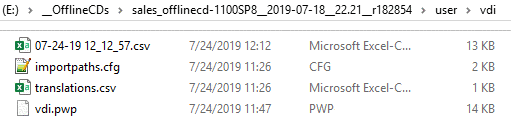
CSV concerning import status: Here, you can quickly detect which files have been successfully imported and for which the import failed.
importpaths.cfg: Here, the catalog structure is set according to VDI data sheets.
translations.csv: Optionally, translations can be stored here.
vdi.pwp: The .pwp file is a XML file with all pipeline settings. You can open it via PARTdataCenter or the Pipe editor.
Update to now the .pwp file has been automatically overwritten with the user settings (in the Wizard). However, all other files have not been modified by the Wizard at no time, in order not to overwrite any user modifications.
Now as of V11 SP8 a query is shown: "Update files to new version?"

Now the user can choose if he wants all files in the user directory to be updated or not.
Details on the VDI importer can be found under VDI 3805 Importer.