3.5.4.2.3. Parametri condivisi 3.5.4.2.3.1. Qual è il significato di Parametri condivisi in Revit? |  |
| Indietro | Avanti |
In Revit esistono vari tipi di parametri, tra cui i "Parametri condivisi".
I parametri condivisi sono definizioni di parametri che possono essere aggiunti alle famiglie o ai progetti. Le definizioni vengono salvate in un file, indipendentemente dalla famiglia o dal progetto.
I parametri condivisi sono determinanti per le analisi di massa in Revit. Solo questi possono essere visualizzati nelle analisi di massa.
Il file dei parametri condivisi contiene diverse informazioni. Il nome e l'identificatore univoco sono particolarmente importanti:
Le illustrazioni che seguono mostrano fondamentalmente come creare parametri condivisi; ulteriori informazioni sono disponibili nella documentazione di Revit, vedi https://help.autodesk.com/view/RVT/2022/DEU/?guid=GUID-94EA2B8E-2C00-4D29-8D5A-C7C6664DE9CE.
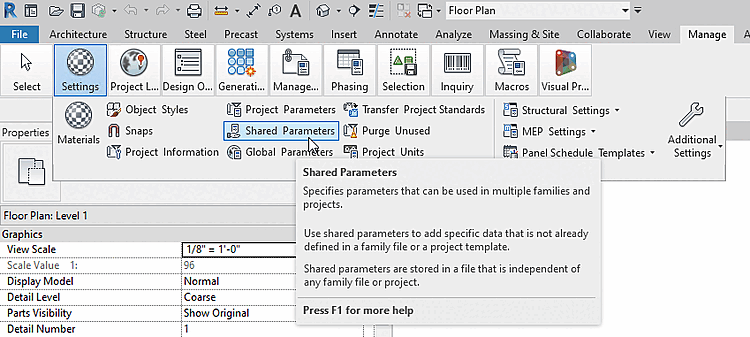
Nella pagina della scheda Gestione, alla voce Impostazioni, fare clic su Parametri condivisi.
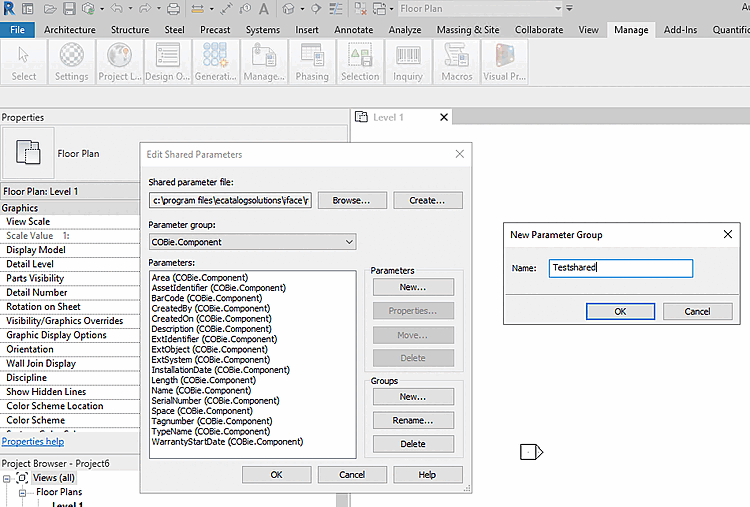
-> Si apre la finestra di dialogo Modifica parametri condivisi.
-> Si apre la finestra di dialogo Nuovo gruppo di parametri.
Inserire un nome per il gruppo di parametri e confermare con .
-> Il nuovo gruppo è già selezionato in Gruppo di parametri.
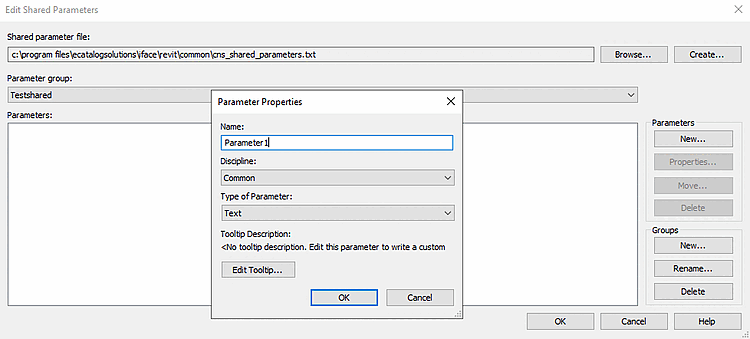
Assegnare un nome, selezionare i valori desiderati nei campi elenco Disciplina e Tipo di parametro e confermare con .
-> I parametri e i gruppi creati sono nel file
sharedparameter.txt/csvmemorizzato.