
4.3.3.2.2. Compiti aggiuntivi
4.3.3.2.2.2. Compito aggiuntivo: spostamento in una cartella dinamica
|  |
| Indietro | Avanti |
Se si desidera utilizzare cartelle create dinamicamente, è necessario utilizzare il servizio "TC_HookService_MoveToNewFolder".
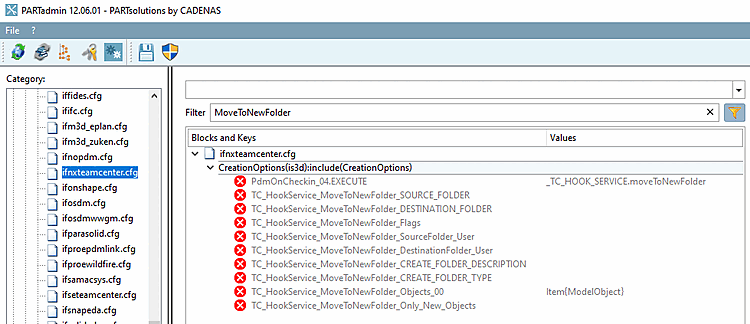
Aprire PARTadmin e filtrare per "MoveToNewFolder".
Attivare l'attività aggiuntiva e impostare i valori desiderati per "TC_HookService_MoveToNewFolder_DESTINATION_FOLDER" e "TC_HookService_MoveToNewFolder_Flags".
[CreationOptions] PdmOnCheckin_04.EXECUTE=_TC_HOOK_SERVICE.moveToNewFolder TC_HookService_MoveToNewFolder_DESTINATION_FOLDER=?"Home/DaBe/"+_Format_0
 ("<PREFIXLIST(/)>").value() + "/" + _FORMAT_0("<ATTR(NN)>").value()
TC_HookService_MoveToNewFolder_Flags=13
("<PREFIXLIST(/)>").value() + "/" + _FORMAT_0("<ATTR(NN)>").value()
TC_HookService_MoveToNewFolder_Flags=13 TC_HookService_MoveToNewFolder_Flags deve essere scritto come <bitfield>. 13 = 1+4+8
#:HELP; The parameter <Bitfield> for moveToNewFolder:
#       1: create not existing folders?
#       2: use Item owner as source folder user?
#          (TC_HookService_MoveToNewFolder_SourceFol  der_User will be ignored)
#       4: use Item owner as destination folder user?
#          (TC_HookService_MoveToNewFolder_DestinationFolder_User will be ignored)
#       8: get sorce folder(s) from Item?
#          (TC_HookService_MoveToNewFolder_SOURCE_FOLDER will be ignored)
13 utilizzerà le opzioni 1,4,8
Eseguire una nuova esportazione.
-> L'elemento verrà spostato nella cartella configurata.
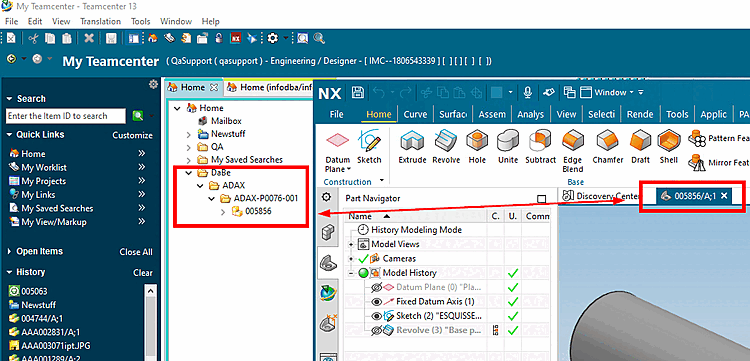
Viene visualizzato un messaggio di errore nel tentativo di spostare un documento utilizzando TC_HOOK_SERVICE.moveToNewFolder.[61]
Motivo: Si tratta di un Problema del flusso di lavoro.
IfProeTeamcenternegozi inizialmente l'elemento nella cartella fornito dalla chiave di configurazione TC_TmpFolder, che da l'impostazione predefinita è la cartella Newstuff dell'utente corrente. È qui che l'articolo si trova attualmente.La chiave TC_TargetFolder viene applicata (l'elemento viene spostato) in EndCheckinTransaction, che viene eseguita dopo Checkin1 (PdmOnCheckin_XX). In questo caso, con il servizio di hook MoveToNewFolder attivo in PdmOnCheckin_01, si cerca di spostare la parte da TC_HOOKSERVICE_MOVETONEWFOLDER_SOURCE_FOLDER=Home/QA/GOHR/CREO a TC_HOOKSERVICE_MOVETONEWFOLDER_DESTINATION_FOLDER=Home/QA/3DFindIT. Questo non può funzionare, perché l'elemento si trova ancora nella cartella TC_TmpFolder (in questo caso Newstuff).
Normalmente MoveToNewFolder non è necessario in quanto
IfProeTeamcentersposta i file in EndCheckinTransaction.Tuttavia, se si desidera spostare i pezzi in una cartella non appartenente all'utente corrente o se esiste un'altra ragione valida per non utilizzare lo spostamento integrato, è necessario inserire il valore TC_TmpFolder nella chiave TC_HOOKSERVICE_MOVETONEWFOLDER_SOURCE_FOLDER e non impostare TC_TargetFolder.