
6.10.7. Dialoghi informativi: Messaggi... | Stato della pubblicazione | Cronologia della pubblicazione | File di registro
6.10.7.2.
Stato della pubblicazione
|  |
| Indietro | Avanti |
Richiamare lo stato di pubblicazione... [Fetch publication status...] (solo sull'indice del catalogo)
Facendo clic sul comando del menu contestuale Ottieni stato di pubblicazione. [Fetch publication status...].. si apre la finestra di dialogo Stato di pubblicazione [Publication status].
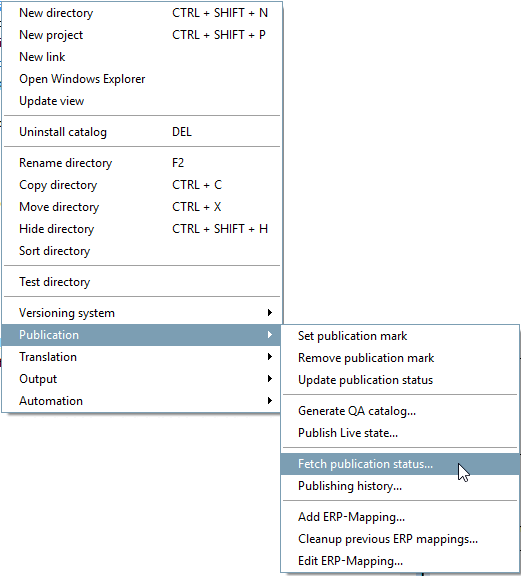
Viene visualizzato un elenco di tutti i cataloghi generati o pubblicati nel giorno corrente.
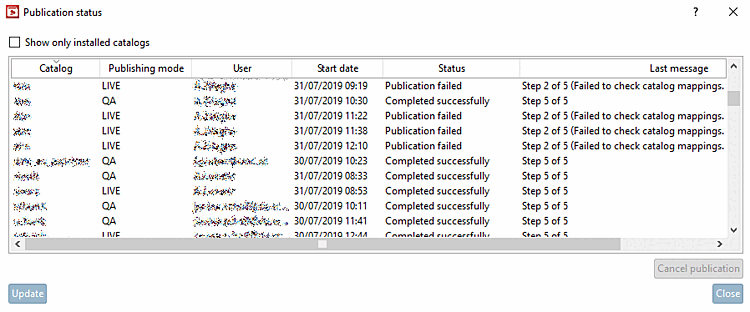
La fase del processo correnteviene visualizzata nella colonna Ultimo messaggio [Last message].
Vengono visualizzati tutti i cataloghi a cui si ha accesso in lettura.
Mostra solo i cataloghi installati [Show only installed catalogs]
Vengono visualizzati solo i cataloghi installati sulla propria postazione di lavoro.
Il pulsante si attiva per i processi ancora attivi e avviati dall'utente.
Le generazioni/pubblicazioni di altri non possono essere cancellate.
Se la finestra è già aperta da tempo, fare clic su per aggiornare la visualizzazione.