
7.6.2.9.2. Creare sweep con curva di progressione
7.6.2.9.2.2. Variante 2: curva di progressione e schizzo della sezione trasversale creati separatamente |  |
| Indietro | Avanti |
Prerequisito: la curva di progressione e lo schizzo della sezione trasversale esistono già.
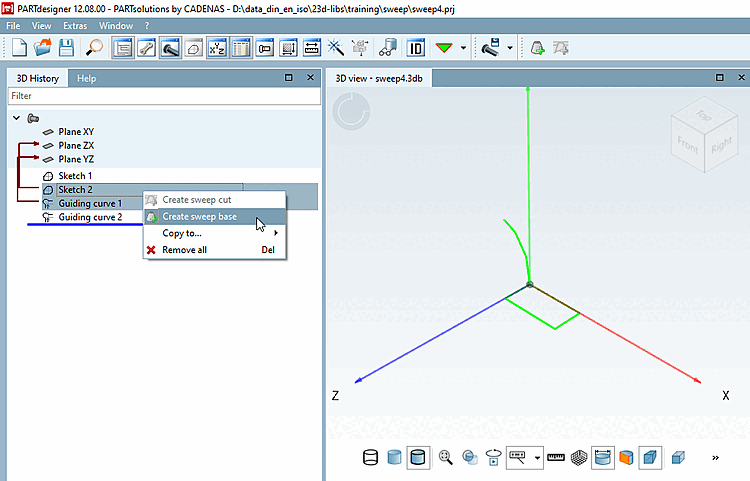
Selezionare sia la curva guida che lo schizzo della sezione trasversale.
Fare clic sul comando del menu contestuale Crea cronologia di base [Create sweep base].
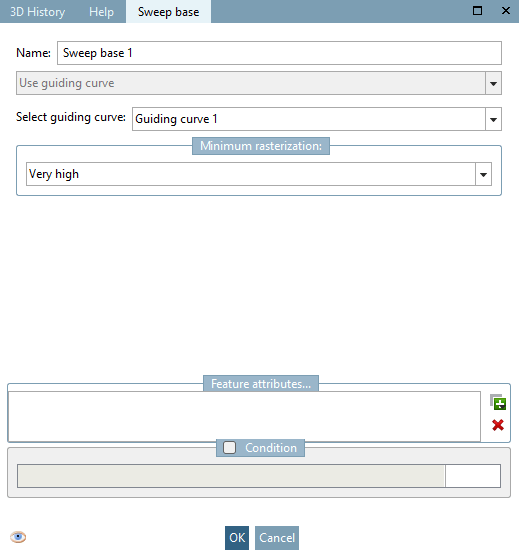
-> Si apre la pagina della scheda Cronologia di base [Sweep base].
Se sono disponibili altre curve di progressione, è possibile selezionarle nel campo elenco in Seleziona schizzo con progressione [Select guiding curve].
![[Nota]](https://webapi.partcommunity.com/service/help/latest/pages/it/partsolutions_user/doc/images/note.png)
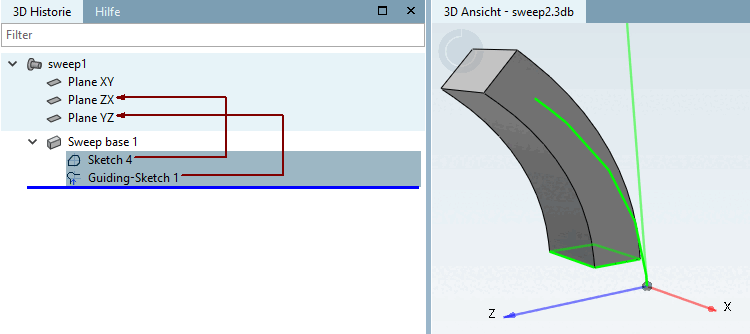
In alternativa, è possibile selezionare inizialmente solo lo schizzo della sezione trasversale e poi la curva di progressione corrispondente (se sono disponibili più curve) nella casella di riepilogo della pagina della scheda Progressione di base [Sweep base].