|
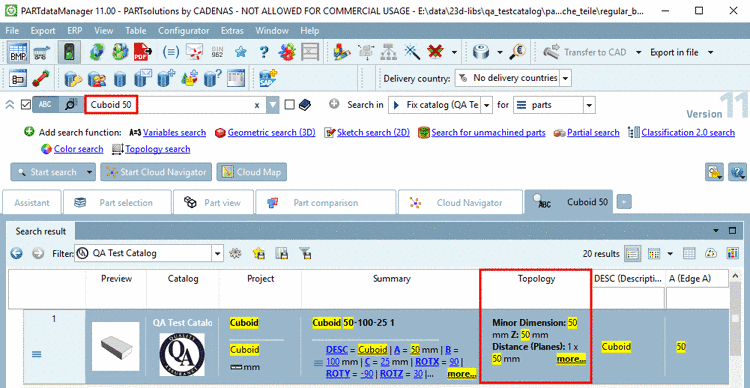
With V11 the Full-text search will also find all linear dimensions from Topology in addition to the values from the characteristic attribute table.
This enhancement becomes evident especially when searching in own part catalogs, because here characteristic values are not necessarily found in the table.
Hits from the topology are displayed in an own column Topology and are marked with yellow.
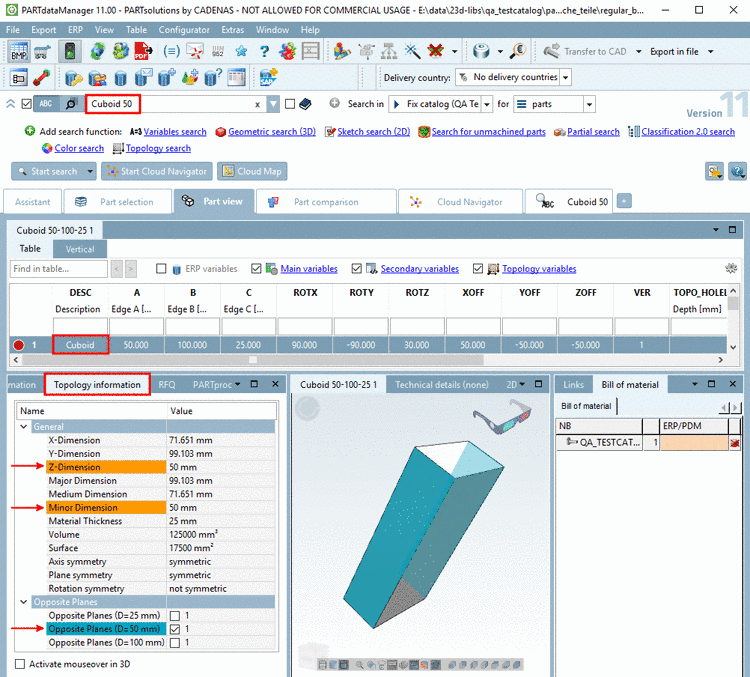
In the Part view you can find the docking window Topology information with a detailed listing, which contains the amount of the respective occurrence in addition.
Use an explicit Topology search when searching for details.
If you are searching for "3 holes with diameter 5" for example, then add the Topology search.
On this please see under Section 2.13.1.2.7, “ Topology search - New topology types ”.
Adjustment of tolerance for topological values
The topology search is not looking for exact values but is using a certain tolerance which is adjustable.
[FULLTEXTSEARCH]
TopologyTolerance=0.02
After an update to V11 you have to regenerate the full-text search index in order for this functionality to be available (should the geometric index not be up-to-date BEFORE this one in additon). See Kontextmenübefehle im Einzelnen -> Create full-text search index (und Geometrical search index -> Create/Update)
![[Tip]](https://webapi.partcommunity.com/service/help/latest/pages/it/partsolutions_user/doc/images/tip.png)