

Nella categoria Connessione al database [Database connection], definire il modo in cui si accede al database (ad esempio, MSSQL, Oracle, ecc.).
![[Nota]](https://webapi.partcommunity.com/service/help/latest/pages/it/partwarehouse/doc/images/note.png)
Driver ODBC: la funzionalità per l'utilizzo di ODBC è automaticamente disponibile.
Se il database viene eseguito tramite AppServer, il driver ODBC deve essere installato solo sul server. È necessario solo sui client se si accede direttamente al database.
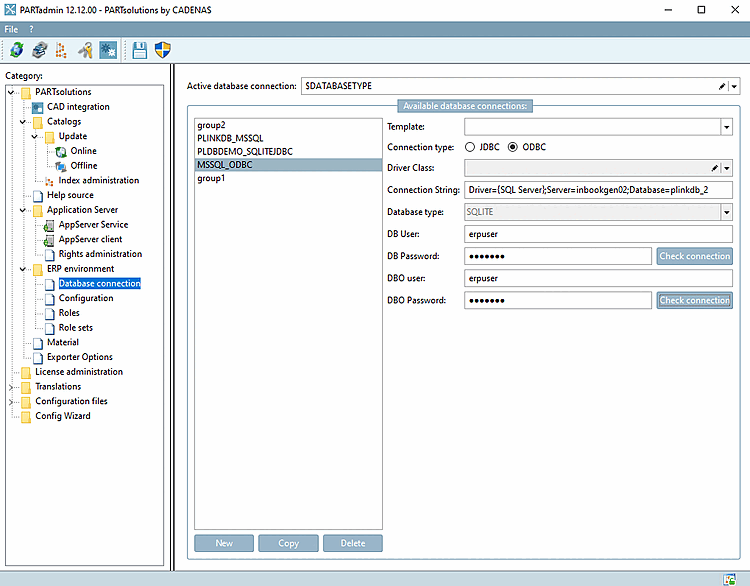
Nell'area di dialogo Connessioni database disponibili [Available database connections], selezionare "MSSQL via ODBC" nella casella di riepilogo Modello [Template].
Tutto sotto
libs/all/java/jarinstallato I driver vengono visualizzati nella finestra di dialogo Disponibile connessioni al database [Available database connections] elencate nella casella di riepilogo Modello [Template] (le e sono sempre disponibili).Altri devono essere contattati dal rispettivo produttore (Oracle, Microsoft) e memorizzato nella directory
libs/all/java/jaressere copiato. NON sono installati sul lato CADENAS.Si prega di scaricarli da uno dei seguenti indirizzi:
https://www.oracle.com/database/technologies/appdev/jdbc-downloads.html
sqljdbc_12.2\deu\mssql-jdbc-12.2.0.jre8.jaro.sqljdbc_12.2\deu\mssql-jdbc-12.2.0.jre11.jarhttps://learn.microsoft.com/de-de/sql/connect/jdbc/download-microsoft-jdbc-driver-for-sql-server?view=sql-server-ver16
Creare la connessione al database:
Utilizzare il pulsante per creare le connessioni al database richieste e compilare i campi pertinenti a destra. Selezionate quindi la connessione [Active database connection] al database desiderata in Connessione attiva al database [Active database connection].
È anche possibile inserire una variabile in Active database connection. Ad esempio, inserire $DATABASETYPE e creare questa variabile in start.env, ad esempio.
[ENVIRONS]
CADENAS=%DirOfThisFile%
CADENAS_SETUP=C:\ProgramData\PARTsolutions\setup
CADENAS_DEFAULTUSER=$CADENAS_SETUP\user\default_user
CADENAS_SITESETUP=C:\ProgramData\PARTsolutions\sitesetup
CADENAS_USER=%UserAppData%\PARTsolutions\user
CADENAS_LICENSE=$CADENAS_SITESETUP\lic
CADENAS_POOL=C:\ProgramData\PARTsolutions\pool
CADENAS_DATA=C:\data\
DATABASETYPE=group1
Ora usare per creare le connessioni a cui fa riferimento il valore DATABASETYPE.
Connessione al database attiva [Active database connection]:
Selezionare la connessione al database attivo [Active database connection] desiderata. Il nome deve corrispondere a una delle connessioni al database disponibili.
Selezionare il tipo di connessione [Connection type] JDBC o ODBC.
La voce relativa alla classe del driver [Driver Class] è omessa per ODBC. Le opzioni di selezione per JDBC sono "net.sourceforge.jtds.jdbc.Driver" e "SQLite.JDBC.Driver".
Stringa di connessione [Connection String]: sostituire i segnaposto con i dati reali.
La stringa di connessione [Connection String] contiene tutte le informazioni necessarie per accedere a LinkDB. (Non è necessario impostare l'origine dei dati ODBC.
Le opzioni della stringa di connessione sono riportate nella documentazione del driver corrispondente.
Inserire l' utente DB [DB User] e la password DB [DB Password].
Inserire facoltativamente l' utente DBO [DBO user] e la password DBO [DBO Password]. Questo è necessario per modificare lo schema del database, ad esempio per creare colonne di tabelle o per eseguire il backup del database.