
5.5. Creare un progetto - Piccolo esempio dalla A alla Z
5.5.6. Passo 6: testare il nuovo progetto in PARTdataManager / 3Dfindit |  |
| Indietro | Avanti |
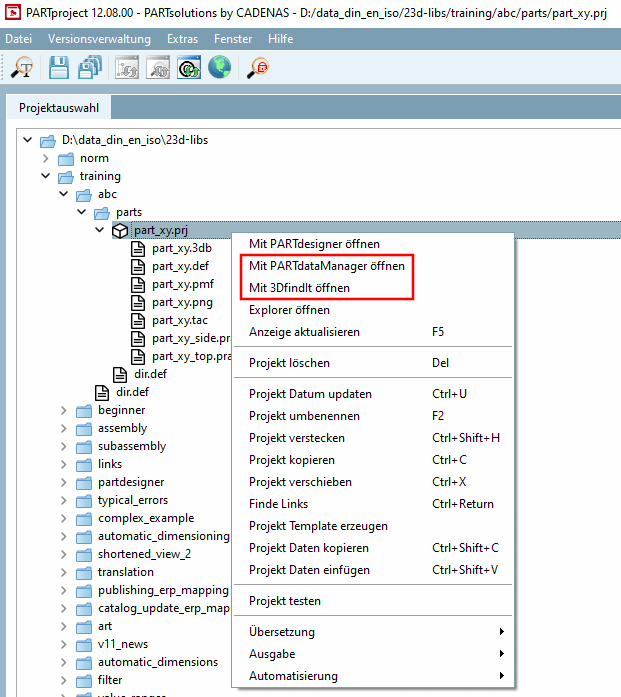
Fare clic sul comando del menu contestuale Apri con PARTdataManager [Open with PARTdataManager] o Apri con 3DfindIt [Open with 3DfindIt].
Aprire con PARTdataManager [Open with PARTdataManager]:
→ PARTdataManager viene avviato e la parte viene aperta nella vista della parte [Part view].
Aprire con 3DfindIt [Open with 3DfindIt]:
→ 3Dfindit viene avviato e il componente viene inizialmente aperto con una tabella e una vista 3D.
![Vista delle parti [Part view] PARTdataManager](https://webapi.partcommunity.com/service/help/latest/pages/it/partwarehouse/doc/resources/img/img_6945cab5e7a54f1997fc7668c2a30734.png)
![Vista delle parti di [Part view] 3Dfindit](https://webapi.partcommunity.com/service/help/latest/pages/it/partwarehouse/doc/resources/img/img_0d165afb4a944e178fab973166a8f700.png)