
 |
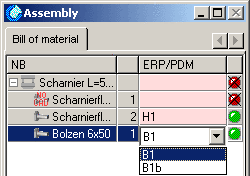
Load the assembly "hinge" and select the row in the window. No rows have yet been assigned ERP numbers. This is also visible in the window, since the status light is set to red in the row as well.
The single part "hinge wing" and "bolt" are set to green since there ERP/PDM had been assigned.
![[Note]](https://webapi.partcommunity.com/service/help/latest/pages/it/partwarehouse/doc/images/note.png)

Select "hinge wing" in the "" window.
In the characteristic attribute table the rows of the single part are also shown. Since the rows were duplicated in the PARTlinkManager, the geometrically similar part is available with 2 different materials.
You will see the corresponding similar result when selecting "bolts".

In the characteristic attributes table the row selection of the single part cannot be changed. You will receive the following notice.

If variants to the geometrically similar part are available then you can change these via the pull-down menu in the "options" window.