![[Nota]](https://webapi.partcommunity.com/service/help/latest/pages/it/partwarehouse/doc/images/note.png)
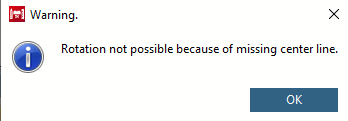
Fare clic con il tasto sinistro del mouse sulla linea/spigolo che fungerà da asse di rotazione. Assicurarsi che la linea/spigolo sia evidenziata in rosso e che la finestra Modifica elemento [Edit element] sia aperta. Premere CTRL + R per definire la linea come asse di rotazione mediante una combinazione di tasti.
In alternativa, si può procedere come segue:
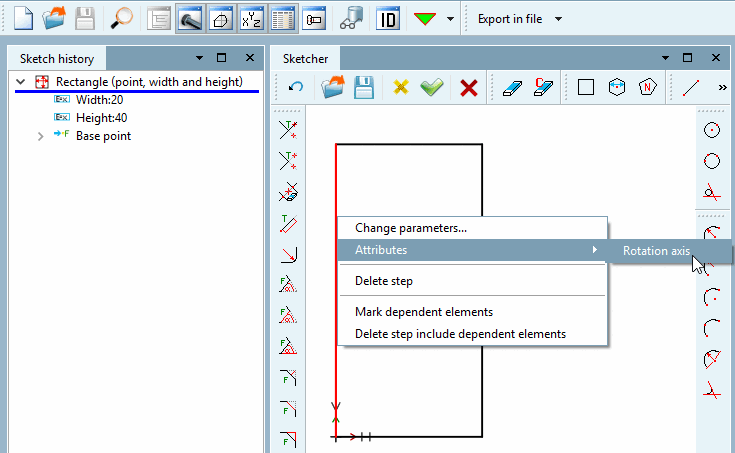
Con il pulsante secondario del mouse, fare clic sulla linea/spigolo che si desidera definire come asse di rotazione.
→ Si apre il menu contestuale corrispondente.
Selezionare il comando Attributi [Attributes] -> Asse di rotazione [Rotation axis].
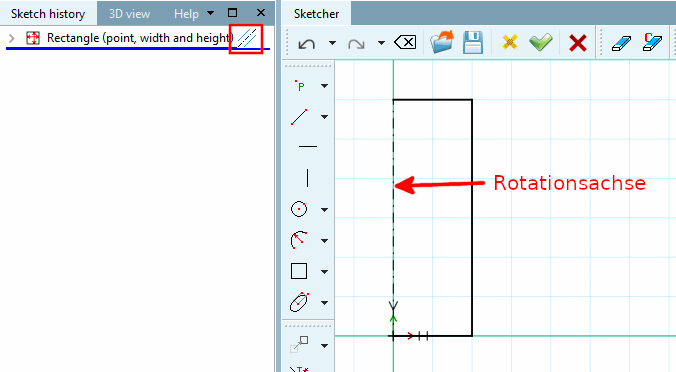
-> La linea/spigolo inizialmente segnata in rosso appare come un asse tratteggiato e un'icona corrispondente viene visualizzata nella cronologia degli schizzi [Sketch history] accanto alla feature contenente l'asse di rotazione.
Applicare questa modifica utilizzando lo schizzo OK button
 .
.
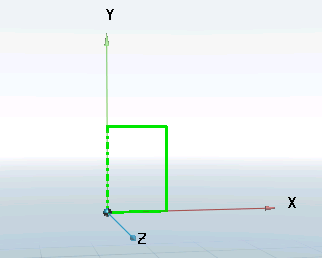
L' asse di rotazione [Rotation axis] è ora visibile anche nella vista 3D [3D view].