5.12.11.28.5.
Creare un sistema di classi per i filtri (plugin)
5.12.11.28.5.2. Requisiti / Impostazioni / Note |  |
| Indietro | Avanti |
Per la rappresentanza sotto forma di tabelle pivot e grafici devono essere forniti dal cliente con un File modello Excel denominato
statistics.xlsxcreato divenire.Il file modello
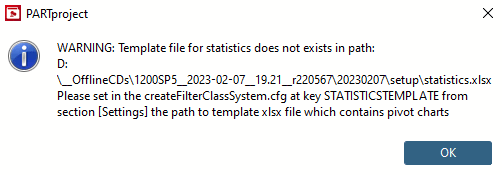
statistics.xlsxdeve trovarsi nel percorso sotto$CADENAS_SETUP\user\default_user\validator_reports_templatementire.La prima volta che esegui il comando Creare un sistema di classi per i filtri [Create class system for filters] Il file modello viene quindi spostato nella directory utente in
$CADENAS_USER/validator_reports_templatecopiato.Le
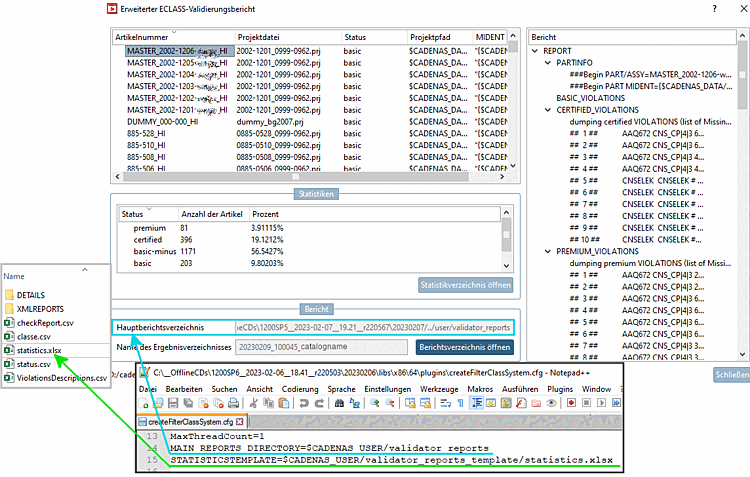
createFilterClassSystem.cfgfile di configurazione può essere trovato sotto$CADENAS\libs\x86\64\plugins\createFilterClassSystem.cfg.Il percorso del file modello xlsx è impostato nella chiave STATISTICTEMPLATE della sezione [Impostazioni].
[Settings]
#:VALS_S
#:HELP;Maximum number of threads
MaxThreadCount=1
MAIN_REPORTS_DIRECTORY=$CADENAS_USER/validator_reports
STATISTICSTEMPLATE=$CADENAS_USER/validator_reports_template/statistics.xlsx
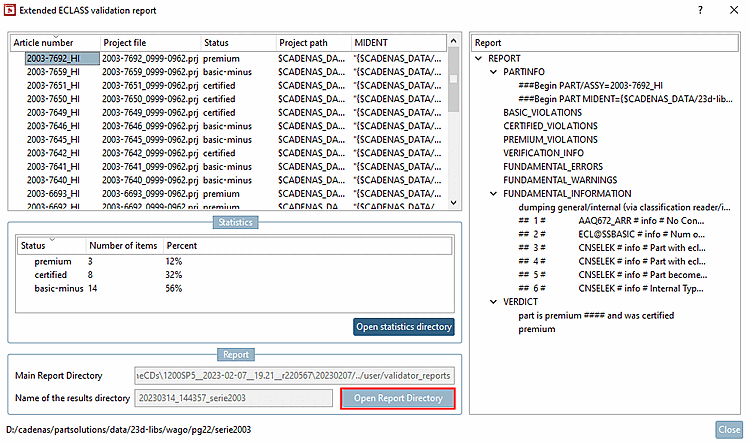
Nella finestra di dialogo del rapporto di convalida ECLASS esteso [Extended ECLASS validation report], il percorso da MAIN_REPORTS_DIRECTORY viene visualizzato sotto la directory del rapporto principale [Main Report Directory].
La specifica del percorso in STATISTICSTEMPLATE definisce il percorso di archiviazione del file modello di Excel
statistics.xlsx.I nomi delle directory "validator_reports_template" nelle directory di setup e utente devono corrispondere.
Inoltre, il percorso predefinito per Mantieni
statistics.xlsxin caso contrario, l'aggiornamento della tabella pivot e grafico tramite "Alt"+"F5" non funziona.
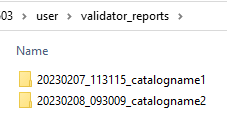
Tutti i rapporti vengono memorizzati nel percorso impostato in MAIN_REPORTS_DIRECTORY ogni volta che viene eseguita la funzione Crea sistema di classi per filtri [Create class system for filters].
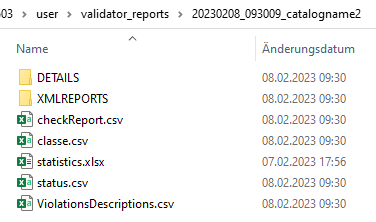
Dopo aver selezionato la directory di report desiderata, vedrai il file Excel
statistics.xlsx. Dopo aver cliccato su è questa già selezionato.È possibile aprire la directory dei rapporti corrente direttamente dalla finestra di dialogo dei rapporti di convalida ECLASS estesi [Extended ECLASS validation report].
![[Nota]](https://webapi.partcommunity.com/service/help/latest/pages/it/partwarehouse/doc/images/note.png)