

Sur la page d'onglet Généralités [General] de PARTproject se trouvent les deux options de réglage Render Material [Render material] et Render Rotation [Render rotation].
Vous devriez définir au préalable les matériaux de rendu pour l'ensemble du catalogue au niveau du catalogue. Cela vous fera gagner un temps précieux lors de l'attribution ultérieure.
![[Important]](https://webapi.partcommunity.com/service/help/latest/pages/fr/installation_ecatalogsolutions/doc/images/important.png)
En cliquant sur le bouton à la fin de la ligne Gérer les matériaux de rendu [Maintain render materials], la boîte de dialogue du même nom s'ouvre. Vous trouverez des informations détaillées sur cette procédure dans les sections Section 5.9.2.8.1.1, « Matériaux de rendu des fenêtres » et Section 5.9.2.8.1.2, « Fenêtre Éditer le matériau pour l'aperçu 3D ».
![Gérer les matériaux de rendu [Maintain render materials] au niveau du catalogue](https://webapi.partcommunity.com/service/help/latest/pages/fr/installation_ecatalogsolutions/doc/resources/img/img_84069055b7654ab1bef41710cbead93f.png)
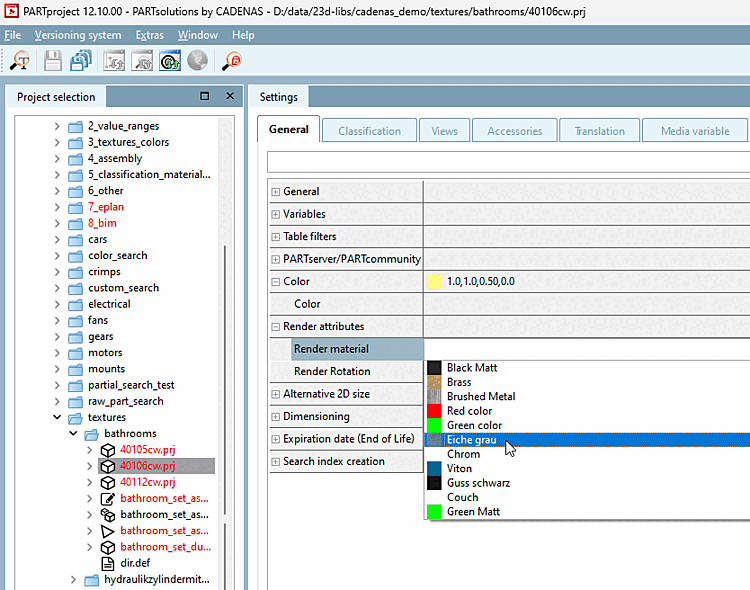
Une fois tous les matériaux de rendu créés, vous pouvez les attribuer au projet à l'aide d'une liste déroulante. Vous voyez dans la liste l'ID et le nom ainsi qu'une petite image d'aperçu du matériau. Nous vous conseillons de lire attentivement le chapitre suivant avant de commencer : Section 5.9.2.8.3, « Paramètres importants ».
Dans le chapitre Section 5.9.2.8.4, « Exemple détaillé de la fonction Render Material », vous trouverez un exemple détaillé de l'ensemble du processus dont vous pourrez vous inspirer.