
5.12.11.28.5.
Créer un système de classes pour les filtres (plugin)
5.12.11.28.5.4. Évaluation |  |
| Précédent | Suivant |
La présentation Excel se fait sur la base des fichiers CSV.
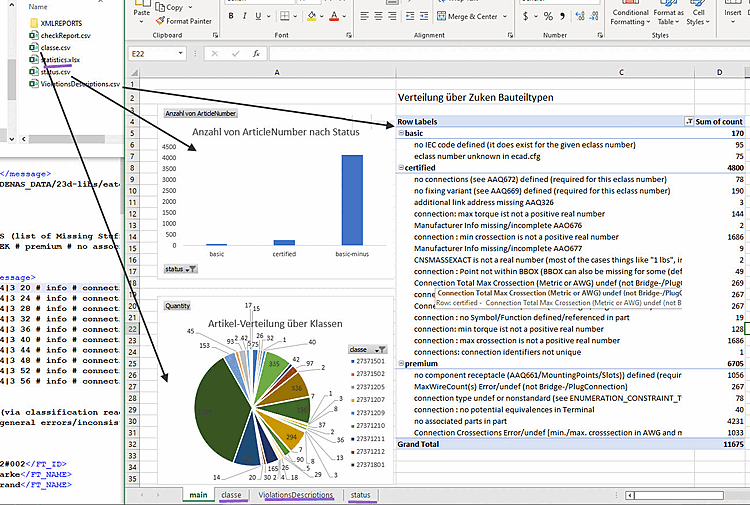
L’annonce à droite (
ViolationsDescriptions.csv) Affiche une répartition selon les groupes d’erreurs Basic, Certified et Premium. Chaque groupe montre ce que pour atteindre le niveau de certification respectif.Pour chaque code d’erreur individuel, le Nombre de visites (comptes) affichées.
Après le dépliage, le Numéros d’articles visibles.
Le digramme de mesure (
status.csv) indique le nombre de produits dans le statut respectif (affiché sous forme de pivot).Le graphique circulaire (
class.csv) montre l’ECLASS Répartition des classes entre tous les produits inclus dans le journal (La représentation comme pivot).


Dans les feuilles Excel « classe », « statut » et « ViolationsDescriptions », vous verrez le sous-jacent Table.
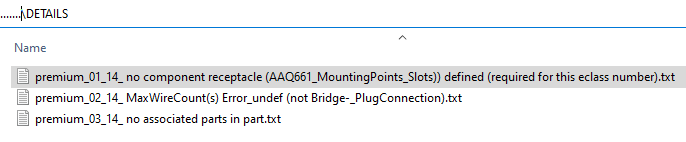
Dans le répertoire de l'utilisateur, sous "validator_reports", se trouvent rassemblés tous les rapports créés après une exécution. Chaque rapport contient les répertoires et fichiers suivants :
Le répertoire DETAILS contient des fichiers texte avec les codes d'erreur spécifiques qui se sont produits. Chaque fichier texte individuel répertorie les articles qui présentent l'erreur en question.
XMLREPORTS: tous les rapports sous forme de fichiers xml (générés par l'outil de vérification par lots "ECADPS3VERIFY") sont répertoriés ici. Si vous ouvrez un fichier dans n'importe quel éditeur xml, vous verrez les informations qui s'affichent dans la boîte de dialogue Rapport de validation ECLASS étendu [Extended ECLASS validation report], dans la zone de dialogue Rapport [Report].
Explications sur les différentes sections XML :
Toutes les sections se terminant par INFO ou WARNINGS ou INFORMATION n'ont aucune influence sur le statut de vérification final de la pièce. Ces entrées contiennent essentiellement des informations qui peuvent être utiles au processus de modélisation.
La section FUNDAMENTAL_ERRORS contient des entrées qui indiquent des violations du modèle de données ECAD ; de telles parties ne sont automatiquement pas certifiées.
VIOLATIONS: Classes et codes d'erreur
Il existe trois types de VIOLATIONS:
La section PREMIUM_VIOLATIONS contient toutes les entrées qui empêchent la pièce d'atteindre le statut Premium.
La section CERTIFIED_VIOLATIONS contient toutes les entrées qui empêchent la pièce d'atteindre le statut Certifié.
La section BASIC_VIOLATIONS contient toutes les entrées qui indiquent des erreurs sérieuses dans la modélisation ; avec de telles pièces, une exportation réussie vers différents systèmes ECAD n'est généralement pas garantie.
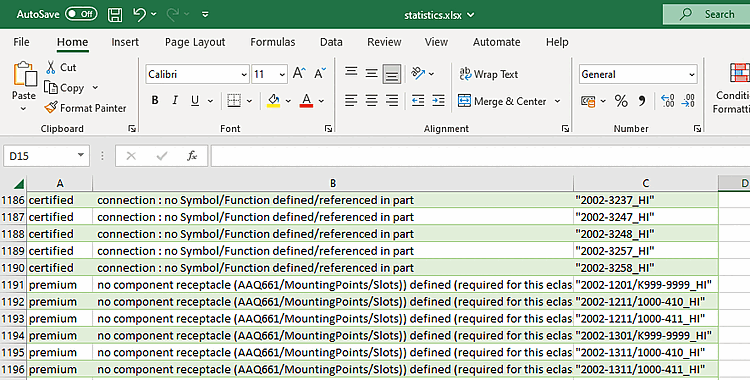
checkReport.csv: Contient des informations sur l' état et les numéros d'articles demandés par le modeleur pour résoudre le problème.
Les informations provenant de
classe.csv,status.csvetViolationsDescriptions.csvdans Excel. Voir ci-dessus.




![[Remarque]](https://webapi.partcommunity.com/service/help/latest/pages/fr/installation_ecatalogsolutions/doc/images/note.png)


![Rapport de validation ECLASS étendu [Extended ECLASS validation report]](https://webapi.partcommunity.com/service/help/latest/pages/fr/installation_ecatalogsolutions/doc/resources/img/img_c8418b326aef485297276db73348bb7b.png)
