

- 1.4.5.9.3.1.1. Possibilités générales de consultation des données
- 1.4.5.9.3.1.2. Consultation des données via un tableau de bord
- 1.4.5.9.3.1.3. Traitement des données lors de la connexion
- 1.4.5.9.3.1.4. Traitement des données lors de l'accès à la base de données ERP
- 1.4.5.9.3.1.5. Mise à jour du catalogue en ligne
- 1.4.5.9.3.1.6. Enregistrement
- 1.4.5.9.3.1.7. Serveur de licences
Le RGPD contient des dispositions relatives à la protection des personnes physiques à l'égard du traitement des données à caractère personnel.
CADENAS traite les données relatives aux utilisateurs telles que le nom, le nom de l'ordinateur, l'heure, etc. en fonction des processus et des fonctions du logiciel utilisé.
Des informations détaillées sont présentées ci-dessous, classées selon les différents cas d'application.
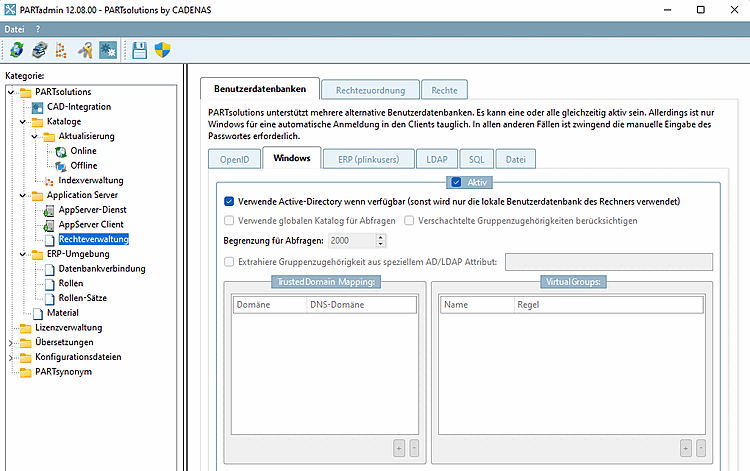
En général, tous les utilisateurs et groupes Windows peuvent être affichés sous PARTadmin -> Catégorie Gestion des droits [Rights administration] -> Onglet Bases de données utilisateurs [User databases] sur la page d'onglet Windows. En règle générale, le module PARTadmin n'est disponible que pour l'administration et l'accès aux fichiers pertinents pour le RGPD est réglé par la gestion des droits Windows.
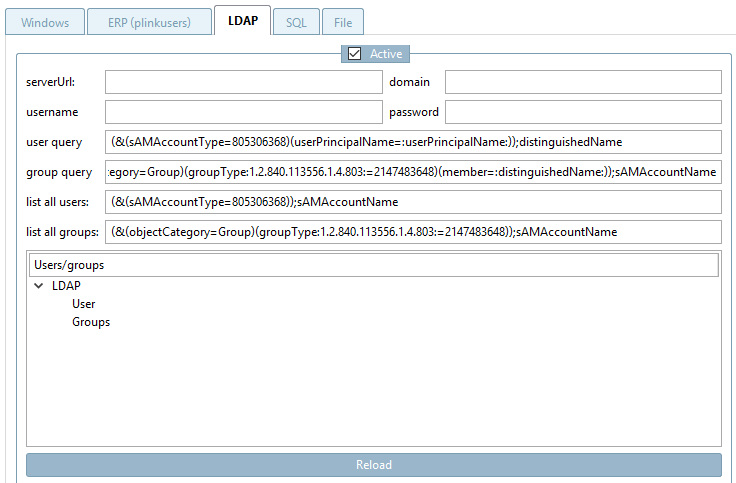
Dans PARTadmin -> catégorie Gestion des droits [Rights administration] -> onglet Bases de données utilisateurs [User databases] -> onglet LDAP, il est également possible d'interroger d'autres attributs AD. Pour cela, il faut toutefois configurer des filtres en conséquence.
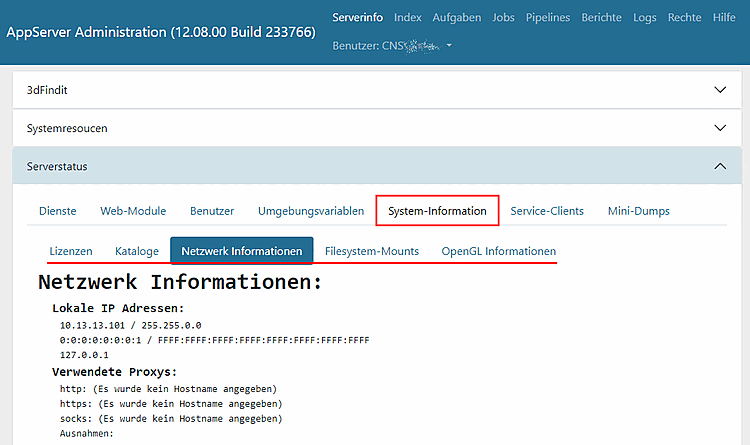
Pour l' administration de l'AppServer, le tableau de bord de PARTapplicationServer peut être ouvert via PARTadmin -> Catégorie AppServer Client [AppServer client] -> Zone de dialogue Diagnostic en cliquant sur .
![Afficher l'état du serveur [Show server state] Afficher l'état du serveur](https://webapi.partcommunity.com/service/help/latest/pages/fr/partwarehouse/doc/resources/img/img_33d03f51946a40a191422c14582f4784.png)
Sur la page d'onglet Informations système, vous trouverez les sous-rubriques suivantes :
![[Remarque]](https://webapi.partcommunity.com/service/help/latest/pages/fr/partwarehouse/doc/images/note.png)
![Profils [Profiles] Profils](https://webapi.partcommunity.com/service/help/latest/pages/fr/partwarehouse/doc/resources/img/img_6a045003204649a8a1a1a0d1570a321a.png)
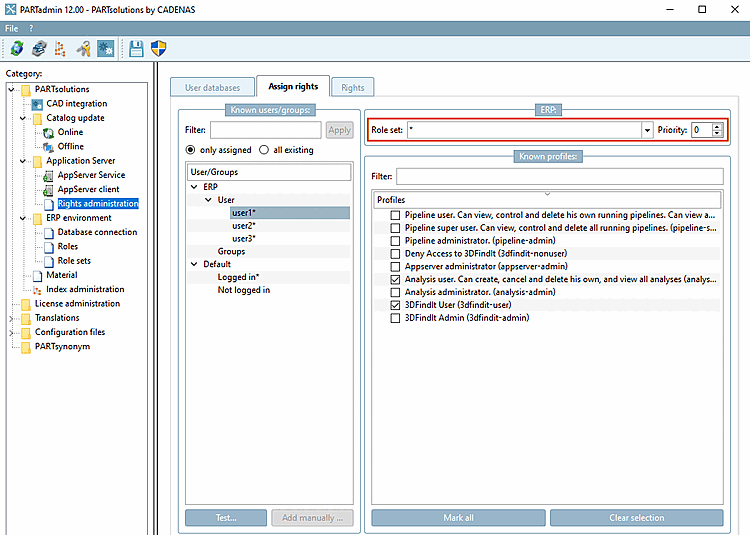
L'enregistrement des données s'effectue conformément à la configuration sous PARTadmin -> Catégorie Gestion des droits [Rights administration] -> Page d'onglet Attribution des droits [Assign rights]:
![ERP -> Jeu de rôles [Role set]](https://webapi.partcommunity.com/service/help/latest/pages/fr/partwarehouse/doc/resources/img/img_b34cfe22d85d4a959c62f84388aea4f7.png)
Attribution de l'ID utilisateur au rôle et au profil ERP 3Dfindit
Attribution de l'ID de groupe au rôle et au profil ERP 3Dfindit
Ni l'un ni l'autre si tous les utilisateurs ont le même rôle et le même profil.
Ni l'un ni l'autre, si les utilisateurs ont des rôles et des profils différents (voir exemple ci-dessous )
Les exemples suivants montrent à quoi peuvent ressembler un login spécifique à l'utilisateur et un login neutre.
Login spécifique à l'utilisateur:
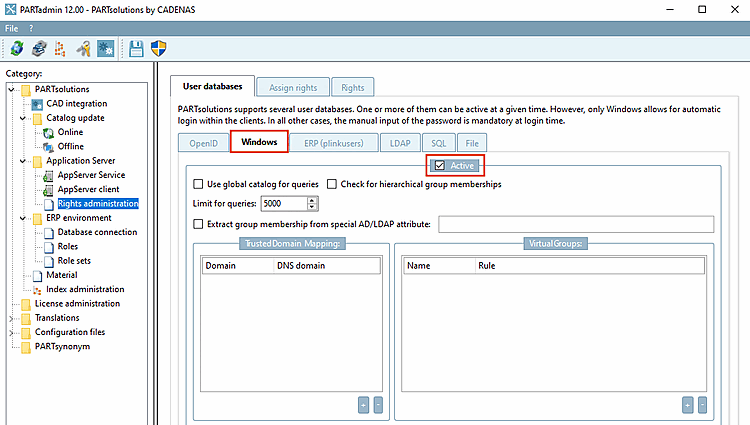
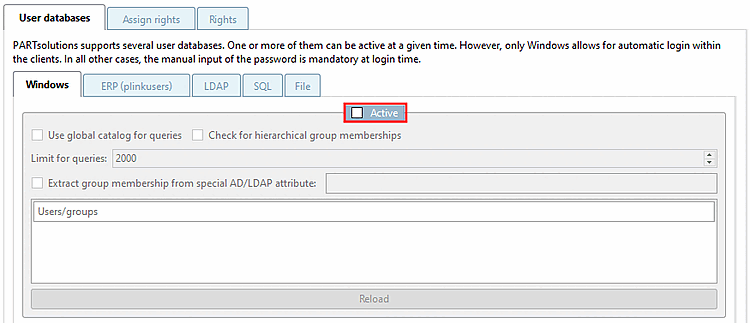
Dès que l'option Actif [Active] est activée sous PARTadmin -> Catégorie Gestion des droits [Rights administration] -> Onglet Bases de données utilisateurs [User databases] sur la page d'onglet Windows, un login spécifique à l'utilisateur peut être effectué.
-> Lors de la connexion avec l'utilisateur Windows, l'ID utilisateur, le groupe, l'appartenance au groupe et le domaine sont saisis.
-> Le nom d'utilisateur Windows est affiché à différents endroits du logiciel, par exemple dans la barre d'état.
Le login relatif à l'utilisateur peut se faire manuellement ou automatiquement.
Le scénario suivant montre, à titre d'exemple, la mise en place d'un login neutre, c'est-à-dire non lié à l'utilisateur :
Désactivez l' option Windows dans PARTadmin -> Catégorie Gestion des droits [Rights administration] -> Onglet Bases de données utilisateurs [User databases]
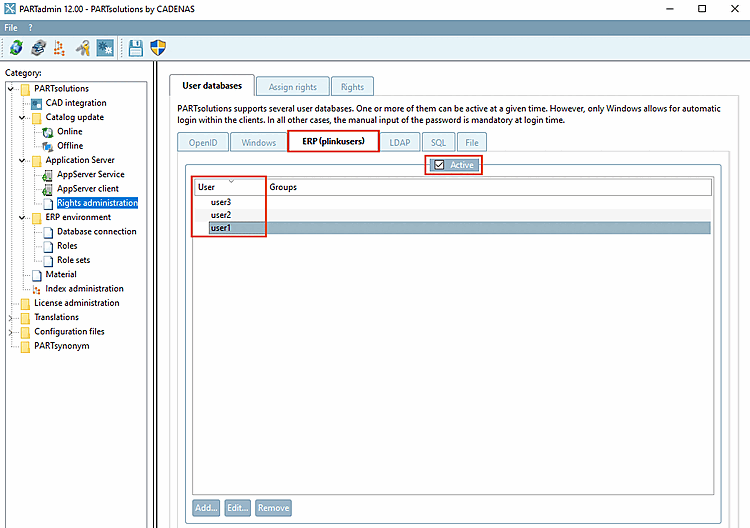
Activez l'option ERP (plinkusers) dans PARTadmin -> catégorie Gestion des droits [Rights administration] -> onglet Bases de données utilisateurs [User databases] et créez des utilisateurs.
Un jeu de rôles doit être attribué à ces utilisateurs.
-> Maintenant, lors de l'appel d'une application (p. ex. PARTdataManager), l'authentification de l'utilisateur peut se faire avec un utilisateur ERP et un mot de passe créés.
Utiliser l'utilisateur actuel du système d'exploitation [Use currently logged in operating system user]
En cas d'erreur de saisie, un message apparaît.
-> Dans PARTdataManager, l'enregistrement de rôle (avec rôle) est affiché dans la ligne d'état (pas d'utilisateur Windows).
Une solution alternative pour travailler avec un login de base de données neutre est d'utiliser un nom de groupe comme login Windows. (Cette solution n'est conforme au DSVGO que si le groupe a plus d'un utilisateur).
Une autre alternative, en plus du nom de groupe, est d'attribuer la configuration "Défaut/Connecté". Cela s'applique alors à tous les utilisateurs qui ne sont pas affectés d'une autre manière.

![Connexion à la base de données [Database login]](https://webapi.partcommunity.com/service/help/latest/pages/fr/partwarehouse/doc/resources/img/img_5aa616269afb4d0ba15ab59501a7fcab.png)
![Utiliser l'utilisateur actuel du système d'exploitation [Use currently logged in operating system user]](https://webapi.partcommunity.com/service/help/latest/pages/fr/partwarehouse/doc/resources/img/img_431a303d057341b4af77ed60e9e399d8.png)
![Nom d'utilisateur ou mot de passe non valide ! [Invalid username or password!]](https://webapi.partcommunity.com/service/help/latest/pages/fr/partwarehouse/doc/resources/img/img_6158495466f04490ad5521333e313383.png)

Pour accéder à la base de données ERP, il faut enregistrer un mot de passe de la base de données.
La saisie s'effectue sous PARTadmin -> Catégorie Environnement ERP [ERP environment] -> Connexion à la base de données [Database connection].
Utilisateur [DB User] DB/mot [DB Password] de passe DB [DB User] ou utilisateur [DBO user] DBO/mot [DBO Password] de passe DBO [DBO user] sont enregistrés sous forme cryptée.
Cela
Le mot de passe est stocké dans le fichier de configuration plinkusers.cfg .
![Catégorie "Connexion à la base de données [Database connection]" -> Zone de dialogue " Connexions à la base de données disponibles [Available database connections]".](https://webapi.partcommunity.com/service/help/latest/pages/fr/partwarehouse/doc/resources/img/img_c9530d35672d4c5f9dbb686172077e61.png)
Catégorie "Connexion à la base de données [Database connection]" -> Zone de dialogue " Connexions à la base de données disponibles [Available database connections]".
Des données relatives à l'utilisateur peuvent également être enregistrées lors du traitement des données, comme par exemple la création d'un numéro ERP ou la modification des rôles et des droits.
Lors de l'ajout d'un numéro ERP, les entrées suivantes sont, entre autres, placées dans le LOGTABLE :
Appel via PARTlinkManager -> onglet "Outils [Extras]" -> "Base de données [Database]" -> "Éditer des tables supplémentaires [Edit additional tables]".
Environnement CAO : génération de données dans l'environnement CAO (attributs CAO)
Parmi les attributs transmis à la CAO, aucune autre donnée que celles écrites dans le LOGTABLE n'est enregistrée du côté de CADENAS.
![Appel via PARTlinkManager -> onglet "Outils [Extras]" -> "Base de données [Database]" -> "Éditer des tables supplémentaires [Edit additional tables]".](https://webapi.partcommunity.com/service/help/latest/pages/fr/partwarehouse/doc/resources/img/img_ee581e832159427a87a61e02e3159792.png)
PARTadmin -> Catégorie Mise à jour du catalogue [Catalog update] -> En ligne [Online]
Émail
et mot de passe sont stockés dans le partupdate.cfg .
Chaque téléchargement CIP est attribué à un utilisateur. Le nom d'utilisateur et l'adresse IP sont enregistrés.
![Mise à jour du [Online update] catalogue [Catalog] en ligne [Online update]](https://webapi.partcommunity.com/service/help/latest/pages/fr/partwarehouse/doc/resources/img/img_f8c446eccda2468cbb6cf76eb93cbe8f.png)
![Authentifier les utilisateurs [Authenticate user]](https://webapi.partcommunity.com/service/help/latest/pages/fr/partwarehouse/doc/resources/img/img_a1c7cf7ac4184c759fbb081d1d39027a.png)
Le logging peut être utilisé à des fins d'analyse.
Dans la boîte de dialogue Paramètres de journalisation [Log settings], qui fait partie de la page de dialogue Paramètres [Settings], à laquelle vous pouvez accéder à partir des modules Enterprise / eCATALOG 3Dfindit via Menu Outils [Extras] -> Paramètres [Preferences], vous pouvez définir le niveau de journalisation. Le nom d'utilisateur, par exemple, est également enregistré dans les modules lors de la procédure de connexion.
![Paramètres de journalisation [Log settings] Paramètres de journalisation](https://webapi.partcommunity.com/service/help/latest/pages/fr/partwarehouse/doc/resources/img/img_3d9668dc7d14411f8e51b5e015a75900.png)
Le
La sortie des données de journalisation se fait dans le fichier de sortie sous $Temp\psol_logs\cadenas_error.log.
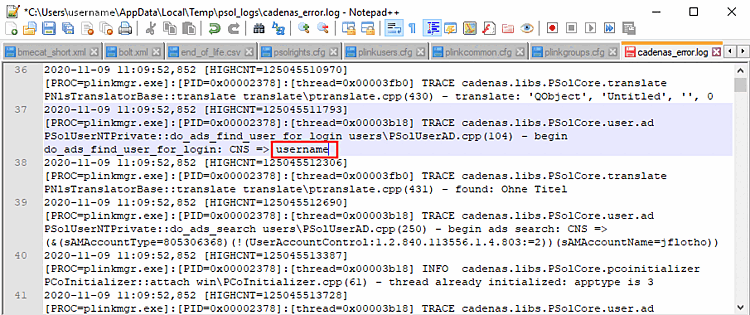
L'affichage dans l'IUG se fait dans la fenêtre de log [Log window] du module concerné.
![Exemple PARTdataManager : fenêtre Log [Log window] Fenêtre du journal](https://webapi.partcommunity.com/service/help/latest/pages/fr/partwarehouse/doc/resources/img/img_4b3f84f44eb04964a3db2bebad2616db.png)
Vous trouverez des informations relatives au RGPD concernant les serveurs de licences sous Section 1.5.4.4, « Page d'onglet "Sécurité ». Ce point est également pertinent sans ERP.