
2.1.6.4.11.
Ricerca topologica
2.1.6.4.11.2.
Ricerca topologica: Risultati della ricerca
|  |
| Indietro | Avanti |
Le
Risultati di una ricerca per topologia [Topology search]
appaiono come di consueto nella scheda corrispondente. La scheda mostra
il simbolo corrispondente  .
.
Le
Le figure seguenti mostrano i risultati di una ricerca combinata di "bullone" ( di ricerca full-text [Full-text search] ) e del foro [Hole] della feature topologica.
![Ricerca topologica [Topology search] per foro [Hole]](https://webapi.partcommunity.com/service/help/latest/pages/it/installation_ecatalogsolutions/doc/resources/img/img_c72bff7c879a4521acb8f260432ee5ef.png)
In una ricerca topologica [Topology search], i valori trovati sono evidenziati in colore e visualizzati nelle rispettive colonne della tabella.
Le colonne della tabella per le proprietà topologiche ricercate vengono visualizzate automaticamente (ma potrebbero dover essere ordinate in testa).
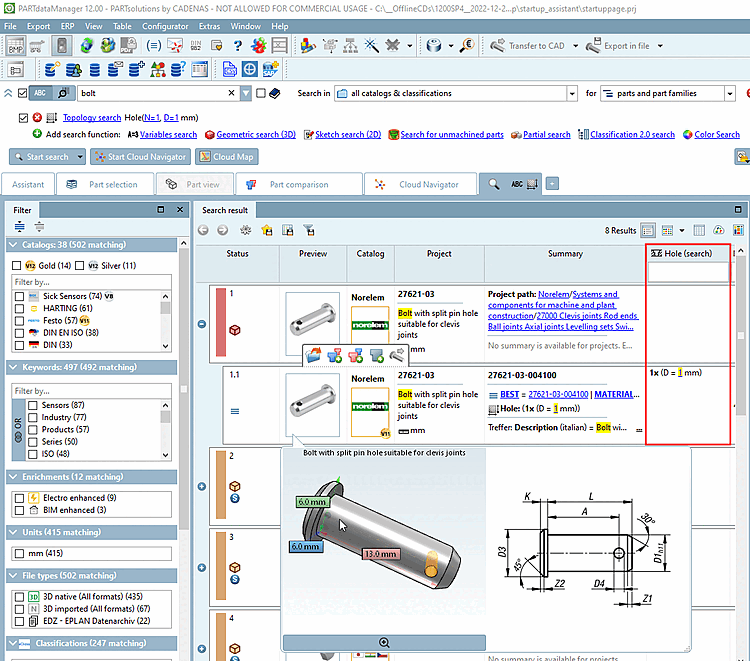
Le caratteristiche come cilindri, coni, ecc. che sono state cercate nella ricerca topologica [Topology search] sono evidenziate a colori nel tooltip dei risultati della ricerca e nella vista 3D.
Per impostazione predefinita, la visualizzazione delle informazioni topologiche nel confronto dei componenti [Part comparison] è disattivata. Tuttavia, quando si aprono i risultati di una ricerca topologica [Topology search], le caratteristiche topologiche sono già contrassegnate nella sezione Confronto tabellare [Tabular Compare], le caselle di controllo corrispondenti sono già selezionate e le informazioni corrispondenti vengono visualizzate anche nel confronto 3D [3D comparison].
