

- 5.12.3.6.1. Classe "CNS_CP_PLACE_PA"
- 5.12.3.6.2. Classe "CNS_CP_MEDIA_HOTSPOT
- 5.12.3.6.3. Classe "CNSGEOMBASE" -> Caratteristica "CNS_NOSECTION"
- 5.12.3.6.4. Classe "CNSERPBASE" -> Caratteristica "CNS_RAWMATERIAL"
- 5.12.3.6.5. Classe "CNSERPBASE" -> Caratteristica "CNSCERTIFICATEROHS"
- 5.12.3.6.6. Classificazione delle curve caratteristiche
- 5.12.3.6.7. Visualizzazione di varie geometrie ausiliarie (stanze) generate dai dati di classificazione
- 5.12.3.6.8. Notifiche di modifica per classi e caratteristiche (Electro)
- 5.12.3.6.9. Notifiche di modifica per classi e caratteristiche
- 5.12.3.6.10. Classificazione secondo CNSORDERNO / CNSTYPECODE
- 5.12.3.6.10.1. Uso di CNSORDERNO e CNSTYPECODE con esempi
- 5.12.3.6.10.2. Vantaggi della classificazione secondo CNSORDERNO e CNSTYPECODE
- 5.12.3.6.10.3. Plugin "Controllo risoluzione"
- 5.12.3.6.10.4. Plugin "Classificare i progetti nell'esecuzione in batch
- 5.12.3.6.10.5. TestMeta: Generale per il numero d'ordine o il codice del tipo
- 5.12.3.6.10.6. TestMeta: ReverseConfigs / Ricerca inversa (automatica)
- 5.12.3.6.10.7. Numeri d'ordine dell'indice a seconda degli intervalli di valori
- 5.12.3.6.10.8. Limitare la risoluzione degli intervalli di valori (campi gialli) tramite la chiave di configurazione
- 5.12.3.6.11. Assegnare semplicemente variabili importanti alla classificazione del SNC
La classificazione di CADENAS (CNS) non è direttamente visibile nel 3Dfindit o nel PARTdataManager, ma un gran numero di funzioni sono controllate attraverso le caratteristiche della classe assegnata.
La classificazione (CNS) non è pensata solo per i pezzi, ma anche per i componenti dei pezzi, come i punti di connessione [Connection points].
Prima di assegnare, selezionare l'opzione desiderata nel campo elenco sotto Filtro [Filter].

Oltre all'opzione Classi [Classes], l'opzione Aggiungi punti [Connection points] viene utilizzata con particolare frequenza.
È possibile classificare i punti di connessione (oggetti geometrici) in PARTproject anche nell' anteprima [Preview]. Il vantaggio è che si dispone di un riferimento diretto alla parte. Sezione 5.12.5, “Classificare i punti di attacco ” Vedere anche .

Se si seleziona l'opzione Classi [Classes] nel filtro [Filter], appare la seguente selezione:
CNSCAX, Cax Basis: premio per simboli e layout, ad esempio nei settori elettrico e BIM.
Sezione 5.12.11, “Classificare le parti elettriche ”C NSELEK, Elektro: per l'uso specifico, vedere .
CNSGEOMBASE, Proprietà geometriche: Proprietà generali per tutte le aree
Le caratteristiche in dettaglio -> vedi sotto
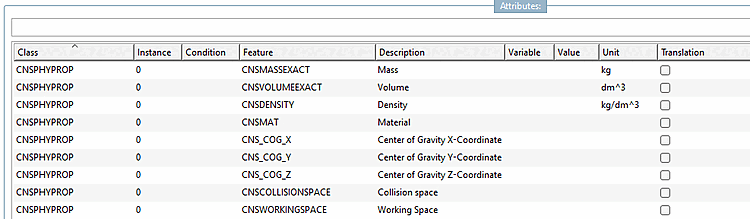
CNSPHYPROP, Proprietà fisiche: Proprietà generali per tutti i settori
Le caratteristiche in dettaglio -> vedi sotto
CNSERPBASE, proprietà caratteristiche: Proprietà generali per tutte le aree, ad esempio numero d'ordine, codice del tipo, testi descrittivi per il software di gara, ecc.
Le caratteristiche in dettaglio -> vedi sotto
Classe CNSERPBASE (proprietà degli attributi)
![[Nota]](https://webapi.partcommunity.com/service/help/latest/pages/it/installation_ecatalogsolutions/doc/images/note.png)
Nota Carattere rosso = campi obbligatori, se non compilati viene visualizzato un messaggio di errore.
Carattere blu = se non viene compilato, viene visualizzato un messaggio di avvertimento.
Caratteristica Descrizione del CNSTYPECODE Digitare il codice -> Visualizzare anche alla voce di menu Variabili [Variables] CNSORDERNO Numero d'ordine -> visualizzato anche alla voce di menu Variabili [Variables] CNS_DESCRIZIONE_BREVE Descrizione breve MARCA_CNS Produttore / Marchio CNS_URL Sito web aziendale CNSUSECASE Caso d'uso CNS_DESCRIPTION_LONG Descrizione lunga CNSEAN Codice EAN CNSCCN Codice ECCN CNSQUANTITÀ Unità di misura CNSPRICE Prezzo CNS_RAWMETERIAL Materia prima CNSSTDDTIME Tempi di consegna standard CNSMNTINTV Intervalli di manutenzione CNSCERTIFICATEDNV Certificato DNV CNSCERTIFICATOEMAS Certificato EMAS CNSCERTIFICATOEX Certificato di protezione dalle esplosioni CNSCERTIFICAREFSC Certificato FSC CERTIFICATO CNSCERTIFICATOISO14001 Certificato ISO14001 CNSCERTIFICATOPEFC Certificato PEFC CNSCERTIFICATOPROP65 Certificato Proposition 65 CNSCERTIFICATEREACH Certificato REACH CNSCERTIFICATEROHS Certificato RoHS CERTIFICATO DI CERTIFICAZIONE Certificato WEEE CNSCTN Numero di tariffa doganale CNS_MANUFACTURER_PID ID prodotto del produttore (classificazione ausiliaria per la ricerca inversa) Classe CNSGEOMBASE (Proprietà geometriche)
Caratteristica Descrizione del CNS_NOSECTION Non tagliare in 2D CNSEXTRUSIONVAR Variabile di estrusione CNSLODDEST Destinazione LOD CNSLODLEVEL Livello LOD Classe CNSPHYPROP (proprietà fisiche)


Se si seleziona l'opzione Aggiungi punti [Connection points] nel filtro [Filter], appare la seguente selezione:
![Classi dopo la selezione di "Aggiungi punti [Connection points]"](https://webapi.partcommunity.com/service/help/latest/pages/it/installation_ecatalogsolutions/doc/resources/img/img_12f0fad9fe1347ebb1f36ff17e1e7e11.png)
Sezione 5.12.11, “Classificare le parti elettriche ”CNS_CP|4, Elettrico -> vedere
Per sapere come funziona l'assegnazione delle classi e delle caratteristiche, consultate la sezione Assegnazione di classi e caratteristiche a livello di progetto.