
Capitolo 3. 3Dfindit - Integrazione CAD - Amministrazione
3.1. Interfaccia utente in PARTadmin
|  |
| Indietro | Avanti |
![[Nota]](https://webapi.partcommunity.com/service/help/latest/pages/it/partsolutions_user/doc/images/note.png) | Nota |
|---|---|
Le impostazioni dei file di configurazione [Configuration files] possono essere modificate solo con i diritti di amministrazione. Se non sono disponibili, accanto alle categorie corrispondenti appare il simbolo del lucchetto.
È inoltre necessario aver effettuato il login come amministratore in ENTERPRISE 3Dfindit (vedere Sezione 1.7.3.3.3.1, “ Tasto "IsAdmin" - Modalità utente ”). Lo stato di accesso è visibile nella barra di stato in basso a destra. | |
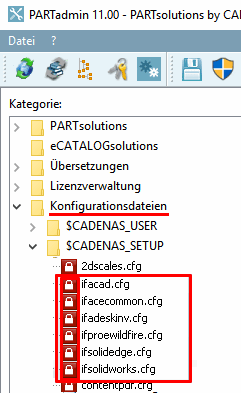
Per modificare un file di configurazione, aprire la categoria File di configurazione [Configuration files] e la relativa sottocategoria. Selezionare il file di configurazione desiderato.
-> Nell'area di dialogo di destra, i blocchi e le chiavi sono ora visualizzati con testi di aiuto.
![L'illustrazione mostra la categoria [Category] "File di configurazione [Configuration files]" con il file di configurazione selezionato sotto "CADENAS_SETUP".](https://webapi.partcommunity.com/service/help/latest/pages/it/partsolutions_user/doc/resources/img/img_69132a35e83d4b1cb90eda2898464cf9.png)
Figura 3.2. L'illustrazione mostra la categoria [Category] "File di configurazione [Configuration files]" con il file di configurazione selezionato sotto "CADENAS_SETUP".
Nel
La valutazione delle impostazioni è specifica del CAD ( ifsolidworks.cfg, ifacad.cfg, ecc.) e generale
file di configurazione ( ifacecommon.cfg ). [47]
| Nota |
|---|---|
| |
[47] Le Le interfacce CAD e PDM di PARTsolutions mostrano il L'opzione di scripting offre un grado di flessibilità molto elevato. Le Il linguaggio di programmazione utilizzato è Visual Basic. Attraverso un CADENAS interprete di script, gli script funzionano sia sotto Windows e Unix.