!["Barra degli strumenti "Ellissi [Ellipses]](https://webapi.partcommunity.com/service/help/latest/pages/it/partsolutions_user/doc/resources/img/img_bdacfad757384af9a3d586bb1b4b4751.png)
 ellisse per punti sull'asse principale e
Hülleckpkt. [Ellipse by point on main axis and hull edge point]
ellisse per punti sull'asse principale e
Hülleckpkt. [Ellipse by point on main axis and hull edge point]
Fare clic sull'icona e seguire le istruzioni della barra di stato.
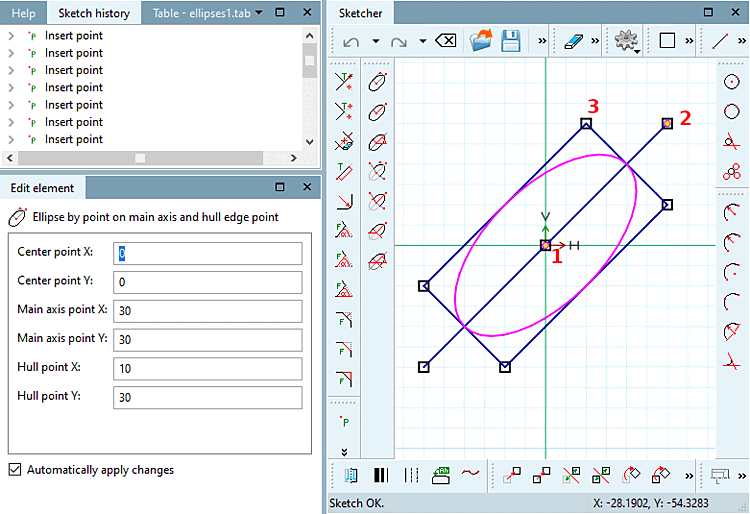
Selezionare il punto centrale [Choose center point]: Una volta creata l'ellisse, le coordinate del punto vengono visualizzate in Modifica elemento [Edit element], alla voce Punto centrale X / Punto centrale Y.
Selezionare il punto sull' [Select point on main axis] asse principale: Non appena l'ellisse è stata creata, le coordinate del punto dell' asse principale punto [Main axis point] X / punto [Main axis point] Y vengono visualizzate in Modifica elemento [Edit element].
L'orientamento dell'ellisse risulta dal punto centrale e dal punto sull'asse principale.
Selezionare il punto d'inviluppo [Select hull point]: Definire un punto d'angolo del rettangolo in cui è inscritta l'ellisse.
Figura 7.915. Ellisse: definizione della dimensione tramite il punto d'angolo del rettangolo di selezione
Nella finestra di aggancio Modifica elemento [Edit element] è possibile regolare successivamente i valori o le variabili dei singoli parametri.
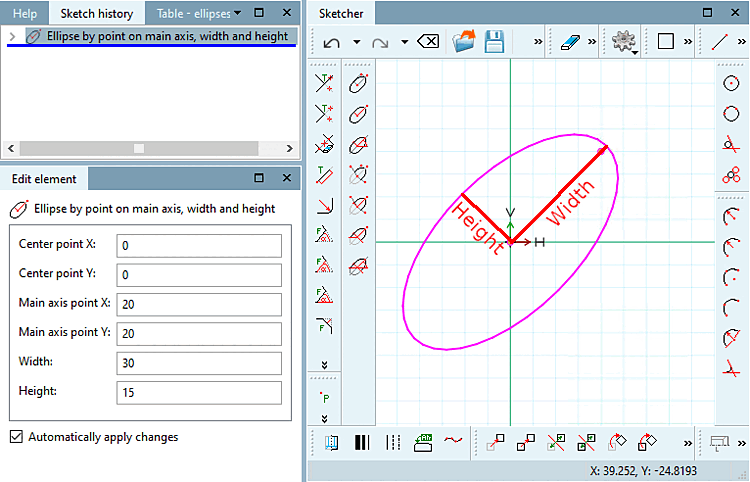
 Ellisse per punto sull'asse principale, latitudine e
Altezza [Ellipse by point on main axis, width and height]
Ellisse per punto sull'asse principale, latitudine e
Altezza [Ellipse by point on main axis, width and height]
Fare clic sull'icona e seguire le istruzioni della barra di stato.
Selezionare il punto centrale [Choose center point]: Una volta creata l'ellisse, le coordinate del punto vengono visualizzate in Modifica elemento [Edit element], alla voce Punto centrale X / Punto centrale Y.
Selezionare il punto sull' [Select point on main axis] asse principale: Non appena l'ellisse è stata creata, le coordinate del punto dell' asse principale punto [Main axis point] X / punto [Main axis point] Y vengono visualizzate in Modifica elemento [Edit element].
L'orientamento dell'ellisse risulta dal punto centrale e dal punto sull'asse principale.
Selezionare le dimensioni [Select size]: Disegnare l'ellisse con la larghezza [Width] e l' altezza [Height] desiderate.
Nella finestra di aggancio Modifica elemento [Edit element] è possibile regolare successivamente i valori o le variabili dei singoli parametri.
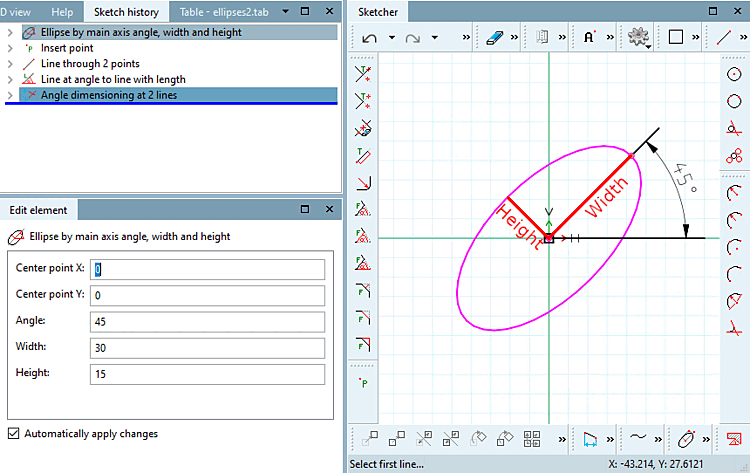
 ellisse per angolo, larghezza e
Altezza [Ellipse by main axis angle, width and height]
ellisse per angolo, larghezza e
Altezza [Ellipse by main axis angle, width and height]
Fare clic sull'icona e seguire le istruzioni della barra di stato.
Selezionare il punto centrale [Choose center point]: Una volta creata l'ellisse, le coordinate del punto vengono visualizzate in Modifica elemento [Edit element], alla voce Punto centrale X / Punto centrale Y.
Selezionare l'angolo dell [Select angle of main axis] 'asse principale: Determinare l'angolo rispetto all'asse X e all'asse principale dell'ellisse.
Selezionare le dimensioni [Select size]: Disegnare l'ellisse con la larghezza [Width] e l' altezza [Height] desiderate.
Figura 7.917. Ellisse: definizione dell'orientamento dell'ellisse tramite la specificazione dell'angolo
Nella finestra di aggancio Modifica elemento [Edit element] è possibile regolare successivamente i valori o le variabili dei singoli parametri.
 ellittica per punti sull'asse principale, all'inizio e
Ultimo punto. [Ellipse segment by point on main axis, start- and end point]
ellittica per punti sull'asse principale, all'inizio e
Ultimo punto. [Ellipse segment by point on main axis, start- and end point]
Fare clic sull'icona e seguire le istruzioni della barra di stato:
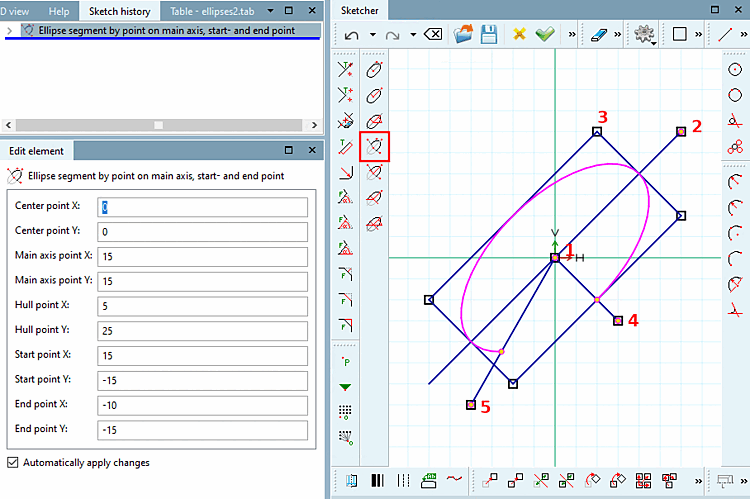
Selezionare il punto centrale [Choose center point]: Una volta creata l'ellisse, le coordinate del punto vengono visualizzate in Modifica elemento [Edit element], alla voce Punto centrale X / Punto centrale Y.
Selezionare il punto sull' [Select point on main axis] asse principale: Non appena l'ellisse è stata creata, le coordinate del punto dell' asse principale punto [Main axis point] X / punto [Main axis point] Y vengono visualizzate in Modifica elemento [Edit element].
L'orientamento dell'ellisse risulta dal punto centrale e dal punto sull'asse principale.
Selezionare il punto d'inviluppo [Select hull point]: Definire un punto d'angolo del rettangolo in cui è inscritta l'ellisse.
Selezionare il punto di partenza [Choose start point]: Il segmento dell'ellisse inizia dall'intersezione della linea tra il centro dell'ellisse e il punto di partenza e l'ellisse.
Selezionare il punto finale [Select end point]: Il segmento dell'ellisse termina all'intersezione della linea tra il punto finale del centro dell'ellisse e l'ellisse.
-> Il segmento che si trova in senso antiorario tra 4) e 5) rimane!
Figura 7.918. Segmento di ellisse: definizione della dimensione tramite il punto d'angolo del rettangolo di selezione
Nella finestra di aggancio Modifica elemento [Edit element] è possibile regolare successivamente i valori o le variabili dei singoli parametri.
 di ellittica per punti sull'asse principale, larghezza e
Altezza, punti di inizio e fine. [Ellipse segment by point on main axis, width, height, start- and end point]
di ellittica per punti sull'asse principale, larghezza e
Altezza, punti di inizio e fine. [Ellipse segment by point on main axis, width, height, start- and end point]
Fare clic sull'icona e seguire le istruzioni della barra di stato:
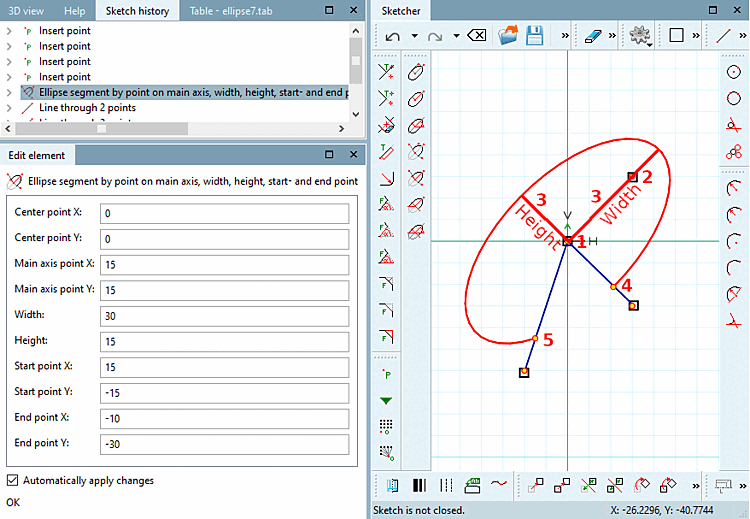
Selezionare il punto centrale [Choose center point]: Una volta creata l'ellisse, le coordinate del punto vengono visualizzate in Modifica elemento [Edit element], alla voce Punto centrale X / Punto centrale Y.
Selezionare il punto sull' [Select point on main axis] asse principale: Non appena l'ellisse è stata creata, le coordinate del punto dell' asse principale punto [Main axis point] X / punto [Main axis point] Y vengono visualizzate in Modifica elemento [Edit element].
L'orientamento dell'ellisse risulta dal punto centrale e dal punto sull'asse principale.
Selezionare le dimensioni [Select size]: Disegnare l'ellisse con la larghezza [Width] e l' altezza [Height] desiderate.
Selezionare il punto di partenza [Choose start point]: Il segmento dell'ellisse inizia dall'intersezione della linea tra il centro dell'ellisse e il punto di partenza e l'ellisse.
Selezionare il punto finale [Select end point]: Il segmento dell'ellisse termina all'intersezione della linea tra il punto finale del centro dell'ellisse e l'ellisse.
-> Il segmento che si trova in senso antiorario tra 4) e 5) rimane!
Nella finestra di aggancio Modifica elemento [Edit element] è possibile regolare successivamente i valori o le variabili dei singoli parametri.
 punti ellittici sull'asse principale, larghezza e altezza,
Angoli iniziale e finale [Ellipse segment by point on main axis, width, height, start- and end angle]
punti ellittici sull'asse principale, larghezza e altezza,
Angoli iniziale e finale [Ellipse segment by point on main axis, width, height, start- and end angle]
Fare clic sull'icona e seguire le istruzioni della barra di stato:
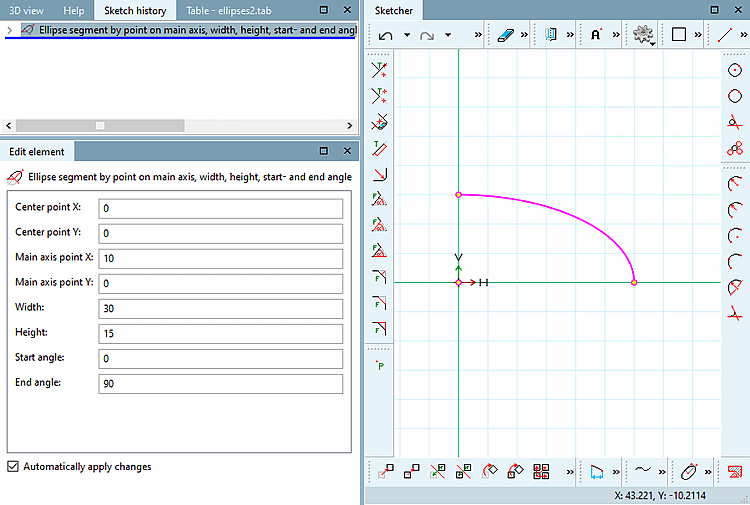
Selezionare il punto centrale [Choose center point]: Il punto selezionato viene visualizzato nel dialogo sotto Punto centrale X / Punto centrale Y.
Selezionare il punto sull' [Select point on main axis] asse principale: Il punto selezionato viene visualizzato nella finestra di dialogo alla voce Punto dell'asse principale [Main axis point] X / Punto dell'asse principale [Main axis point] Y.
L'orientamento dell'ellisse risulta dal punto centrale e dal punto sull'asse principale.
Selezionare le dimensioni [Select size]: Disegnare l'ellisse con la larghezza [Width] e l' altezza [Height] desiderate.
Selezionare il punto finale [Select end point]:
L' angolo iniziale [Start angle] e l' angolo finale [End angle] sono relativi all'asse principale. L'angolo viene applicato in senso antiorario come di consueto.
Nella finestra di aggancio Modifica elemento [Edit element] è possibile regolare successivamente i valori o le variabili dei singoli parametri.
![[Nota]](https://webapi.partcommunity.com/service/help/latest/pages/it/partsolutions_user/doc/images/note.png)
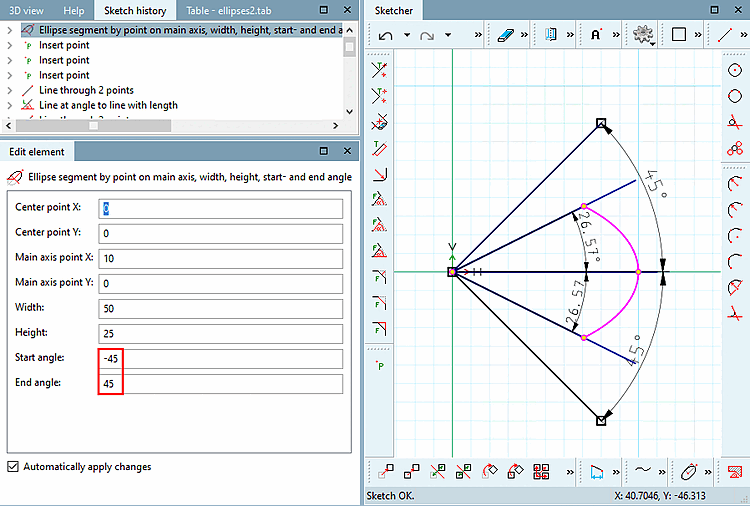
Nota Per i segmenti di ellisse che non raggiungono la loro estensione massima/minima (valori dell'asse maggiore e minore), i valori effettivi nello schizzo relativi a larghezza/altezza [Height] e angolo [Start angle] iniziale/angolo finale [End angle] non sono corretti a causa del metodo di calcolo interno.
Viene creato un arco con l' angolo iniziale [Start angle] e l' angolo finale [End angle] inseriti.
Ora l'arco viene compresso/allungato per dargli una forma ellittica.
Tuttavia, questo comprime anche gli angoli di inizio e fine.
Ciò significa che l'angolo inserito non è quello che può essere misurato nello schizzo. Anche la larghezza e l'altezza del segmento dell'ellisse sono diverse nello schizzo. Figura 7.921, “Segmento ellittico: valori devianti nello schizzo” Vedere . (Le linee al di sotto dei 45 gradi sono disegnate solo a scopo di chiarimento).
 ellittica per angolo, larghezza e altezza dell'asse principale,
Angoli iniziale e finale [Ellipse segment by main axis angle, width, height, start- and end angle]
ellittica per angolo, larghezza e altezza dell'asse principale,
Angoli iniziale e finale [Ellipse segment by main axis angle, width, height, start- and end angle]
Fare clic sull'icona e seguire le istruzioni della barra di stato:
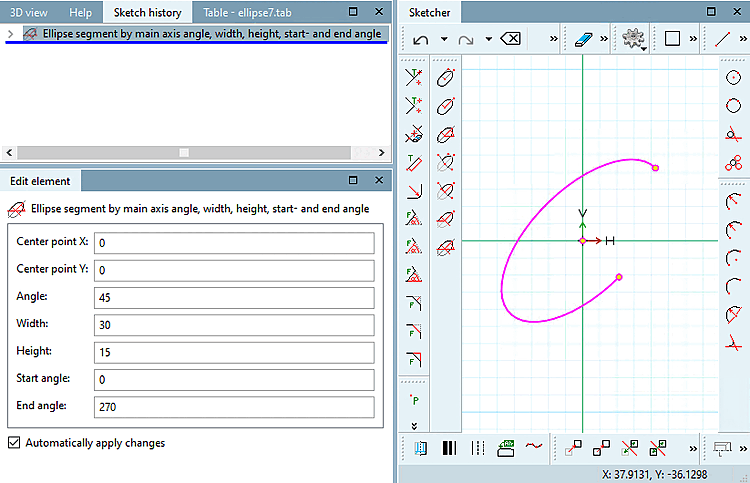
Selezionare il punto centrale [Choose center point]: Il punto selezionato viene visualizzato nel dialogo sotto Punto centrale X / Punto centrale Y.
Selezionare l'angolo dell [Select angle of main axis] 'asse principale: Determinare l'angolo rispetto all'asse X e all'asse principale dell'ellisse.
L'angolo selezionato viene visualizzato nel dialogo alla voce Angolo [Angle].
Selezionare le dimensioni [Select size]: Disegnare l'ellisse con la larghezza [Width] e l' altezza [Height] desiderate.
Selezionare il punto finale [Select end point]:
L' angolo iniziale [Start angle] e l' angolo finale [End angle] sono relativi all'asse principale. L'angolo viene applicato in senso antiorario come di consueto.
Figura 7.922. Segmento ellisse: definizione dell'orientamento dell'ellisse tramite la specificazione dell'angolo
Nella finestra di aggancio Modifica elemento [Edit element] è possibile regolare successivamente i valori o le variabili dei singoli parametri.
Nota Di seguito
punti ellittici sull'asse principale, larghezza
e gli angoli di altezza, inizio e fine [Ellipse segment by point on main axis, width, height, start- and end angle]
Anche in questo caso si applicano restrizioni. Vedi nota sopra.