|
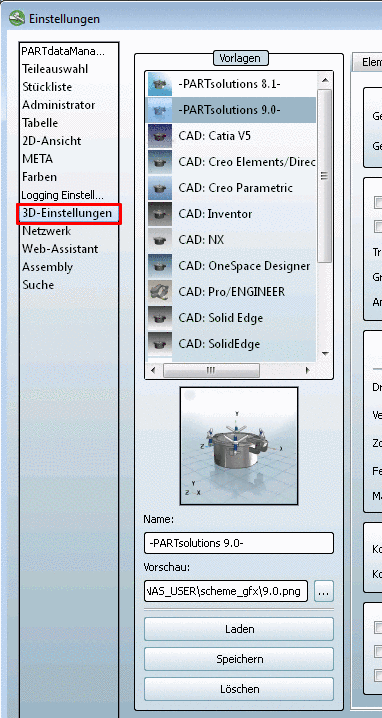
Various templates are already
pre-configured and are available for selection:
PARTsolutions 8.1, PARTsolutions 9.0, CAD: Catia V5,
etc. Below the selection options the
preview of the respective selected option is
displayed. Select the desired template and
click on Load. Perform changes and click on
Save. In
order to create your own template do the following: Select an existing template,
which comes close to your idea. Configure the template on all
needed index pages. Enter the desired template name
under Name. Load the desired preview image
via browse
button .... Click on Save.
Delete templates via Delete.
![[Note]](https://webapi.partcommunity.com/service/help/latest/pages/it/partsolutions_user/doc/images/note.png) | Note |
|---|
If you delete templates, they
cannot restored again! |
|
|