
6.1. Come vengono inseriti i record di dati nel LinkDB?
6.1.1. Trasferimento di dati da sistemi di terze parti
|  |
| Indietro | Avanti |
Il LinkDB crea il collegamento tra i dati geometrici dei cataloghi dei pezzi standard e dei produttori e i dati ERP [ERP data] provenienti da vari sistemi e database. Questo collegamento deve essere creato una volta.[9]
PARTdataCenter è lo strumento per identificare i pezzi, anche con denominazioni diverse.
In linea di principio, un pezzo è chiaramente identificato con un numero standard e una specifica della caratteristica.
Questo potrebbe essere un esempio: ISO 4762 e M5x25
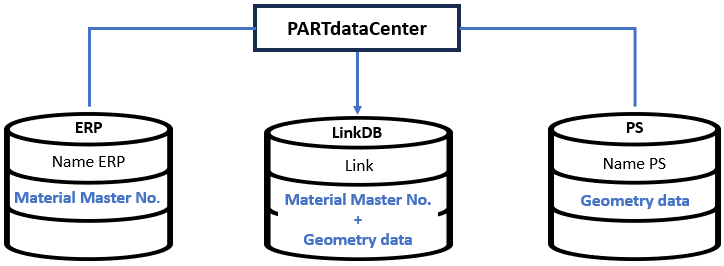
Le parti identificate vengono salvate nel LinkDB con il n. di anagrafica materiale + parametro geometria.
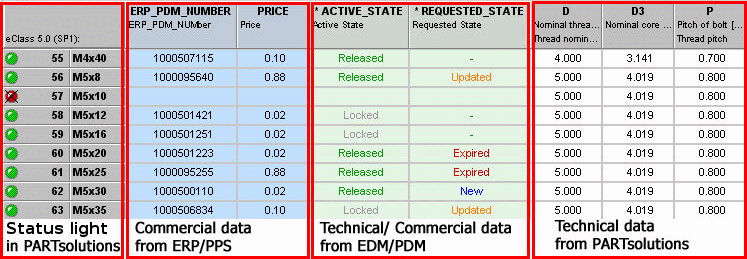
Sulla base di questo collegamento, è possibile assegnare e aggiungere ulteriori attributi/informazioni [Attributes] da sistemi terzi. Tutte le informazioni possono poi essere visualizzate nel PARTdataManager, completamente o filtrate a piacere.
Inoltre, il numero (ERP_PDM_NUMBER) consente di identificare facilmente i dati e di mantenerli sempre aggiornati. Sezione 6.3.1.3, “Aggiornamento automatico dei dati ” Vedere .
In PARTdataManager, tutti i dati possono essere visualizzati in un'unica interfaccia.
[9] Sezione 6.1.3.1, “Tabella di collegamento e tabella ERP”Le informazioni di base sul collegamento (tabella di collegamento, tabella ERP) sono disponibili su .