7.6.2.12.5. Cosa considerare 7.6.2.12.5.1. Tutti gli smussi o le curve i cui bordi si incontrano devono essere creati in un'unica funzione di fusione. |  |
| Indietro | Avanti |
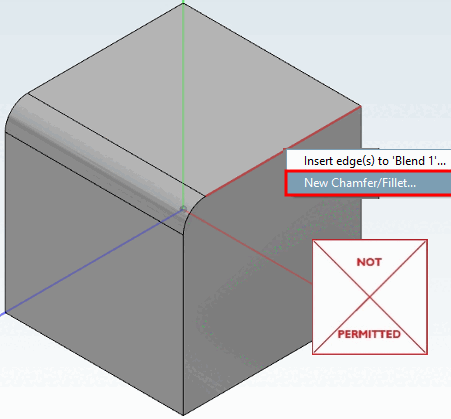
Tutti gli smussi o le curve i cui bordi si incontrano devono essere creati in un'unica funzione di fusione. Il comando Crea nuovo smusso/arrotondamento [New Chamfer/Fillet...]... può quindi essere utilizzato solo inizialmente. Per ulteriori sfumature, è necessario utilizzare il comando Aggiungi bordo/i a 'Sfumatura xy'..., altrimenti viene visualizzato un messaggio di errore, anche se gli smussi o le curve hanno le stesse dimensioni (vedere le illustrazioni seguenti).
È preferibile creare tutte le miscele i cui bordi si incontrano in un'unica fase, altrimenti le prestazioni della funzione di miscelazione potrebbero peggiorare.
L'uso del comando Crea nuovo smusso/arrotondamento. [New Chamfer/Fillet...].. invece di aggiungere uno o più bordi a 'Blend xy' non è consentito.
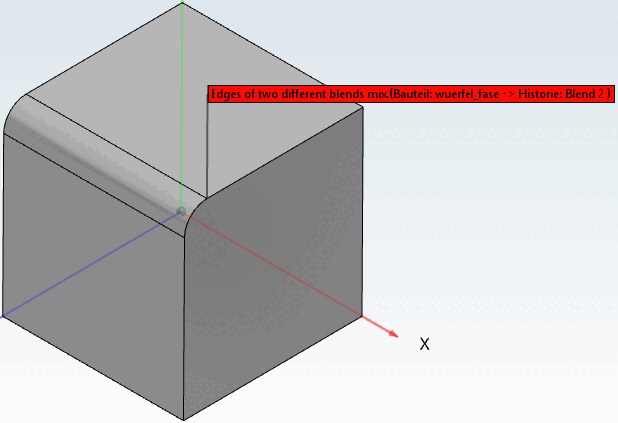
Messaggio di errore nella vista 3D [3D view].
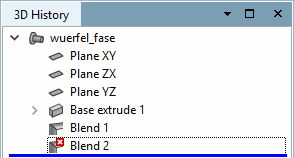
Le miscele non autorizzate sono contrassegnate dall'icona di una x rossa nella cronologia 3D [3D History].
Messaggio di errore nella finestra dei messaggi [Messages].