

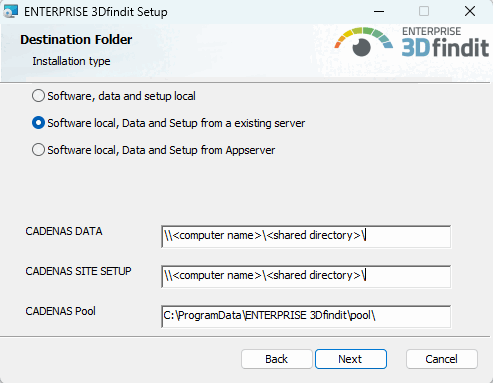
In Cartella di destinazione [Destination Folder] > Metodo di installazione [Installation method] sono disponibili due opzioni:
Software, dati e impostazioni locali da un server esistente [Software Local, data and setup from an existing server]
Se è stata effettuata un'installazione server e le directory CADENAS_DATA e CADENAS_SITESETUP sono state rilasciate lì, è possibile installare un client, in cui il software si trova localmente, ma le altre directory sono referenziate.
Software locale, dati e impostazioni da Appserver:
Per configurare un client con una connessione diretta a un server di app come parte di un'installazione client-server, selezionare l'opzione Software local, data and setup from app server [Software Local, data and setup from the app server] in Target folder [Destination Folder] nella routine di installazione e inserire l' URL del server di app.
Figura 4.52. Software, dati e impostazioni locali dal server dell'app [Software Local, data and setup from the app server]
Esempio (estratto da start.env):
CADENAS_APPSERVER=https://SERVERNAME.cadenas.internal?mzcomsport=9025&sslport=447
CADENAS_APPSERVER=https://SEVERNAME.cadenas.internal?sslport=447&ws=1&flm=1
CADENAS_APPSERVER (URL con parametri)
CADENAS_APPSERVER=https://<servername.domain>?<param1>=<value1>&<param2>=<value2>...
Sono possibili i seguenti parametri: (nome, valore predefinito se non specificato, significato)
proxyAddr= => se specificato, indirizzo proxy da utilizzare se noproxy=0
remoteFileSystem=1 => montare CADENAS_DATA via rfs dal server
remoteSetup=0 (default) => CADENAS_SETUP locale | 1 => monta CADENAS_SETUP via rfs dal server
remoteSiteSetup=1 => montare CADENAS_SITESETUP via rfs dal server
remoteDB=1 => Usa la connessione al DB con accesso remoto tramite l'app server
remotepool=1 => monta $CADENAS_DATA/pool e $CADENAS_DATA/shared da Appserver (se =0, vengono posizionati nella directory dati locale)
writeable=1 => monta rfs in modalità di scrittura e lascia che sia il server a decidere se la scrittura è consentita... (se =0 tutti i montaggi sono di sola lettura...)
httpCacheSize=5000 => Dimensione della cache rfs in MB ... L'impostazione predefinita è un massimo di 5 GB in $CADENAS_USER/rfs
![Software, dati e impostazioni locali dal server dell'app [Software Local, data and setup from the app server]](https://webapi.partcommunity.com/service/help/latest/pages/it/partwarehouse/doc/resources/img/img_a6758263e13842b5a893db466e7d65a6.png)
![[Nota]](https://webapi.partcommunity.com/service/help/latest/pages/it/partwarehouse/doc/images/note.png)