

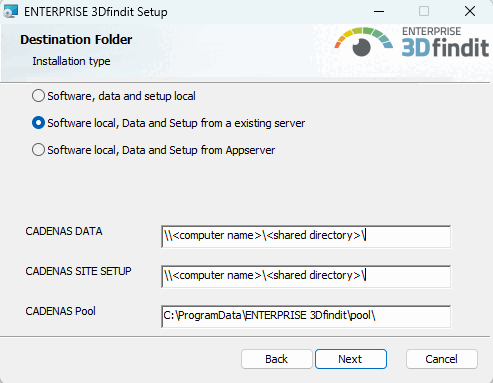
There are two options under Destination folder [Destination Folder] > Installation method:
Software Local, data and setup from an existing server
If a server installation has been performed and the directories CADENAS_DATA and CADENAS_SITESETUP have been shared there, then a client can be installed where the software is locally and the other directories are referenced.
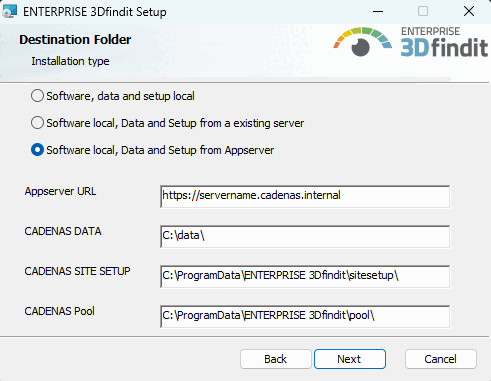
Software local, Data and Setup from Appserver:
To set up a client with a direct connection to an app server as part of a client-server installation, select the option Software local, data and setup from app server [Software Local, data and setup from the app server] under Target folder [Destination Folder] in the installation routine and enter the app server URL.
Example (excerpt from start.env):
CADENAS_APPSERVER=https://SERVERNAME.cadenas.internal?mzcomsport=9025&sslport=447
CADENAS_APPSERVER=https://SEVERNAME.cadenas.internal?sslport=447&ws=1&flm=1
CADENAS_APPSERVER (URL with parameters)
CADENAS_APPSERVER=https://<servername.domain>?<param1>=<value1>&<param2>=<value2>...
The following parameters are possible: (name, default value if not specified, meaning)
proxyAddr= => if specified, proxy address to be used if noproxy=0
remoteFileSystem=1 => mount CADENAS_DATA via rfs from server
remoteSetup=0 (default) => CADENAS_SETUP local | 1 => mount CADENAS_SETUP via rfs from server
remoteSiteSetup=1 => mount CADENAS_SITESETUP via rfs from server
remoteDB=1 => Use DB connection with remote access via app server
remotepool=1 => mount $CADENAS_DATA/pool and $CADENAS_DATA/shared from Appserver (if =0, they are placed in the local data directory)
writeable=1 => mount rfs in write mode and let the server decide if writing is allowed... (if =0 all mounts are readonly...)
httpCacheSize=5000 => Size of rfs cache in MB ... Default is a maximum of 5GB in $CADENAS_USER/rfs
![[Note]](https://webapi.partcommunity.com/service/help/latest/pages/en/partwarehouse/doc/images/note.png)